

oobookoo
John Chaykowsky Book iPhoneiPadiPod touch
oobookoo is a free Book app for iPhone and iPad by John Chaykowsky. Requires iOS 17.6. Updated October 1, 2026.
- Price
- Free
- on the App Store
- Size
- 40 MB
- Age 12+
- Updated
- Oct 1
- 2026 · v1.7
Screenshots
About oobookoo
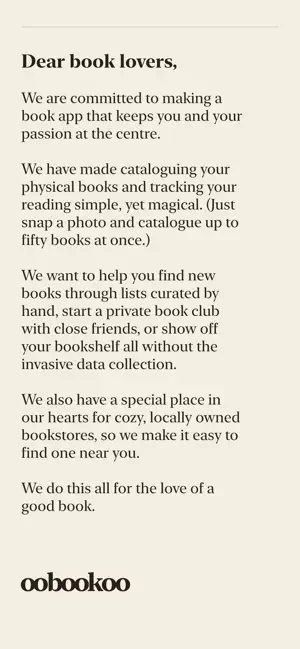
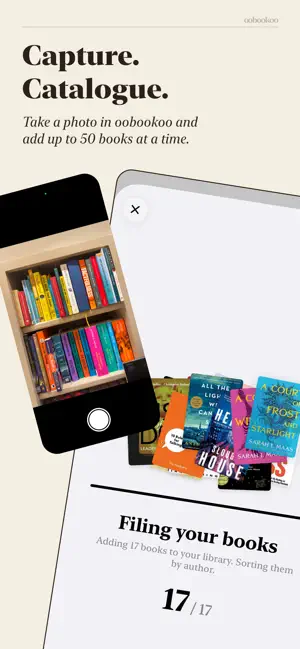
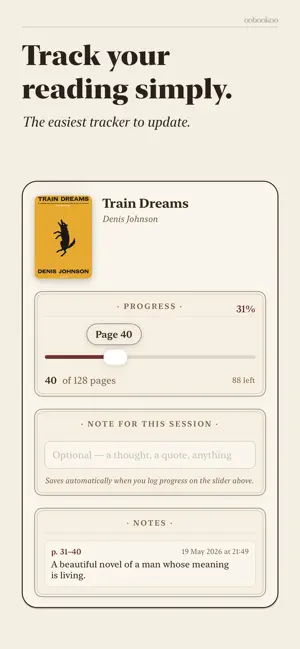
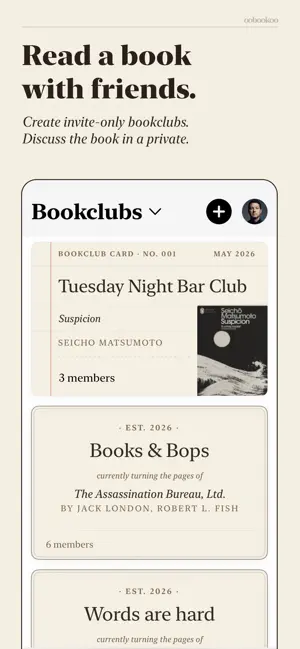
oobookoo is a warm, quiet home for every book you've ever loved. Built by book lovers for book lovers, we specialise in only physical books collecting and library tracking. We support indie book shops directly. SCAN YOUR WHOLE LIBRARY Scan up to 40 books at one time. Snap a photo of an entire shelf using our "Bookshelf Scanner" and oobookoo will recognise each book and add them to your digital Bookshelf. Search across everything you've ever read, filter by genre, and rediscover what you'd half-forgotten. FINISH THE SERIES oobookoo quietly looks up the rest of every series you own. The next volume. The prequel you forgot existed. The one you skipped. It surfaces what's missing without you having to ask, and adds the gaps to your Wishlist with a tap. TRACK A READ THAT FEELS REAL Choose how you rate: classic stars, a quick Yes-Maybe-No verdict, or six honest emoji vibes. Log a session, set a target finish date, and let oobookoo do the maths on the pace you need to keep. See your streaks, your weekday rhythm, the quiet pride of a finished book without the pressure. READ WITH PEOPLE YOU LIKE Start a *private* bookclub. Invite the friends you actually want in it. Pick a book together — or put it to a vote with a poll — set a pace, and glance at the progress ring next to every member's avatar to see who's where; sharing is opt-in. Plan in-person meetups with RSVPs and recaps, and let oobookoo suggest discussion questions to get the conversation going. Tap a post to blur a spoiler. Replies stay tidy: one level deep, no rabbit holes. DISCOVER WITHOUT GETTING LOST Recommendations picked just for you in For You, refreshed every week. Editorial picks from real people and bestsellers, organised by list. Rare-book finds from collectors and small presses. Browse other readers' shelves — peek at someone's library and add anything that catches your eye to your own. SUPPORT INDIE BOOKSHOPS When you find your next read, oobookoo points you to the nearest independent bookshop. Search shops and cities, or find them on the map. Your library, your local store, your community. YOUR READING IS YOURS No ads. No selling your data. No tracking what you read to recommend things to advertisers. Bookclubs are invite-only, there's no public broadcasting unless you choose it. Delete your account in a couple taps; it removes everything at once. WHAT'S FREE, WHAT'S PREMIUM Free covers your personal library and the heart of oobookoo: unlimited ISBN, search, and manual entry, CSV import, a couple of AI Bookshelf Scanner shelf-photos, joining bookclubs and creating your first, browsing Staff Picks and lists, a taste of For You, and the indie bookshop map. Premium — by subscription or a one-time lifetime unlock — adds unlimited AI Bookshelf Scanner, weekly For You recommendations, unlimited bookclubs with premium themes, AI discussion questions, hosting in-person meetups, reading sessions and pacing, full stats and Wrapped, collector tools (formats, archive, provenance), and premium share layouts and Shelfie. oobookoo For the love of Books Terms of Use (EULA): https://www.apple.com/legal/internet-services/itunes/dev/stdeula/ Privacy Policy: https://oobookoo.com/privacy
What’s new
Version 1.7 · Updated October 1, 2026
**Meet the Library** A new Library tab is your home for free classics. Get a personal library card, browse twelve genre shelves (Mystery & Detective, Romance, and more), pick up where you left off, and keep everything you've checked out in My Stacks: Reading, Want to Read, and Finished. **Earn your stamps** Finish a free classic and it earns a date stamp on the back of your library card. The more you finish, the higher your standing goes: Visitor, Member, Patron, Benefactor. **Find any classic** Search Free Classics from the Library tab by title or author. Results from Project Gutenberg and Standard Ebooks now arrive together, so a search for "Hemingway" shows every book instead of just one. **Select and organize in bulk** Tap Select on your Bookshelf to choose several books at once. Add them all to a shelf or delete them together. Swipe a book to delete it, and if a cover fails to load, tap Retry. **Continue Reading, right where you are** Open a book that you're reading as a free ebook and Continue Reading takes you straight back to your page. Small kindnesses to help our users because details matter: • Bookclubs: you're told when a club is no longer available • Bookclubs: poll load failures explain themselves instead of showing an empty list • Bookclubs: closing a poll or removing an option asks you to confirm first • Bookclubs: removing a member can also reset the invite link, so they can't rejoin with it • Bookclubs: new meetups can't be scheduled in the past, and meeting links are tidied up • Library and Discover headers no longer leave a gap at the top of the screen • Fixed a stray back button that appeared on the Bookstores and Library tabs • Covers load faster and use less memory • Sign-in attempt limits now apply per account, not per device • Stronger protection for your connection to our servers • Fixed the Bookshelf briefly showing the empty-shelf screen while loading • Fixed duplicated words in a few imported book subtitles • Series details are now saved more reliably when adding a book
App privacy
The developer, John Chaykowsky, reported these privacy practices to Apple.
Data Linked to You
The following data, which may be collected and linked to your identity, may be used for the following purposes:
- Contact Info: Email Address
- Identifiers: User ID
- User Content: Photos or Videos
- Usage Data: Product Interaction, Other Usage Data
Used for: Analytics, Product Personalization, App Functionality
Data Not Linked to You
The following data, which may be collected but is not linked to your identity, may be used for the following purposes:
- Location: Coarse Location
- Diagnostics: Crash Data, Performance Data, Other Diagnostic Data
Used for: Product Personalization, App Functionality
Alternatives to oobookoo
Looking for apps like oobookoo? Here are 6 similar apps on the App Store. The highest rated is Book Tracker - BookBinder (4.0/5), and all 6 are free to download.
-
 My Books Archive
-
 Libris Book Tracker
-
 Book Catalog: Shelf Scanner
-
 Book Tracker - BookBinder
4.0
Book Tracker - BookBinder
4.0
-
 Reading Tracker & Books: Libri
-
 PaperTrail: Book Tracker
3.9
PaperTrail: Book Tracker
3.9
| App | Rating | Price | Last updated | Compare |
|---|---|---|---|---|
| oobookoo | – | Free | October 1, 2026 | |
| My Books Archive | – | Free | Sep 7, 2026 | Compare |
| Libris Book Tracker | – | Free | Jul 30, 2026 | Compare |
| Book Catalog: Shelf Scanner | – | Free | Aug 18, 2026 | Compare |
| Book Tracker - BookBinder | 4.0 / 5 (1) | Free | Oct 2, 2026 | Compare |
| Reading Tracker & Books: Libri | – | Free | Dec 19, 2025 | Compare |
| PaperTrail: Book Tracker | 3.9 / 5 (18) | Free | Oct 5, 2025 | Compare |
Compare oobookoo with the top alternatives: ratings, updates, ASO score and keyword gaps →