

Photo Slimmer: Storage Cleanup
浩 刘 Utilities iPhoneiPadiPod touch
Photo Slimmer: Storage Cleanup is a free Utilities app for iPhone and iPad by 浩 刘. Requires iOS 13.0. Updated October 7, 2026.
- Price
- Free
- on the App Store
- Size
- 47 MB
- Age 4+
- Updated
- Oct 7
- 2026 · v1.1
Screenshots


About Photo Slimmer: Storage Cleanup
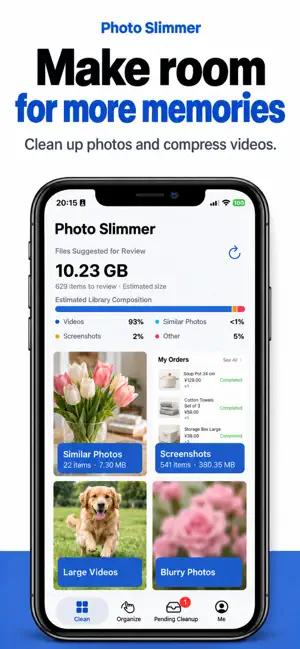
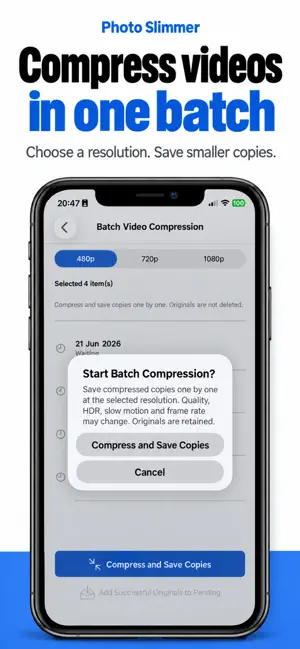
Make room for new memories, without losing track of the ones you want to keep. Photo Slimmer helps you sort duplicate and similar photos, review large videos and tidy your photo library. Browse by category, compare your media and choose what stays. PHOTO CLEANUP Find duplicate, similar and blurry photos. Browse screenshots, Live Photos and panoramas together. Sort by newest or oldest, or filter by date. VIDEO COMPRESSION Compress one video or a batch and choose a compression preset. Compare an individual video before saving, or review batch results afterwards. Decide separately whether to remove the originals. SWIPE TO SORT Swipe left to add an item to your cleanup list, or right to keep it. Make your choices first, then review them together. REVIEW BEFORE DELETING Preview selected photos and videos, remove items from the cleanup list or confirm deletion. Adding an item to the list does not delete it or free up space. MORE WAYS TO TIDY Organise duplicate or incomplete contacts, remove eligible old calendar events and use a password-protected private space. Choose Light, Dark or System appearance. GOOD TO KNOW Space savings depend on what you delete and the compression results. Video compression is lossy and creates a copy; originals are not deleted automatically. Quality, HDR, slow motion or frame rate may change. Items in Photos' Recently Deleted may still occupy storage until removed. PURCHASES Optional subscriptions and a one-time purchase are available in the app. Plans, prices and benefits are shown before purchase. Subscriptions renew automatically and can be managed or cancelled in your Apple Account subscription settings. Privacy policy: https://docs.qq.com/doc/DRFJrbnF6akhETmRO Terms of use: https://docs.qq.com/doc/DRFJkUXNpd09QUEVz
What’s new
Version 1.1 · Updated October 7, 2026
Meet the refreshed Photo Slimmer in version 1.1. - Updated branding, icon, home screen categories and storage overview. - Swipe sorting and a cleanup list to review your choices before deleting. - Individual and batch video compression, with results to review and controls for originals and copies. - Refined contact cleanup, old calendar event cleanup and private space controls. - Dark Mode with Light, Dark and System appearance options. - Improvements to scanning after photo access is granted, preview gestures, filters and localisation.
App privacy
The developer, 浩 刘, reported these privacy practices to Apple.
Data Not Linked to You
The following data, which may be collected but is not linked to your identity, may be used for the following purposes:
- Contacts: Contacts
- User Content: Photos or Videos, Other User Content
Used for: Analytics, App Functionality
Alternatives to Photo Slimmer: Storage Cleanup
Looking for apps like Photo Slimmer: Storage Cleanup? Here are 6 similar apps on the App Store. The highest rated is NexCleaner (5.0/5), and all 6 are free to download.
-
 情侣吵架不分手-倒数复合记事本
-
 摄像头扫描-隐藏摄像头探测器
-
 加密相册-私密照片视频保险箱&隐私加密守护
-
 NexCleaner
5.0
NexCleaner
5.0
-
 LockFlow: Earn & Grant
-
 极守护-应用锁,防沉迷手机,隐藏,屏幕时间管理,家长管理
| App | Rating | Price | Last updated | Compare |
|---|---|---|---|---|
| Photo Slimmer: Storage Cleanup | – | Free | October 7, 2026 | |
| 情侣吵架不分手-倒数复合记事本 | – | Free | Aug 29, 2026 | Compare |
| 摄像头扫描-隐藏摄像头探测器 | – | Free | Jun 19, 2026 | Compare |
| 加密相册-私密照片视频保险箱&隐私加密守护 | – | Free | Jul 21, 2026 | Compare |
| NexCleaner | 5.0 / 5 (1) | Free | Apr 10, 2026 | Compare |
| LockFlow: Earn & Grant | – | Free | Oct 12, 2026 | Compare |
| 极守护-应用锁,防沉迷手机,隐藏,屏幕时间管理,家长管理 | – | Free | Oct 21, 2026 | Compare |