

PDF Snap: Photo Converter
晓洪 梁 Utilities iPhoneiPadiPod touch
PDF Snap: Photo Converter is a paid Utilities app for iPhone and iPad by 晓洪 梁. Requires iOS 16.6. Updated September 14, 2026.
- Price
- 2.99 USD
- on the App Store
- Size
- 3 MB
- Age 4+
- Updated
- Sep 14
- 2026 · v1.6.3
Screenshots


About PDF Snap: Photo Converter
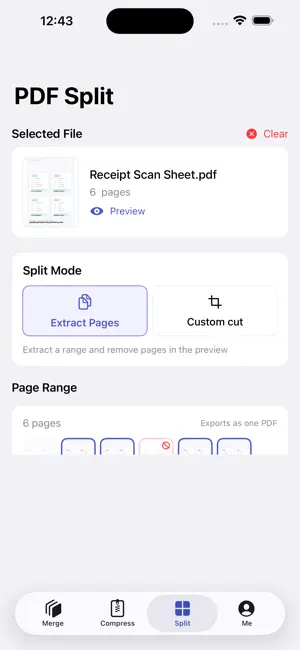
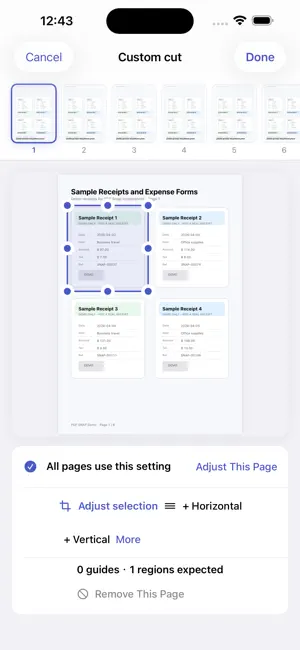
Convert photos and images to PDF, compress large PDF files, merge documents, and split or extract pages — all on your iPhone. PDF Snap processes your selected files on-device. Your documents and images are not uploaded to our servers. It is a one-time purchase with no subscription. Main features • Photos to PDF: Choose images from Photos or Files, set the page size and orientation, and create a standard or scan-style PDF. • PDF compression: Choose clarity-first, balanced, or stronger compression. Preview the estimated size before processing to balance readability and file size. • PDF merge: Combine PDF files and images into one document, reorder items, set a file name, and add a text watermark. • PDF split and page extraction: Select a page range and save only the pages you need as a new PDF. • Crop and guide-line slicing: Remove blank margins or unrelated areas, or drag split lines to turn several receipts, forms, or screenshots on one page into separate PDF pages. • Local history and export: Preview and rename results on your device, save them to Files, or use the iOS share sheet. Useful for • Turning photos, receipts, and screenshots into one PDF • Combining contracts, class notes, or work attachments • Reducing a PDF before email, chat, or form upload • Extracting selected pages from a long document • Cropping scan margins or unrelated content • Separating several receipts captured on one page PDF Snap is a one-time purchase with no subscription. Other than a manual Check for Updates action, core document processing does not depend on a network connection.
What’s new
Version 1.6.3 · Updated September 14, 2026
• Refined the PDF Split interface for clearer, more intuitive controls. • Added a PDF Split guide to help you get started quickly. • Added a PRO member card with subtle holographic effects and tilt interaction.
App privacy
The developer, 晓洪 梁, reported these privacy practices to Apple.
Data Not Collected
The developer does not collect any data from this app.
Alternatives to PDF Snap: Photo Converter
Looking for apps like PDF Snap: Photo Converter? Here are 6 similar apps on the App Store. The highest rated is NB连环画阅读器 (5.0/5), and 5 of the 6 are free to download.
-
 Image to PDF: Convert PDF
-
 NotionMail
-
 Password Manager - Panoptes
3.7
Password Manager - Panoptes
3.7
-
 Type-Cat
-
 NB连环画阅读器
5.0
NB连环画阅读器
5.0
-
 SecureVault-password box
| App | Rating | Price | Last updated | Compare |
|---|---|---|---|---|
| PDF Snap: Photo Converter | – | 2.99 USD | September 14, 2026 | |
| Image to PDF: Convert PDF | – | Free | Oct 17, 2026 | Compare |
| NotionMail | – | Free | Mar 27, 2025 | Compare |
| Password Manager - Panoptes | 3.7 / 5 (3) | Free | Apr 22, 2026 | Compare |
| Type-Cat | – | Free | Sep 2, 2026 | Compare |
| NB连环画阅读器 | 5.0 / 5 (1) | 4.99 USD | Oct 5, 2026 | Compare |
| SecureVault-password box | – | Free | Oct 21, 2024 | Compare |