

CalBuddy: Calorie Counter AI
ROCKET DEVELOPMENT GROUP LLC Health & Fitness iPhoneiPadiPod touch
CalBuddy: Calorie Counter AI is a free Health & Fitness app for iPhone and iPad by ROCKET DEVELOPMENT GROUP LLC. Requires iOS 16.4. Updated October 7, 2026.
- Price
- Free
- on the App Store
- Size
- 52 MB
- Age 4+
- Updated
- Oct 7
- 2026 · v2.0.1
Screenshots


About CalBuddy: Calorie Counter AI
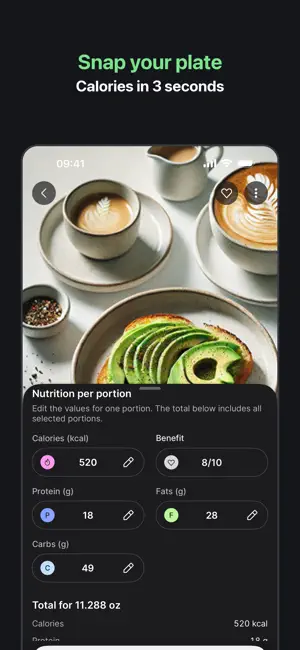
Point your camera at your plate. CalBuddy names the food and counts calories, protein, carbs and fat — you fix anything in one tap. No digging through food databases. No weighing every gram. A photo, a quick check, and your day adds up on its own. WHAT YOU GET • Food scanner — snap a photo, say it out loud, or type it. Drinks and water count too. • Your AI coach — ask why your protein keeps coming up short or what to eat tonight. It answers about your day, not with a generic tip. • Everything is editable — portions, ingredients, numbers. The AI gives you a starting point, not a verdict. • Repeat a meal in one tap — your usual breakfast takes two seconds. • Day and week at a glance — calories, macros, weight trend, no clutter. • Widget and gentle reminders — your numbers on the home screen, nagging optional. HONEST ABOUT THE NUMBERS Photo recognition estimates. It is very good with everyday food and it can miss a hidden spoon of oil. That is why every entry stays editable — correct it once and move on. Tracking works when it takes seconds, not when it is perfect. FREE AND PAID CalBuddy is free to use: keep a diary, edit meals, repeat saved food, see your daily totals, and get a few AI scans to try it out. A subscription unlocks unlimited scanning, the AI coach and full history. Subscriptions renew automatically unless cancelled at least 24 hours before the period ends. Manage or cancel any time in your App Store account settings. Prices vary by country. Terms of use: https://calbuddy.tech/terms.html Privacy policy: https://calbuddy.tech/privacy.html
What’s new
Version 2.0.1 · Updated October 7, 2026
Polish after the big update. • The app is lighter — about 10 MB less to download and less space on your phone. • Translations fixed: onboarding and dozens of wordings across the app. • Onboarding is one step shorter. • An active draft now shows as a proper card instead of a bare line on the home screen. • Food and water counters, rings and haptics are back in sync. • The reminders screen is translated and tidied up.
App privacy
The developer, ROCKET DEVELOPMENT GROUP LLC, reported these privacy practices to Apple.
Data Used to Track You
The following data may be used to track you across apps and websites owned by other companies:
- User Content: Emails or Text Messages
- Identifiers: User ID, Device ID
Data Not Linked to You
The following data, which may be collected but is not linked to your identity, may be used for the following purposes:
- Identifiers: User ID, Device ID
- Usage Data: Product Interaction, Advertising Data
- Health & Fitness: Health
- User Content: Emails or Text Messages, Customer Support, Other User Content
- Diagnostics: Crash Data, Performance Data
Used for: Developer’s Advertising or Marketing, Analytics, App Functionality
Alternatives to CalBuddy: Calorie Counter AI
Looking for apps like CalBuddy: Calorie Counter AI? Here are 6 similar apps on the App Store. The highest rated is AI Calories: Scanner & Counter (4.8/5), and all 6 are free to download.
-
 Food Scan - AI Calorie Counter
4.6
Food Scan - AI Calorie Counter
4.6
-
 Calorie Counter AI: CalTrack
4.7
Calorie Counter AI: CalTrack
4.7
-
 CalRizz ™ AI Calorie Tracker
4.5
CalRizz ™ AI Calorie Tracker
4.5
-
 AI Calories: Scanner & Counter
4.8
AI Calories: Scanner & Counter
4.8
-
 Calorize - AI Calorie Tracker
4.7
Calorize - AI Calorie Tracker
4.7
-
 Dial: Protein & Macro Tracker
4.7
Dial: Protein & Macro Tracker
4.7
| App | Rating | Price | Last updated | Compare |
|---|---|---|---|---|
| CalBuddy: Calorie Counter AI | – | Free | October 7, 2026 | |
| Food Scan - AI Calorie Counter | 4.6 / 5 (49) | Free | Oct 2, 2025 | Compare |
| Calorie Counter AI: CalTrack | 4.7 / 5 (167) | Free | Sep 5, 2026 | Compare |
| CalRizz ™ AI Calorie Tracker | 4.5 / 5 (200) | Free | Sep 17, 2026 | Compare |
| AI Calories: Scanner & Counter | 4.8 / 5 (79) | Free | Sep 3, 2026 | Compare |
| Calorize - AI Calorie Tracker | 4.7 / 5 (166) | Free | Nov 7, 2025 | Compare |
| Dial: Protein & Macro Tracker | 4.7 / 5 (809) | Free | Oct 13, 2026 | Compare |