

Flow Timer: Visual Countdown
Codejuno Ltd Productivity iPhoneiPadiPod touch
Flow Timer: Visual Countdown is a free Productivity app for iPhone and iPad by Codejuno Ltd. Rated 4.9/5 from 7 ratings. Requires iOS 16.4.
- Rating
- 4.9
- 7 ratings
- Price
- Free
- on the App Store
- Size
- 83 MB
- Age 4+
- Updated
- Sep 1
- 2026 · v2.4.0
Screenshots


About Flow Timer: Visual Countdown
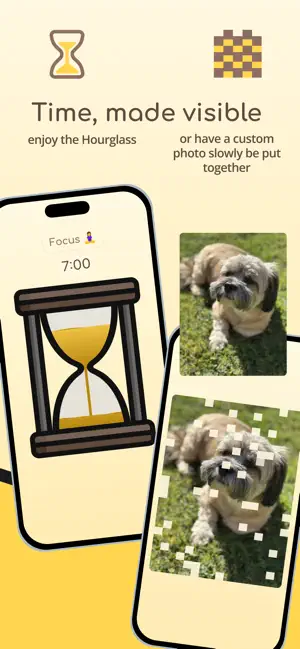
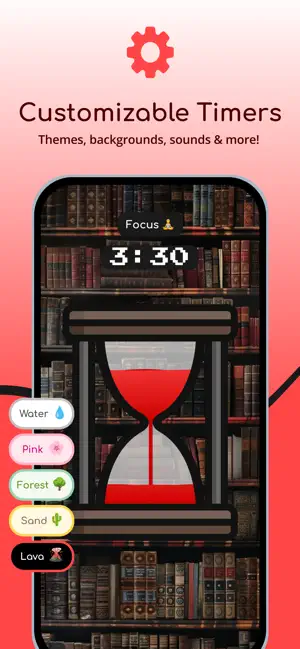
Water climbs. Sand falls. A picture appears. Flow Timer is a visual timer: it shows you time instead of telling you. Water that climbs the glass as you go, a sand timer whose grains really fall, or a picture that paints itself while you work. Glance at it and you know how long is left — no numbers to read, no arithmetic. BUILT FOR TIME BLINDNESS When minutes feel invisible — as they often do for people with ADHD — a shape you can watch beats a number you have to interpret. That is the whole design. Nothing flashes, nothing nags, nothing demands a decision. The timer simply keeps being visible until it is done. A TIMER WORTH LOOKING AT Most timers are ugly because nobody expects you to watch them. This one is made to be watched: hand-drawn scenes, five colour palettes, an hourglass with real falling sand, calming sounds, and a zen mode that clears away everything but the time. Leave it running on a desk or a second screen and it earns its place. IN THE CLASSROOM AND AT HOME Big enough to read from the back row, clear enough for a child who cannot read a clock yet. Transitions, tests, quiet reading, toothbrushing, screen time, bedtime wind-down. A visual countdown ends the "how long left?" question without anyone having to answer it. ALSO A GOOD STUDY TIMER Set any duration, name it, start it in one tap. Build interval sessions for pomodoro study blocks, workouts or circuits. Streaks, badges, a heatmap and monthly trends record where your focus actually went, from your very first session. OFFLINE, AND STAYS THAT WAY No account, no sign-in, no analytics, no ads. Flow Timer collects nothing about you because it has nowhere to send it — everything stays on your device unless you export a backup yourself. Available in 15 languages. ONE PURCHASE, NOT A SUBSCRIPTION Free covers the liquid mode, the sand timer, intervals, every duration, most sounds and your daily statistics. Flow Timer Pro is an optional one-time purchase — never a subscription — adding canvas timers with your own photos, binaural beats and focus tones, your complete history, and backup export. Buy it once and it is yours for good. Built by one person who wanted a timer worth looking at.
Ratings & reviews
4.9
7 ratings
What’s new
Version 2.4.0 · Updated September 1, 2026
Flow Timer Pro is here — and if you already use the app, nothing has been taken away. Everything you have today stays yours, free, forever. Pro is one purchase, never a subscription. It adds canvas timers with your own photos, binaural beats and focus tones, your full focus history, and backup export. Also in this version: the app now shows as "Flow Timer" on your home screen in every language, and onboarding and button labels are tidier.
App privacy
The developer, Codejuno Ltd, reported these privacy practices to Apple.
Data Not Collected
The developer does not collect any data from this app.
Alternatives to Flow Timer: Visual Countdown
Looking for apps like Flow Timer: Visual Countdown? Here are 6 similar apps on the App Store. The highest rated is Pomodoro Buddy: Focus Timer (5.0/5), and all 6 are free to download.
-
 Pomodoro Buddy: Focus Timer
5.0
Pomodoro Buddy: Focus Timer
5.0
-
 Lofi Pomodoro Timer
3.8
Lofi Pomodoro Timer
3.8
-
 Visual Countdown Pixel Timer
5.0
Visual Countdown Pixel Timer
5.0
-
 Pomo: Pomodoro Study Timer
5.0
Pomo: Pomodoro Study Timer
5.0
-
 Lily pad - visual timer
3.6
Lily pad - visual timer
3.6
-
 Visual Countdown Timer Liquid
4.6
Visual Countdown Timer Liquid
4.6
| App | Rating | Price | Last updated | Compare |
|---|---|---|---|---|
| Flow Timer: Visual Countdown | 4.9 / 5 (7 ratings) | Free | September 1, 2026 | |
| Pomodoro Buddy: Focus Timer | 5.0 / 5 (2) | Free | Feb 23, 2026 | Compare |
| Lofi Pomodoro Timer | 3.8 / 5 (6) | Free | Sep 30, 2026 | Compare |
| Visual Countdown Pixel Timer | 5.0 / 5 (8) | Free | May 3, 2026 | Compare |
| Pomo: Pomodoro Study Timer | 5.0 / 5 (3) | Free | Oct 5, 2026 | Compare |
| Lily pad - visual timer | 3.6 / 5 (9) | Free | Nov 20, 2024 | Compare |
| Visual Countdown Timer Liquid | 4.6 / 5 (695) | Free | Oct 11, 2026 | Compare |