

TypeShelf: Reply Keyboard
Nikolai Rodionov Utilities iPhoneiPadiPod touchMac
TypeShelf: Reply Keyboard is a free Utilities app for iPhone and iPad by Nikolai Rodionov. Rated 4.3/5 from 25 ratings. Requires iOS 17.0.
- Rating
- 4.3
- 25 ratings
- Price
- Free
- on the App Store
- Size
- 33 MB
- Age 4+
- Updated
- Oct 11
- 2026 · v1.23
Screenshots


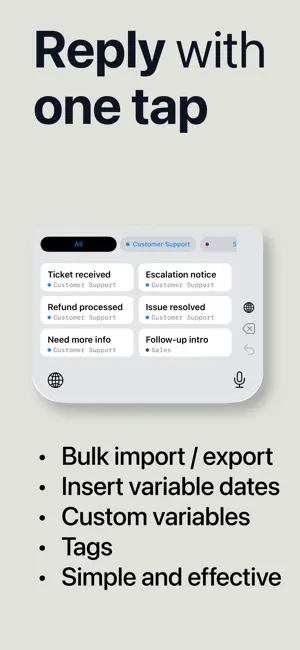
About TypeShelf: Reply Keyboard
Keep your customer replies ready. Save the answers you send again and again — shipping questions, opening hours, quotes, booking links, follow-ups — then switch to the TypeShelf keyboard and tap a reply to insert it, in any app where you type. TYPE ONCE, REUSE ANYWHERE • Tap a saved reply from the keyboard to insert it • Pin favorites and jump back to your recent replies • Create text and image snippets • Organize replies with custom tags and quick filters • Search, reorder, import, export, and share your collection PERSONALIZE EVERY MESSAGE • Fill-in fields ask for a name, option, date, or time before the reply goes in • My details: save your business name, booking link, or signature once and reuse it in any reply • Magic Variables add live dates, times, clipboard content, cursor placement, or a random option START IN MINUTES Choose a ready-made reply pack or write your own. Your first replies are on the keyboard in a few taps. SEE THE TIME YOU SAVE Review usage statistics, find your most-used replies, and run the typing test for a more personal time-saved estimate. QUICK SETUP 1. Create or choose your replies. 2. Add TypeShelf in Settings > General > Keyboard > Keyboards. 3. Switch to the TypeShelf keyboard in any app and tap a reply to insert it. iOS requires Allow Full Access so the keyboard can read the reply library shared by the main app. Terms of Use (EULA): https://www.apple.com/legal/internet-services/itunes/dev/stdeula/
Ratings & reviews
4.3
25 ratings
What’s new
Version 1.23 · Updated October 11, 2026
Bug fixes and improvements.
App privacy
The developer, Nikolai Rodionov, reported these privacy practices to Apple.
Data Not Linked to You
The following data, which may be collected but is not linked to your identity, may be used for the following purposes:
- Purchases: Purchase History
- Usage Data: Product Interaction
Used for: Analytics
Alternatives to TypeShelf: Reply Keyboard
Looking for apps like TypeShelf: Reply Keyboard? Here are 6 similar apps on the App Store. The highest rated is Video to MP3 Converter © (5.0/5), and 5 of the 6 are free to download.
-
 Fast PDF to Word
4.6
Fast PDF to Word
4.6
-
 AI recording
3.7
AI recording
3.7
-
 PDF to Image.
4.0
PDF to Image.
4.0
-
 FrameLab: Screenshot editor
4.7
FrameLab: Screenshot editor
4.7
-
 MagicKit Pro: AI Smart Toolbox
4.9
MagicKit Pro: AI Smart Toolbox
4.9
-
 Video to MP3 Converter ©
5.0
Video to MP3 Converter ©
5.0
| App | Rating | Price | Last updated | Compare |
|---|---|---|---|---|
| TypeShelf: Reply Keyboard | 4.3 / 5 (25 ratings) | Free | October 11, 2026 | |
| Fast PDF to Word | 4.6 / 5 (10) | Free | Apr 7, 2026 | Compare |
| AI recording | 3.7 / 5 (3) | Free | Oct 8, 2026 | Compare |
| PDF to Image. | 4.0 / 5 (5) | Free | Jan 7, 2024 | Compare |
| FrameLab: Screenshot editor | 4.7 / 5 (6) | Free | Sep 17, 2026 | Compare |
| MagicKit Pro: AI Smart Toolbox | 4.9 / 5 (27) | 1.99 USD | Dec 5, 2025 | Compare |
| Video to MP3 Converter © | 5.0 / 5 (12) | Free | Oct 10, 2025 | Compare |