

PDF Reader - PDF Scanner
斌 刘 Business iPhoneiPadiPod touch
PDF Reader - PDF Scanner is a free Business app for iPhone and iPad by 斌 刘. Requires iOS 13.0. Updated April 8, 2025.
- Price
- Free
- on the App Store
- Size
- 37 MB
- Age 17+
- Updated
- Apr 8
- 2025 · v1.0.0
Screenshots


About PDF Reader - PDF Scanner
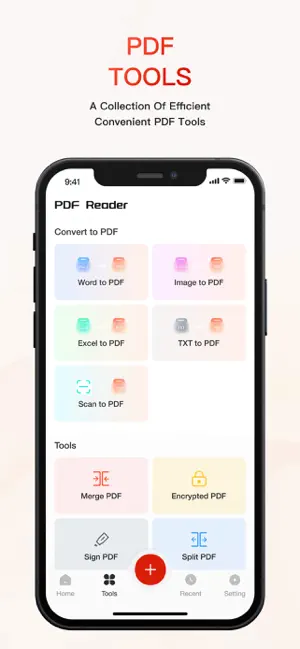
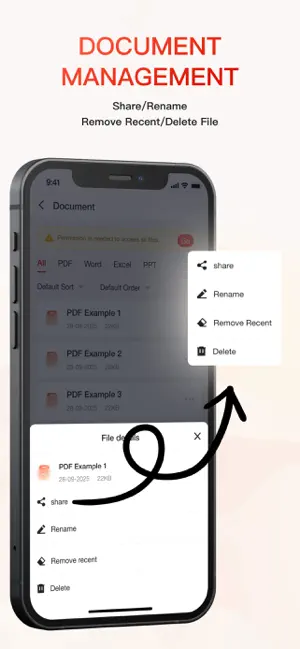
PDF Reader – PDF Scanner Your Ultimate Document Viewer & PDF Tool for iOS Open, view, and convert documents with ease using PDF Reader, the powerful iOS app designed for seamless handling of PDFs, Word, Excel, PowerPoint, and TXT files. Whether you're reading, converting, or editing, PDF Reader provides a smooth and efficient experience for all your document needs. Key Features 1. Universal Document Viewer Open and view PDFs, Word, Excel, PowerPoint, and TXT files in a clean, user-friendly interface. Smooth scrolling, zooming, and adjustable viewing modes for comfortable reading. Full-text search within documents for quick navigation. Global File Search: Quickly find any document in your library with powerful search functionality. Smart Document Sorting: Organize files by name, date, size. 2. Advanced PDF Conversion PDF to Image: Convert PDF pages to JPG or PNG format with customizable resolution. PDF to Long Image: Generate a single, scrollable long image from a multi-page PDF - perfect for sharing reports or presentations. PDF to TXT: Extract and preserve text formatting when converting PDFs to editable text files. PDF to Excel: Accurately convert PDF tables into fully editable Excel spreadsheets while maintaining data structure. Word to PDF: Create professional-quality PDFs from Word documents with preserved layouts and formatting. TXT to PDF: Convert plain text files into properly formatted PDF documents. Excel to PDF: Transform spreadsheets into PDFs while keeping all data, charts, and tables intact. 3. Essential PDF Tools Merge PDFs: Combine multiple PDF files into one organized document with flexible page ordering. Split PDFs: Extract specific pages or ranges to create new, focused PDF files. PDF Signing: Add secure digital signatures or draw handwritten signatures directly on documents. PDF Encryption: Protect sensitive files with strong password security and permission controls. 4. Scan to PDF Real-time Document Scanning: Instantly capture documents, receipts, or whiteboards using your camera and convert them to high-quality PDFs. Multi-page Support: Scan multiple pages and combine them into a single PDF document. Instant Export: Save your scanned documents as PDF files. Why Choose PDF Reader? All-in-One Solution – From viewing to converting, everything you need in one app. Professional Quality Conversions – Preserve original formatting across all file types. Lightning Fast Processing – Handle large documents quickly and efficiently. Secure & Private – All processing done locally on your device for maximum security. Download PDF Reader today and experience the most comprehensive document solution for your iOS device!
App privacy
The developer, 斌 刘, reported these privacy practices to Apple.
Data Used to Track You
The following data may be used to track you across apps and websites owned by other companies:
- Diagnostics: Crash Data
Data Not Linked to You
The following data, which may be collected but is not linked to your identity, may be used for the following purposes:
- Diagnostics: Crash Data
Used for: Analytics
Alternatives to PDF Reader - PDF Scanner
Looking for apps like PDF Reader - PDF Scanner? Here are 6 similar apps on the App Store.
-
 Document Reader & PDF View
-
 PDF Reader Pro - Ebook Reader
-
 Promate - Staff Management
-
 PinLog Text Notes
-
 CurrAsst:Exchange & Converter
-
 PureProduct-Product Passport
| App | Rating | Price | Last updated | Compare |
|---|---|---|---|---|
| PDF Reader - PDF Scanner | – | Free | April 8, 2025 | |
| Document Reader & PDF View | – | Free | Jul 27, 2026 | Compare |
| PDF Reader Pro - Ebook Reader | – | Free | Jul 17, 2024 | Compare |
| Promate - Staff Management | – | Free | Oct 2, 2026 | Compare |
| PinLog Text Notes | – | Free | Oct 21, 2026 | Compare |
| CurrAsst:Exchange & Converter | – | Free | Mar 30, 2026 | Compare |
| PureProduct-Product Passport | – | Free | Jun 9, 2024 | Compare |