

Audio Editor: Cut & Converter
DF Vietnam Company Limited Music iPhoneiPadiPod touch
Audio Editor: Cut & Converter is a free Music app for iPhone and iPad by DF Vietnam Company Limited. Requires iOS 18.0. Updated September 14, 2026.
- Price
- Free
- on the App Store
- Size
- 64 MB
- Age 12+
- Updated
- Sep 14
- 2026 · v1.0.1
Screenshots
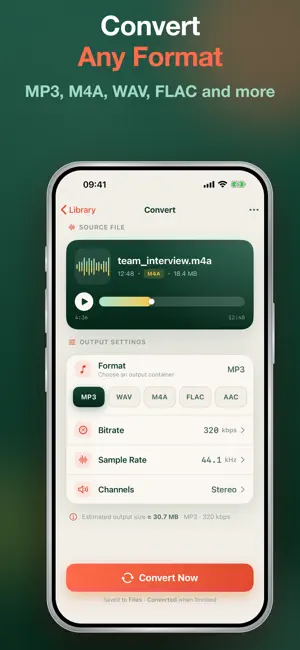


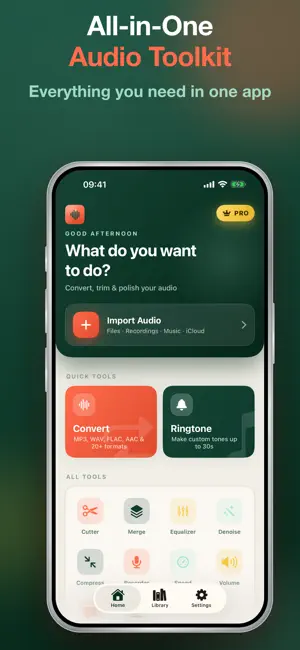
About Audio Editor: Cut & Converter
Edit audio like a pro — right on your iPhone. Cut, convert, merge, and fine-tune any sound in seconds. No desktop software, no watermarks, no fuss. Audio Editor is the all-in-one toolkit for anyone who works with sound. Turn a song into the perfect ringtone, convert a recording to MP3, merge clips into one track, clean up background noise, or turn speech into text — all in one fast, beautifully simple app built for iOS 18. WHAT YOU CAN DO • Convert any format — MP3, M4A, WAV, FLAC, OGG, AAC, AIFF, CAF, WMA, and M4R. Switch in a tap. • Cut & trim — Drag on the waveform to grab exactly the part you want. Frame-accurate, zero guesswork. • Merge — Combine multiple files into one seamless track. • Compress — Shrink file size for easy sharing without wrecking quality. • Equalizer — Shape your sound with ready-made presets or build your own. • Denoise — Remove hiss, hum, and background noise from any recording. • Speed & volume — Slow down, speed up, or boost the level of any clip. • Record — Capture high-quality audio anytime, then edit it instantly. • Ringtone maker — Turn any song into a custom ringtone for your iPhone. • Transcribe — Convert voice and audio into accurate text you can copy and share. WHY YOU'LL LOVE IT • 100% native, built for iOS 18 — fast, smooth, and gorgeous in light and dark mode. • No watermarks, ever — your audio stays clean. • Works offline — your files never have to leave your device. • Share Extension — send audio from any app and start editing in one tap. HOW IT WORKS 1. Import or record your audio. 2. Pick a tool — cut, convert, merge, EQ, denoise, and more. 3. Export and share in your favorite format. Perfect for podcasters, musicians, students, content creators, and anyone who needs to clean up a voice memo or build the perfect ringtone. Download Audio Editor today and take full control of your sound. AUDIO EDITOR PREMIUM (auto-renewing subscription) • Unlocks unlimited access to every tool in Audio Editor — conversion, cutting, merging, compression, EQ, denoise, ringtone maker, and transcription. • Monthly and Yearly plans available; the Yearly plan includes a 7-day free trial. • Payment is charged to your Apple ID account at confirmation of purchase. • Subscription automatically renews unless auto-renew is turned off at least 24 hours before the end of the current period. • Your account will be charged for renewal within 24 hours prior to the end of the current period, at the price of the selected plan. • Manage your subscription or turn off auto-renewal anytime in Settings > [your name] > Subscriptions on your device after purchase. • Any unused portion of a free trial period is forfeited when you purchase a subscription. Terms of Use (EULA): https://www.apple.com/legal/internet-services/itunes/dev/stdeula/ Privacy Policy: https://dfvietnam.top/privacy
What’s new
Version 1.0.1 · Updated September 14, 2026
Welcome to Audio Editor — your all-in-one audio studio for iPhone. • Convert between MP3, M4A, WAV, FLAC, OGG, and more • Cut & trim with precise waveform editing • Merge clips into one seamless track • Compress files for easy sharing • Shape your sound with EQ presets • Remove background noise from recordings • Adjust speed and volume • Record and edit on the spot • Create custom ringtones • Transcribe speech to text No watermarks. Works offline. Beautifully built for iOS 18. Thanks for trying Audio Editor — we'd love your feedback!
App privacy
The developer, DF Vietnam Company Limited, reported these privacy practices to Apple.
Data Used to Track You
The following data may be used to track you across apps and websites owned by other companies:
- User Content: Photos or Videos, Audio Data, Customer Support
- Usage Data: Product Interaction, Advertising Data, Other Usage Data
- Diagnostics: Crash Data, Performance Data, Other Diagnostic Data
- Other Data: Other Data Types
Data Not Linked to You
The following data, which may be collected but is not linked to your identity, may be used for the following purposes:
- User Content: Customer Support, Photos or Videos, Audio Data
- Usage Data: Product Interaction, Advertising Data, Other Usage Data
- Diagnostics: Crash Data, Performance Data, Other Diagnostic Data
- Other Data: Other Data Types
Used for: Third-Party Advertising, Analytics, Product Personalization, App Functionality, Other Purposes
Alternatives to Audio Editor: Cut & Converter
Looking for apps like Audio Editor: Cut & Converter? Here are 6 similar apps on the App Store. The highest rated is Audio Editor Ringtone Clipex (5.0/5), and all 6 are free to download.
-
 AudioJoin - Joiner & Cutter
4.0
AudioJoin - Joiner & Cutter
4.0
-
 Audio Editor Ringtone Clipex
5.0
Audio Editor Ringtone Clipex
5.0
-
 MP3 WAV M4A Audio Converter
-
 Audio Editor & Music,Mp3
-
 Audio Cutter and Merger
-
 Music Cutter: MP3 Audio Editor
5.0
Music Cutter: MP3 Audio Editor
5.0
| App | Rating | Price | Last updated | Compare |
|---|---|---|---|---|
| Audio Editor: Cut & Converter | – | Free | September 14, 2026 | |
| AudioJoin - Joiner & Cutter | 4.0 / 5 (2) | Free | Oct 22, 2026 | Compare |
| Audio Editor Ringtone Clipex | 5.0 / 5 (4) | Free | Oct 26, 2026 | Compare |
| MP3 WAV M4A Audio Converter | – | Free | Aug 29, 2026 | Compare |
| Audio Editor & Music,Mp3 | – | Free | Oct 23, 2026 | Compare |
| Audio Cutter and Merger | – | Free | May 28, 2026 | Compare |
| Music Cutter: MP3 Audio Editor | 5.0 / 5 (5) | Free | Oct 24, 2026 | Compare |