

MP3 Converter Video to Audio
HyperMind Ltd. Music iPhoneiPadiPod touch
MP3 Converter Video to Audio is a free Music app for iPhone and iPad by HyperMind Ltd. Rated 4.9/5 from 8 ratings. Requires iOS 15.0.
- Rating
- 4.9
- 8 ratings
- Price
- Free
- on the App Store
- Size
- 88 MB
- Age 4+
- Updated
- Oct 21
- 2026 · v1.3.3
Screenshots


About MP3 Converter Video to Audio
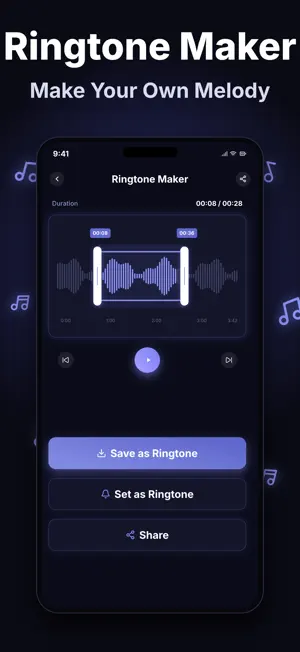
MP3 Converter · Video to Audio — The Complete Audio Toolbox for iPhone Turn any video into a clean audio file, swap between every major audio format, and craft a personal ringtone — all from one streamlined iOS app built for podcasters, musicians, video editors, students, and everyday listeners who want full control over their sound. WHY USERS CHOOSE THIS APP • One app, every format. Convert and export to MP3, WAV, FLAC, AAC, OGG, WMA, M4A, ALAC, AIFF, AMR, AC3, Opus, CAF, DTS, WV, OGA, W64, VOC, SPX, IRCAM, MP2, GSM — 22 formats, no hidden paywalls per codec. • Pull audio out of any video. Drop in an MP4, MOV, or any supported clip and walk away with a pristine audio track in the format you need. • Bring files in from anywhere. Import from the Files app, the Photos library, other apps via Share Sheet, Wi‑Fi transfer from a computer, or AirDrop straight from a friend's device. • Hand-craft a phone ringtone. Trim, fade, and export ready-to-set tones for iPhone (a bonus tool — the core of the app is conversion and extraction). WHO IT'S FOR • Podcasters cleaning up interviews and exporting episode files in the right codec • Musicians moving stems between WAV, FLAC, and ALAC • Video editors who need a clean audio track from a finished cut • Language learners pulling audio from lectures and tutorials • Anyone who simply wants to swap an unsupported file into something their device can play BUILT FOR iOS Native on iPhone and iPad, optimised for Apple Silicon, supports Files, Photos, Share Sheet, AirDrop, and Wi‑Fi transfer. No account required to start. Your files stay on device — conversions happen locally. HONEST LIMITATIONS This app does NOT separate vocals from instrumentals and does NOT extract an isolated vocal or instrumental track from a song. If that's what you're after, look for a dedicated stem-splitting tool. Everything else in the audio conversion, extraction, editing, and ringtone space is covered here. FREQUENTLY ASKED QUESTIONS Q: Can I convert a video file like MP4 or MOV directly into MP3? A: Yes. Import the video from Files, Photos, or AirDrop, choose MP3 (or any of 22 audio formats), and export. Q: How do I get a file from my computer into the app? A: Use the built-in Wi‑Fi transfer to drag a file from any browser, or save it to Files / iCloud Drive and open it through the Share Sheet. Q: Can I make a ringtone from a song or recording? A: Yes. Import the audio, trim to the section you want, add a fade if you like, and export as a ringtone-ready file. Ringtone making is a bonus tool — the heart of the app is converting and extracting. Q: Does the app work offline? A: Yes. Conversion, extraction, and editing all run on device. No internet, no cloud upload, no account. Q: Can it isolate or extract a vocal-only or instrumental-only track from a song? A: No. Vocal / instrumental separation is intentionally not included. The app focuses on format conversion, full-track extraction from video, and standard audio editing. Get the toolbox that handles your audio end to end — import, convert, extract, edit, export. Tap Get and start with your first file in under a minute. Subscription Information: Subscription Options: Weekly, Monthly, and Lifetime Membership. Pricing: Weekly subscription at $2.99/week, Monthly subscription at $8.99/month, Lifetime membership at $18.99. Payment: Charges will be applied to your iTunes account upon confirmation of purchase. Renewal: Your subscription will automatically renew within 24 hours prior to the end of the current period, and your iTunes account will be charged accordingly. Cancellation: To cancel, please do so at least 24 hours before the end of the current period via Settings > iTunes & App Store > Apple ID > Subscriptions. Privacy Policy: https://mp3-audio-converter.netlify.app/mp3/privacy Terms of Service: https://mp3-audio-converter.netlify.app/mp3/terms
Ratings & reviews
4.9
8 ratings
What’s new
Version 1.3.3 · Updated October 21, 2026
In this update: • New "High Quality" output preset: export 320 kbps MP3 in one tap • Much smaller app, about a third lighter • Loudness Normalization is now its own option, with one-tap settings for common podcast and streaming levels • Fixed an issue where files shared from other apps sometimes didn't open the editor while the Settings page was open Thank you for your feedback and support.
App privacy
The developer, HyperMind Ltd., reported these privacy practices to Apple.
Data Not Linked to You
The following data, which may be collected but is not linked to your identity, may be used for the following purposes:
- Usage Data: Product Interaction
- Diagnostics: Crash Data
Used for: Analytics, App Functionality
Alternatives to MP3 Converter Video to Audio
Looking for apps like MP3 Converter Video to Audio? Here are 6 similar apps on the App Store. The highest rated is Audio Editor | MP3 Converter (5.0/5), and all 6 are free to download.
-
 Audio Converter: Ringtone MP3
4.5
Audio Converter: Ringtone MP3
4.5
-
 Video To Audio Batch Converter
4.6
Video To Audio Batch Converter
4.6
-
 Video 2 MP3 Converter
4.7
Video 2 MP3 Converter
4.7
-
 Audio Editor - Mp3 Converter
3.9
Audio Editor - Mp3 Converter
3.9
-
 Audio Editor | MP3 Converter
5.0
Audio Editor | MP3 Converter
5.0
-
 MP3 Converter: Audio Tools
4.8
MP3 Converter: Audio Tools
4.8
| App | Rating | Price | Last updated | Compare |
|---|---|---|---|---|
| MP3 Converter Video to Audio | 4.9 / 5 (8 ratings) | Free | October 21, 2026 | |
| Audio Converter: Ringtone MP3 | 4.5 / 5 (53) | Free | May 28, 2025 | Compare |
| Video To Audio Batch Converter | 4.6 / 5 (20) | Free | Jun 25, 2026 | Compare |
| Video 2 MP3 Converter | 4.7 / 5 (10) | Free | Mar 3, 2025 | Compare |
| Audio Editor - Mp3 Converter | 3.9 / 5 (7) | Free | Sep 9, 2026 | Compare |
| Audio Editor | MP3 Converter | 5.0 / 5 (1) | Free | Jul 7, 2026 | Compare |
| MP3 Converter: Audio Tools | 4.8 / 5 (87) | Free | Sep 30, 2025 | Compare |