

Event Sales POS - TakujoSales
Tasuku Tozawa Utilities iPhoneiPadiPod touch
Event Sales POS - TakujoSales is a free Utilities app for iPhone and iPad by Tasuku Tozawa. Requires iOS 18.0. Updated September 9, 2026.
- Price
- Free
- on the App Store
- Size
- 6 MB
- Age 4+
- Updated
- Sep 9
- 2026 · v2.4
Screenshots


About Event Sales POS - TakujoSales
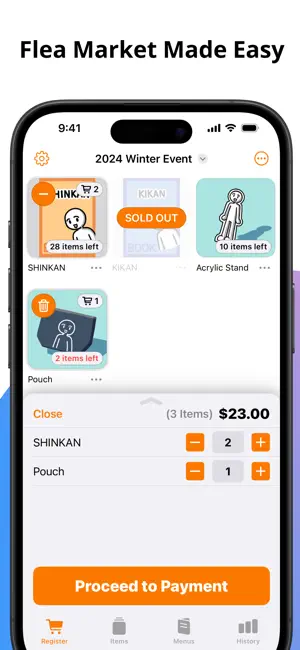
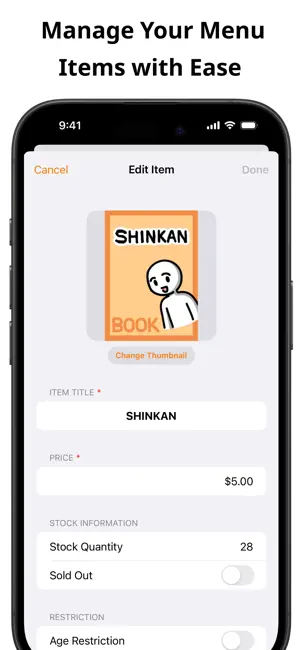
TakujoSales is a lightweight point-of-sale app designed for individual sellers at pop-up booths, school fairs, craft markets, flea markets, and similar gatherings. We’d love to hear your feedback! Please share your comments and suggestions through our in-app feedback feature. Main Features: ■ Item Management ・Register your products on the “Items” tab. Besides entering names and prices, you can also set up thumbnails, stock quantities, categories, and even mark items as sold out. ・When age restrictions are set, the app will prompt for age verification at checkout. It displays the required age along with the corresponding date of birth, making verification easier. ・Easily select an image from your photo library for your product’s thumbnail and adjust its size with just a few taps. ■ Sales Register ・In the “Register” tab, simply select products and tap the “Proceed to Payment (or Payment)” button to move to the checkout screen. ・Choose your preferred input method—calculator-style, coin & bill, or direct entry for frequently used amounts. ・Once you confirm the payment, the screen displays the change due and items distributed; just hit “Close” when finished to start your next transaction. ■ Product Menu ・Easily create a custom product list tailored for your event. Register multiple items at once and arrange them in any order that suits you best. ・On the day of the event, load your pre-made menu into the “Register” screen to speed up the checkout process. ■ Sales Dashboard ・ In the “Transaction History” tab, monitor your overall sales, number of transactions, and distribution trends in real time during the event. ・After the event, use the settings (located at the top right) to specify a custom date range and review or analyze past sales data. ■ Transaction History ・Check detailed transaction records with itemized breakdowns on the “Transaction History” tab. ・Download the displayed history as a TSV file—perfect for reviewing in Numbers, Excel, or Google Sheets. ・Manage multiple transactions at once with easy batch deletion or sharing based on your chosen criteria. ■ Additional Features ・Works offline ・Supports both Dark Mode and Light Mode ・Sync your data across devices with iCloud ・Bilingual support for English and Japanese ・Support for accessibility options: VoiceOver, Larger Text, Button Shapes, Reduce Motion
What’s new
Version 2.4 · Updated September 9, 2026
■ Resolved Issues ・Fixed an issue where transaction history recorded in version 2.2.0 or earlier was not displayed correctly on the Order History screen. ■ Enhancements ・Made other minor adjustments.
App privacy
The developer, Tasuku Tozawa, reported these privacy practices to Apple.
Data Not Collected
The developer does not collect any data from this app.
Alternatives to Event Sales POS - TakujoSales
Looking for apps like Event Sales POS - TakujoSales? Here are 6 similar apps on the App Store. The highest rated is Tagged Notes App - Tag Pad (5.0/5), and all 6 are free to download.
-
 Sokubai - Doujin Booth POS
-
 BOO-POS
-
 コミマップ
コミマップ
-
 Tagged Notes App - Tag Pad
5.0
Tagged Notes App - Tag Pad
5.0
-
 GoodsBar - Artist Alley POS
-
 セリフ暗記
セリフ暗記
| App | Rating | Price | Last updated | Compare |
|---|---|---|---|---|
| Event Sales POS - TakujoSales | – | Free | September 9, 2026 | |
| Sokubai - Doujin Booth POS | – | Free | Jun 25, 2026 | Compare |
| BOO-POS | – | Free | Sep 16, 2026 | Compare |
| コミマップ | – | Free | Jul 16, 2024 | Compare |
| Tagged Notes App - Tag Pad | 5.0 / 5 (1) | Free | Nov 2, 2024 | Compare |
| GoodsBar - Artist Alley POS | – | Free | Oct 1, 2026 | Compare |
| セリフ暗記 | – | Free | Oct 23, 2026 | Compare |