

Authenticator app, 2FA and MFA
Conteza LLC Productivity iPhoneiPadiPod touch
Authenticator app, 2FA and MFA is a free Productivity app for iPhone and iPad by Conteza LLC. Requires iOS 15.0. Updated August 6, 2025.
- Price
- Free
- on the App Store
- Size
- 16 MB
- Age 17+
- Updated
- Aug 6
- 2025 · v1.3
Screenshots


About Authenticator app, 2FA and MFA
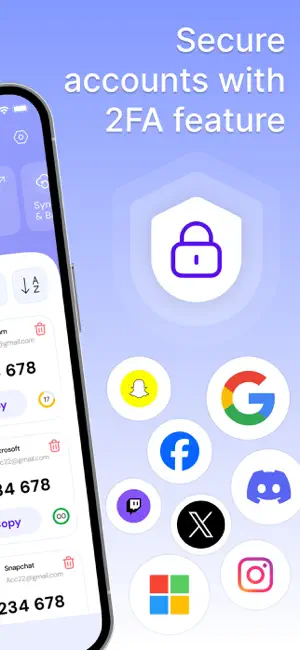
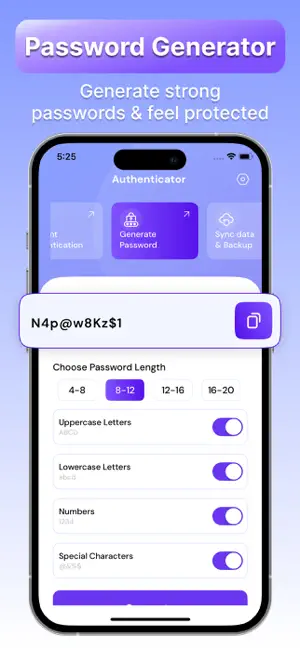
Secure your digital life with one powerful app. Our Authenticator app is designed to keep your online accounts safe and your login process simple. Whether you're managing personal or professional accounts, this all-in-one security tool offers reliable two-factor authentication (2FA), a secure password generator, and encrypted sync and backup — all in a clean, user-friendly experience. Two-Factor Authentication (2FA) Protect your accounts with time-based one-time passwords (TOTP). Easily add services by scanning a QR code or entering a setup key manually. Compatible with any service that supports TOTP, including Google, Facebook, Amazon, Instagram, Twitter, and many others. Your codes are securely stored and always available — even offline. Password Generator Create strong, unique passwords in seconds. The built-in generator lets you customize password length and character types (uppercase, lowercase, numbers, symbols) to meet your security needs. Stop reusing passwords and start securing your accounts the right way. Sync and Backup Never lose access to your accounts. With secure, encrypted cloud sync and backup, your data stays safe and can be easily restored when needed. Whether you're changing devices or using more than one, your authentication codes and passwords are always in sync. Key Features Fast and secure 2FA code generation Works with all TOTP-compatible services Offline access to your authentication codes Strong, customizable password generation Secure encrypted sync and backup Easy import and export for data portability PIN, biometric, or passcode protection Simple, ad-free, and intuitive design Privacy You Can Trust Your data is never shared or sold. All information is encrypted and stored securely — giving you full control and complete privacy. Take control of your online security Download the Authenticator app today and start protecting your accounts with confidence. Note: Payment will be charged to your iTunes account at confirmation of purchase. Your subscription will automatically renew unless auto-renew is turned off at least 24-hours before the end of the current subscription period. Your account will be charged for renewal within 24-hours prior to the end of the current subscription period. Automatic renewals will cost the same price you were originally charged for the subscription. You can manage your subscriptions and turn off auto-renewal by going to your Account Settings on the App Store after purchase. Read our terms of service and Privacy Policy for more information. Privacy Policy: https://conteza.com/privacy-policy.html Terms of Use: https://conteza.com/terms-and-conditions.html
What’s new
Version 1.3 · Updated August 6, 2025
- Fix Bugs.
App privacy
The developer, Conteza LLC, reported these privacy practices to Apple.
Data Not Collected
The developer does not collect any data from this app.
Alternatives to Authenticator app, 2FA and MFA
Looking for apps like Authenticator app, 2FA and MFA? Here are 6 similar apps on the App Store. The highest rated is Authenticator-2FA Code (5.0/5), and all 6 are free to download.
-
 Authenticator-2FA Code
5.0
Authenticator-2FA Code
5.0
-
 Authenticator: 2FA OTP Codes
4.4
Authenticator: 2FA OTP Codes
4.4
-
 Authe for Google Authenticator
4.4
Authe for Google Authenticator
4.4
-
 Authenticator App : 2FA & MFA
4.5
Authenticator App : 2FA & MFA
4.5
-
 Authenticator App - 2FA Auth +
4.5
Authenticator App - 2FA Auth +
4.5
-
 QQ邮箱
3.6
QQ邮箱
3.6
| App | Rating | Price | Last updated | Compare |
|---|---|---|---|---|
| Authenticator app, 2FA and MFA | – | Free | August 6, 2025 | |
| Authenticator-2FA Code | 5.0 / 5 (1) | Free | Mar 3, 2026 | Compare |
| Authenticator: 2FA OTP Codes | 4.4 / 5 (181) | Free | Oct 16, 2026 | Compare |
| Authe for Google Authenticator | 4.4 / 5 (89) | Free | Jul 28, 2025 | Compare |
| Authenticator App : 2FA & MFA | 4.5 / 5 (654) | Free | Oct 22, 2026 | Compare |
| Authenticator App - 2FA Auth + | 4.5 / 5 (1,798) | Free | Sep 4, 2026 | Compare |
| QQ邮箱 | 3.6 / 5 (736) | Free | Sep 24, 2026 | Compare |