

Phidoku: Snap & Learn Sudoku
松年 陈 Education iPhoneiPadiPod touch
Phidoku: Snap & Learn Sudoku is a free Education app for iPhone and iPad by 松年 陈. Requires iOS 16.4. Updated July 29, 2026.
- Price
- Free
- on the App Store
- Size
- 56 MB
- Age 4+
- Updated
- Jul 29
- 2026 · v1.3
Screenshots

About Phidoku: Snap & Learn Sudoku
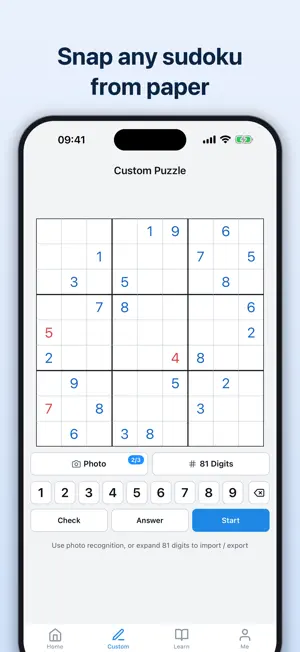
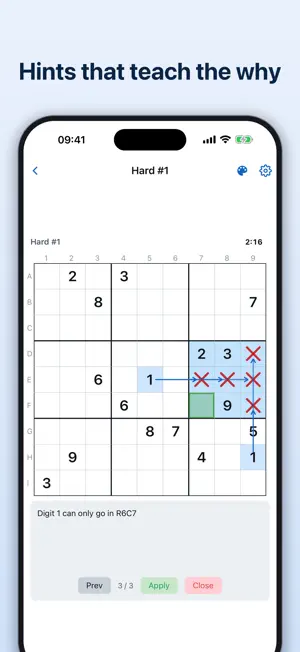
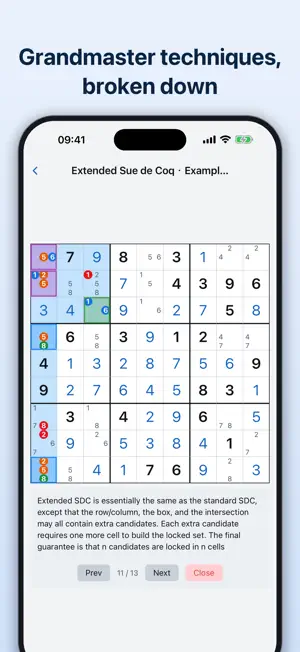
Stuck halfway through a sudoku with nothing left but guessing? Phidoku puts teaching first — it doesn't just give you answers, it shows you the reasoning behind every step. From beginner Hidden Singles to grandmaster chain logic, you can learn step by step from day one. 63 SOLVING TECHNIQUES, TAUGHT INTERACTIVELY From beginner Hidden Singles to grandmaster AIC chains, all 63 techniques are demonstrated step by step on real boards: relevant cells highlighted, key candidates marked, logic revealed one move at a time. Organized in 5 difficulty tiers; each technique comes with dedicated practice — 1,000+ puzzles in total, so you can train right after you learn. SMART HINTS THAT TEACH, NOT TELL When you're stuck, the hint system analyzes your board, finds an applicable technique, and walks you through it — the region first, then the reasoning, and only then the conclusion. You learn the why, not just the what. Hints use the same technique language as the tutorials, closing the loop: learn → practice → hint. Free trial uses are included; a lifetime purchase unlocks unlimited hints. SNAP ANY SUDOKU · CUSTOM ENTRY Photograph a puzzle from a newspaper, magazine, or book and it's instantly recognized and imported as a playable board. Uncertain cells are flagged in red for one-tap correction. You can also enter a custom puzzle by hand. 9,000 PUZZLES, 6 DIFFICULTY LEVELS Every puzzle is analyzed by our solver and tagged with the techniques it requires — filter by technique to drill what you need. Auto-save, completion records, and time stats built in. TOOLS FOR SERIOUS SOLVERS - Chain finder: the hardest part of chain techniques is finding the chain. Pick a starting candidate and watch chains unfold visually — including grouped nodes and ALS nodes. - Bi-value highlighting: bi-value cells are the natural entry points for XY-Chains, W-Wings, and Unique Rectangles. Light up every 2- and 3-candidate cell with one tap. - Full singles auto-solve: filling naked singles in the opening and the endgame is just busywork. Clear them all in one tap and keep your full attention on the real deductions. - Staged candidate fill: pairs first, then triples, then the rest. Every stage leaves room to spot patterns yourself, and your own notes are never overwritten. - Drawing & coloring: 6 shapes and 10 colors; color cells or individual candidates to map chains and logical groups. - Custom keyboard: three presets — 2×9, 3×5, and 4×5 — plus full customization. Resize the grid, then add, remove, rearrange, or reassign every key (hints, singles, chain finder, coloring, and more) so your most-used actions sit where your thumb wants them. - Toggle each of the 63 techniques individually — hints only use what you've learned, so you set your own learning pace. PERSONALIZATION - Board coordinates: show row/column labels around the grid — numeric or letter coordinates, or turn them off - Input lock: lock the cell (pick a cell, then a digit) or lock the keypad (pick a digit, then tap cells) - Candidates & helpers: candidate display style, staged candidate fill, auto-check errors, auto-remove candidates, remaining-count badges, timer, and more - Related-cell highlighting when you select a cell - Appearance & language: system / light / dark mode; English & Chinese Tune every option to how you actually solve — no need to live with the defaults. SYNC & MORE - Sign in with Apple, progress synced seamlessly across devices - Full iPad support - Daily stats to track your improvement All puzzles and tutorials are free to play. A single lifetime purchase unlocks unlimited smart hints and photo import — no subscription, no ads. Terms of Use (EULA): https://www.apple.com/legal/internet-services/itunes/dev/stdeula/ Privacy Policy: https://phidoku.com/privacy
What’s new
Version 1.3 · Updated July 29, 2026
What's new: · Fixed game progress not being saved when leaving via swipe-back or switching apps · Improved eraser: select it in number-lock mode for continuous erasing, now also clears pencil marks · Restored the Clear key in coloring and drawing modes · Various keyboard state display fixes and polish
App privacy
The developer, 松年 陈, reported these privacy practices to Apple.
Data Linked to You
The following data, which may be collected and linked to your identity, may be used for the following purposes:
- Purchases: Purchase History
- Contact Info: Email Address, Name
- User Content: Photos or Videos, Other User Content
- Identifiers: User ID, Device ID
Used for: App Functionality
Alternatives to Phidoku: Snap & Learn Sudoku
Looking for apps like Phidoku: Snap & Learn Sudoku? Here are 6 similar apps on the App Store. The highest rated is 数独家 - 经典数独教学软件 (5.0/5), and all 6 are free to download.


| App | Rating | Price | Last updated | Compare |
|---|---|---|---|---|
| Phidoku: Snap & Learn Sudoku | – | Free | July 29, 2026 | |
| Sudokung | – | Free | Sep 28, 2026 | Compare |
| 数独家 - 经典数独教学软件 | 5.0 / 5 (1) | Free | Jul 15, 2024 | Compare |
| Sudoku.by BinG | 5.0 / 5 (1) | Free | Jul 11, 2026 | Compare |
| K.O. Flip - Light up | – | Free | Mar 18, 2026 | Compare |
| 数独高高手 | 4.3 / 5 (3) | Free | Jun 17, 2026 | Compare |
| 数独达人 - 经典数独游戏|九宫格数字谜题 | – | Free | Aug 8, 2026 | Compare |