

Suroy: Philippine Passport
SuroyPH Media Group Travel iPhoneiPadiPod touch
Suroy: Philippine Passport is a free Travel app for iPhone and iPad by SuroyPH Media Group. Requires iOS 17.0. Updated October 5, 2026.
- Price
- Free
- on the App Store
- Size
- 76 MB
- Age 4+
- Updated
- Oct 5
- 2026 · v1.4
Screenshots



About Suroy: Philippine Passport
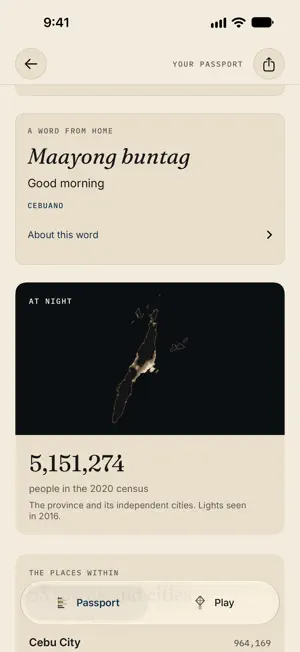
Your Philippines, in one Passport. No third-party ads. No account required. A cousin's wedding in Iloilo. A work trip to Davao. That summer in Sagada. Your travels began long before you downloaded an app. Suroy makes room for all of them, and the places still on your mind. Suroy is Cebuano for "to wander." Keep your Philippine travel story, share a little of it, and play your way around home. BEGIN WITH HOME Choose the place you call Home and give it its own mark on your map. Count the days until going home or your next trip, in Suroy and on your Lock Screen. MAKE THE MAP YOURS Mark Been and watch your map fill in. Keep places On my list. All 82 provinces have a place in your Passport, with a separate Metro Manila record. No location permission or check-in is required. Tap a province, hold and glide across the map, or explore the Passport spine. Find its outline, capital and neighbours, with your visit stamps, local stories, researched pasalubong and words from home where available. A little pawikan shares the water with you. KEEP THE DETAILS THAT MATTER Keep a note and a photograph you choose. Record earlier trips and repeat visits with an exact day, a month, a year or no date. Link the memories that belong to a visit without inventing details you no longer remember. A year in places gathers explicitly dated visits into an annual map and chapters. Choose a photograph and a few words for a personal year keepsake. Unknown months remain unknown, and fully undated visits stay outside annual counts. SEND A PADALA A photograph. A place. Your own words. Make a province postcard in three styles: Stamped, The Big Name and Both Sides. Use its outline or choose a photograph, frame it with Fit or Fill, write a message and add an optional dedication. Choose whether to include a Been stamp or a recorded visit date. Preview Post 4:5 or Story 9:16 before sharing. Passport and annual cards offer their own ways to share. Private saved notes, Home and exact visit dates are not automatically copied into public cards. KEEP A PASSPORT COPY Save a private Passport file to Files, including supported records, preferences and app-saved photographs. Review a file before adding records back. Existing conflicting records are preserved and identical records are not duplicated. This is a file you control, not automatic cloud sync. Keep it private: Suroy does not encrypt the exported file. KEEP YOUR PLACES CLOSE Add a Passport map, a place, your province spine or Been stamps to the Home Screen. Clear and Tinted appearances are supported where available. Lock Screen widgets keep your progress or next journey close. FOUR WAYS TO PLAY The Daily Suroy: One Philippine question each day, with many right answers. Rarity ranks and common-answer comparisons are editorial estimates. Sakto ba?: Match original Suroy.ph photographs with place names and Bisaya words. Suroy Fun Run: Cross CCLEX, dodge jeepneys and collect puso and lechon. Cebu signboards add local flavor, not real route guidance. Cebu Quiz: Ten questions about home and a score to pass around. PLAN WHAT COMES NEXT Find trips, notes and researched Day plans in My trips & notes. Plans include dated cost ranges and things to confirm before booking. Province pages also offer the Island Series by Suroy Wear, with optional links to physical shirts. YOUR TRAVELS STAY PERSONAL No third-party ads, app analytics or ad networks. No account required. Suroy stores records locally and does not upload them. Device backups may include them, depending on your settings. The system photo picker supplies only the photo you select. Saving a card asks permission to add it to Photos. External websites, sharing services and file providers have their own practices. Core Passport and games work offline. Light and dark appearances, layouts made for iPad, quiet navigation and touch feedback you can choose. Built in Cebu by the people behind Suroy.ph and Suroy Wear.
What’s new
Version 1.4 · Updated October 5, 2026
Our biggest Passport update yet. - Meet your biodata page. Your Passport now opens like the real thing, with your name, your home province, your first stamp and every region seal you've earned, down to the machine line. - The Philippines at night, as seen from space. Each province shows its real night lights, and every region you complete earns its own night portrait. - Carry those lights on your Home Screen with two new widgets, Home at night and Passport at night. - Your stamps now take the ink of the year you went, and All years brings every year together on one map. - Collect your region seals in their own album. - Tap a provincial capital for a closer look. - Reach 41 provinces and your Passport says it: Half the Philippines. - Send a Padala with the province's name and a link to the app, and keep your sign-off for next time. Daghang salamat for carrying your Passport with you. Padayon.
App privacy
The developer, SuroyPH Media Group, reported these privacy practices to Apple.
Data Not Collected
The developer does not collect any data from this app.
Alternatives to Suroy: Philippine Passport
Looking for apps like Suroy: Philippine Passport? Here are 6 similar apps on the App Store. The highest rated is Biyahe (4.6/5), and all 6 are free to download.
-
 Astray - Commute Companion
-
 LakbAI: Plan PH Trips
-
 Exploretale
-
 YAT: Commute Alarm
-
 Biyahe
4.6
Biyahe
4.6
-
 mapa - Group Travel Planner
| App | Rating | Price | Last updated | Compare |
|---|---|---|---|---|
| Suroy: Philippine Passport | – | Free | October 5, 2026 | |
| Astray - Commute Companion | – | Free | Sep 23, 2026 | Compare |
| LakbAI: Plan PH Trips | – | Free | May 6, 2026 | Compare |
| Exploretale | – | Free | Jun 10, 2026 | Compare |
| YAT: Commute Alarm | – | Free | Sep 29, 2026 | Compare |
| Biyahe | 4.6 / 5 (7) | Free | Sep 22, 2026 | Compare |
| mapa - Group Travel Planner | – | Free | Sep 14, 2026 | Compare |