

Tikuren: Voice Time Tracker
BartMolk Productivity iPhoneiPadiPod touch
Tikuren: Voice Time Tracker is a free Productivity app for iPhone and iPad by BartMolk. Requires iOS 15.1. Updated October 12, 2026.
- Price
- Free
- on the App Store
- Size
- 58 MB
- Age 4+
- Updated
- Oct 12
- 2026 · v2.2.0
Screenshots


About Tikuren: Voice Time Tracker
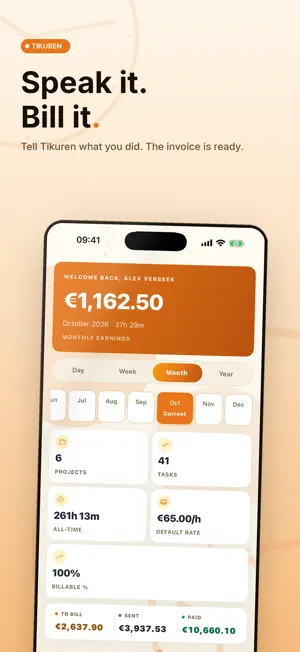
You drove back from a client. Two hours on their roof in the rain. Forgot to start a timer. Again. That is money you already earned and will never bill. Tikuren fixes that. Tell it what you did, by voice or text, and it builds the project, the hours, and a branded invoice. Hit sent. Hit paid. Move on. Tikuren is voice-first time tracking, trips, and real invoicing in one app, for freelancers, contractors, and small teams. One account across iPhone, Mac, and the web: start a timer on your phone, finish at your desk. CAPTURE TIME WITHOUT THE STOPWATCH • Voice entry. Speak one sentence in the car or on a ladder and we pull out the project or task, rate, time, due date, and sub-tasks. You confirm a preview before it saves. • One-tap timer. Tap any recent task to start or stop. The timer and a trip in progress show on your Lock Screen and in the Dynamic Island. • Quick type. Add a line and we sort the project and category (billable, internal, or admin). • Calendar import. Turn appointments from the last 30 days into time entries, duration filled in. • Meeting recorder. Record a meeting and copy or share the transcript, long meetings too. The iPhone keeps recording when the screen locks. TRIPS AND TRAVEL COSTS • Recognise trips. Turn it on and Tikuren records your drives while a timer runs, with the route on a map and the kilometres. • Tap Start trip, also without a timer. The trip ends by itself when you arrive. • Or add a trip by hand, and the distance by road is filled in. • Travel costs per project: per kilometre, per trip, or not charged, as a line on your invoice. A trip is never billed twice. • Arrive at a client and Tikuren offers to link the trip to them. Find a company by name to add it as a client, with its address. • Export your kilometre log as CSV. INVOICES THAT LOOK LIKE YOUR COMPANY • Branded A4 PDF with your logo color, company number, VAT id, IBAN, and payment terms. Three templates, or your own house style. • Bill by the hour, fixed price, per unit (m2, piece, word, km), or per day, with call-out charges, materials, discount, a minimum charge, and VAT. The numbers always add up. • Combine tasks from several projects on one invoice. Saved clients never get retyped. • Gap-free numbered invoices with draft, sent, paid, and void status. Each entry bills only once, and voiding frees the hours again. SEE WHAT YOU EARN • Day, week, month, and year earnings, with a To bill, Sent, and Paid strip. Money counts as earned only when a task is done. • A 365-day activity heatmap, your billable percentage, and faster quotes from similar work you already finished. WORK AS A TEAM, WITH PEACE OF MIND • Up to 10 members with owner, editor, and viewer roles. Row-level security means people only see the projects and teams they belong to. Time entries show who logged what. Included with any plan. • Nine languages, including Dutch and Thai, with Dutch billing terms like BTW, KvK, and voorrijkosten. Screen reader labels on every button. • Data on EU infrastructure, encrypted in transit. Export your time entries to CSV, or delete your account and all your data in the app. • AI is optional and asks first. AI services turn speech into text, write your summaries and design invoice templates; the privacy policy names them. They do not train on your data, and recordings are deleted from our servers once transcribed. SUBSCRIPTION Choose the Freelancer or Team plan, billed monthly or yearly through your App Store account. New subscribers get the first 14 days free. Payment is charged to your Apple ID after the free period, or at confirmation if you have used it before. Subscriptions renew automatically unless turned off at least 24 hours before the current period ends. Any unused portion of the free trial is forfeited when you buy a subscription. Manage or cancel any time in your Apple ID settings. Privacy Policy: https://tikuren.com/privacy Terms of Use (EULA): https://tikuren.com/voorwaarden Questions? [email protected]
What’s new
Version 2.2.0 · Updated October 12, 2026
• Trips: turn on Recognise trips during a timer, and Tikuren records your drives while a timer runs, with the route on a map and the kilometres. • Start trip: record a trip from where you are, also without a timer. It ends by itself when you arrive. • Trips by hand: pick the start and end by address or your current location, and the distance by road is filled in. • Travel costs per project: per kilometre, per trip or not charged, with a travel line on your invoice. A trip is never billed twice. • Arrive at a client and Tikuren offers to link the trip to them. • Find a company by name and add it as a client, with its address. • Export a kilometre log as CSV for your tax return. • A trip in progress shows on the Lock Screen and in the Dynamic Island. Also new since the previous version: • Overview: the daily standup and the weekly recap now describe your own work, in your language: your hours, tasks, projects and amounts. • Voice: the first tap on the mic records right away. If a transcription fails, retry it without recording again. • Meetings: long meetings are transcribed in 10-minute parts, and the iPhone keeps recording with the screen locked. • Tasks: completing a task after its timer ran now sticks, and a double tap on start or stop logs the time once. • Invoices: you are the sender on every invoice. A project's fixed price and extras such as call-out charges count once per project, and a follow-up invoice bills only the new hours. • AI asks for your consent before its first use and tells you which provider does what. • Delete your account and all your data in the app. • All nine languages are complete, including clients, invoices and templates. Every button has a VoiceOver label, and the overview, timer and voice screens respect Reduce Motion. • Many smaller fixes.
App privacy
The developer, BartMolk, reported these privacy practices to Apple.
Data Linked to You
The following data, which may be collected and linked to your identity, may be used for the following purposes:
- Contact Info: Email Address, Name
- Search History: Search History
- Purchases: Purchase History
- Location: Precise Location
- User Content: Photos or Videos, Audio Data, Other User Content
- Identifiers: User ID
Used for: Analytics, App Functionality
Alternatives to Tikuren: Voice Time Tracker
Looking for apps like Tikuren: Voice Time Tracker? Here are 6 similar apps on the App Store. The highest rated is JobGuard AI (4.9/5), and all 6 are free to download.
-
 Duesy: AI Life Admin
-
 Axion: AI Voice Planner
-
 JobGuard AI
4.9
JobGuard AI
4.9
-
 DoBeDoBe
-
 YPM
YPM
-
 Memora - AI Memory & Assistant
| App | Rating | Price | Last updated | Compare |
|---|---|---|---|---|
| Tikuren: Voice Time Tracker | – | Free | October 12, 2026 | |
| Duesy: AI Life Admin | – | Free | Sep 29, 2026 | Compare |
| Axion: AI Voice Planner | – | Free | May 18, 2026 | Compare |
| JobGuard AI | 4.9 / 5 (13) | Free | Oct 11, 2026 | Compare |
| DoBeDoBe | – | Free | Sep 16, 2025 | Compare |
| YPM | – | Free | Oct 27, 2025 | Compare |
| Memora - AI Memory & Assistant | – | Free | Apr 14, 2026 | Compare |