

LayMatic
Irsadi Soganci Utilities iPhoneiPadiPod touch
LayMatic is a free Utilities app for iPhone and iPad by Irsadi Soganci. Requires iOS 12. Updated June 12, 2026.
- Price
- Free
- on the App Store
- Size
- 38 MB
- Age 4+
- Updated
- Jun 12
- 2026 · v2.8.62
Screenshots


About LayMatic
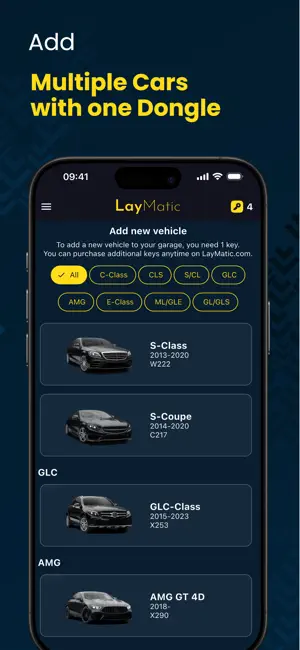
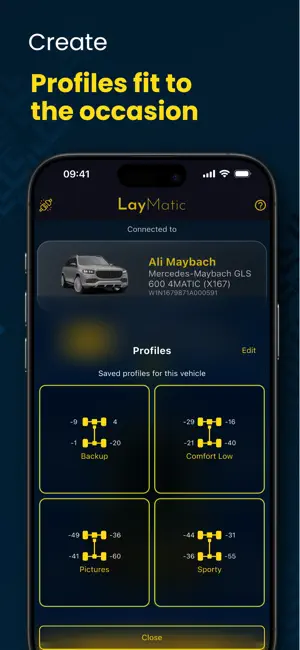
LayMatic lets you adjust the factory air suspension of compatible Mercedes-Benz vehicles—right from your iPhone. Set the perfect stance for daily driving, photo shoots, or track days, then restore stock height anytime. No permanent wiring or coding: plug in, adjust, unplug. Requires the LayMatic OBD-II dongle (sold separately). What you can do Lower in seconds: Easy Mode adjusts all four corners; Front/Back controls axles; Manual enables per-wheel fine-tuning. Save & restore: Your vehicle’s original values are backed up on first connect so you can return to stock anytime. Multiple vehicles: One Key licenses one car; add additional Keys to enable more cars in your garage. Non-invasive setup: No cutting, no “lowering links,” and no permanent wiring. How it works Create an account and sign in. Plug the LayMatic OBD-II dongle into the OBD port (under the steering wheel on most Mercedes-Benz models). Open the app and connect; on first connection you’ll assign a Key to the vehicle. Adjust height using Easy, Front/Back, or Manual modes. Unplug the dongle when you’re done. Compatibility Works with most Mercedes-Benz models equipped with factory air suspension (e.g., AIRMATIC, Air Body Control). Not compatible with hydraulic systems such as Active Body Control (ABC)/Magic Body Control. For the latest list of supported models, see our compatibility page on the LayMatic website. Safety & legal Use only when parked on a level surface with the parking brake engaged. Do not operate while driving. Ensure any changes comply with your local laws and inspection requirements (e.g., TÜV). Adjustments are reversible, but may affect warranty or assistance; use at your own risk. Requirements LayMatic OBD-II dongle (sold separately) and an active LayMatic account. A compatible Mercedes-Benz vehicle (see compatibility on our website). Bluetooth and internet access for initial setup and updates. Trademarks Mercedes-Benz, AIRMATIC, and related marks are trademarks of their respective owners. LayMatic is an independent product and is not affiliated with or endorsed by Mercedes-Benz.
What’s new
Version 2.8.62 · Updated June 12, 2026
bugfixes and reliability improvements
App privacy
The developer, Irsadi Soganci, reported these privacy practices to Apple.
Data Linked to You
The following data, which may be collected and linked to your identity, may be used for the following purposes:
- Contact Info: Email Address, Name
- Identifiers: User ID
- Usage Data: Product Interaction
- Diagnostics: Crash Data, Performance Data, Other Diagnostic Data
- Other Data: Other Data Types
- User Content: Customer Support
Used for: Developer’s Advertising or Marketing, Analytics, App Functionality, Other Purposes
Alternatives to LayMatic
Looking for apps like LayMatic? Here are 6 similar apps on the App Store. The highest rated is R8 Companion (4.8/5), and 5 of the 6 are free to download.
-
 My Flasher US
4.4
-
 RaceChip+
3.1
-
 R8 Companion
4.8
-
 AmbientLight+
3.1
-
 Magic CarLight
2.5
-
 OBDeleven – OBD2 car scanner
4.3
| App | Rating | Price | Last updated | Compare |
|---|---|---|---|---|
| LayMatic | – | Free | June 12, 2026 | |
| My Flasher US | 4.4 / 5 (7) | Free | Oct 23, 2026 | Compare |
| RaceChip+ | 3.1 / 5 (81) | Free | Sep 30, 2026 | Compare |
| R8 Companion | 4.8 / 5 (1,575) | 9.99 USD | Oct 10, 2026 | Compare |
| AmbientLight+ | 3.1 / 5 (17) | Free | Oct 20, 2026 | Compare |
| Magic CarLight | 2.5 / 5 (21) | Free | Feb 14, 2025 | Compare |
| OBDeleven – OBD2 car scanner | 4.3 / 5 (1,584) | Free | Oct 17, 2026 | Compare |
Compare LayMatic with the top alternatives: ratings, updates, ASO score and keyword gaps →