

Routinia: Routine Automation
Leonid Goldberg Productivity iPhoneiPadiPod touch
Routinia: Routine Automation is a free Productivity app for iPhone and iPad by Leonid Goldberg. Rated 4.0/5 from 1 ratings. Requires iOS 15.1.
- Rating
- 4.0
- 1 ratings
- Price
- Free
- on the App Store
- Size
- 64 MB
- Age 4+
- Updated
- Sep 3
- 2026 · v1.9.0
Screenshots
About Routinia: Routine Automation
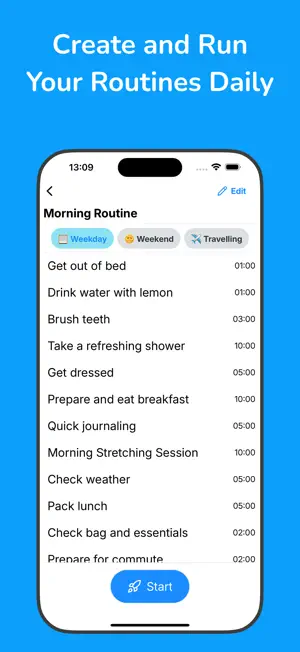
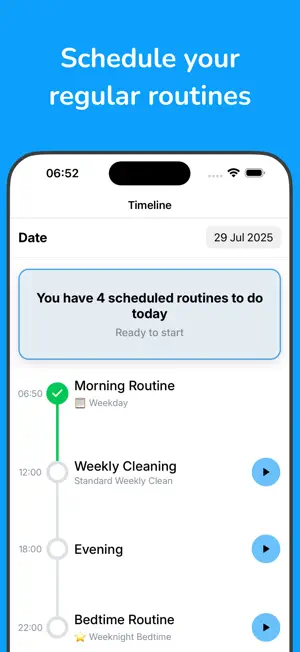
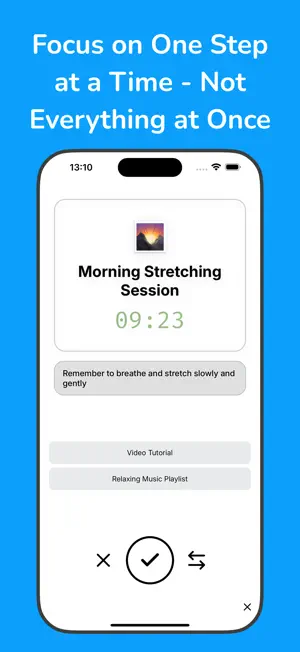
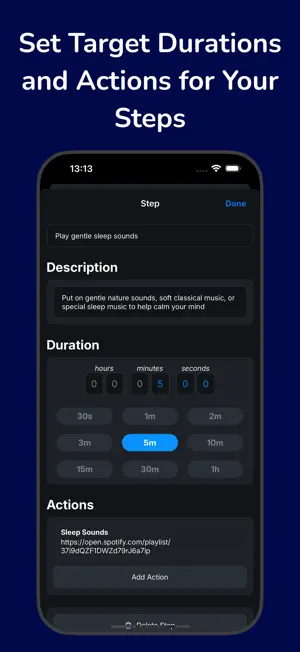
Routinia walks you through the repeating parts of your day, step by step, and gives you tools to automate them. Here is what you can do with Routinia: • In your morning routine, set up an action to open your morning music playlist • Thanks to voice control, you can simply listen for each step instruction and say "Done" to hear the next one, letting you quickly complete many steps in a row. For example, "open windows" - done!, "turn down the heater" - done!, "take medication" - done! • Schedule your regular routines at a specific time and day of week, and we'll visualize it on the timeline, giving you the incentive to complete the full day • Use it for non-regular routines too, like "Packing for a trip" routine. It could make sure you remember to take a hat and sunscreen with you • Use it for any process that benefits from structure and repetition Add steps to your routines, then follow them one by one. Each step can have a timer, letting you see when you need to speed up or how much time you have left. KEY FEATURES • Automation Routine actions can open a web link or a deep link into another app for you. For example, you can attach your favorite workout video or meditation app to a step in your routine. Or you can use actions to run web/HTTP requests directly from your routine (Pro)! • Voice control No need to break the flow by looking at the screen. Hear the instruction for current step, say one of "done", "skip", "switch", and move on to the next step. Quick and efficient! • Routine variations There should only be one morning routine, not "Morning routine at home", "Morning routine on holiday". Routinia allows you to group variations of the same routine together, so they don't clutter the app. One routine, many variations. • Scheduling For a regular routine, choose the days of the week and time at which it should run. You can set up notifications to remind you to complete the routine at the target time. See routines visualized a timeline so you can easily see what you still need to do today. • Insights Evaluate your progress over time with two key metrics: how closely you follow the schedule you set, and how many steps you complete rather than skip in each run. Both give you a percentage value that you can use to understand the overall performance of your routine system. • Optional data syncing Either use the app locally on your device, or optionally create an account to sync your routines across all your devices and keep your routines backed up. TIPS FOR CREATING POWERFUL ROUTINES • Routinia lets you create an unlimited number of routines, but don't rush to create them all too quickly! Start with something you already do regularly and rarely skip, like a morning or bedtime routine. • Start by adding a few small and specific steps, it doesn’t need to be perfect. The important thing is to begin. Over time you will understand what more needs to be added. • Your routine will change and evolve over time. Regularly review whether your routines in the app are consistent with real life. Make adjustments if not. Terms of use: https://www.apple.com/legal/internet-services/itunes/dev/stdeula/
What’s new
Version 1.9.0 · Updated September 3, 2026
Introducing the new routine insights feature! There are two key metrics now available based on routine completions: how closely you follow the schedule you set, and how many steps you complete rather than skip in each run. Both give you a percentage value that you can use to understand the overall performance of your routine system. Also fixed a problem where you could have more than one simultaneous routine run for the same routine.
App privacy
The developer, Leonid Goldberg, reported these privacy practices to Apple.
Data Linked to You
The following data, which may be collected and linked to your identity, may be used for the following purposes:
- Purchases: Purchase History
- Contact Info: Email Address
- User Content: Other User Content
- Identifiers: User ID
Used for: Analytics, App Functionality
Data Not Linked to You
The following data, which may be collected but is not linked to your identity, may be used for the following purposes:
- Identifiers: Device ID
- Usage Data: Product Interaction
Used for: Analytics
Alternatives to Routinia: Routine Automation
Looking for apps like Routinia: Routine Automation? Here are 6 similar apps on the App Store. The highest rated is Decree - Routine Manager (5.0/5), and 5 of the 6 are free to download.
-
 Decree - Routine Manager
5.0
Decree - Routine Manager
5.0
-
 Questask
-
 Idea Outliner
-
 Routine Ranger
-
 Go Time - Always on time
5.0
Go Time - Always on time
5.0
-
 TimeLynk – Global Time Planner
| App | Rating | Price | Last updated | Compare |
|---|---|---|---|---|
| Routinia: Routine Automation | 4.0 / 5 (1 rating) | Free | September 3, 2026 | |
| Decree - Routine Manager | 5.0 / 5 (1) | Free | Oct 27, 2024 | Compare |
| Questask | – | Free | Apr 3, 2026 | Compare |
| Idea Outliner | – | Free | Jun 5, 2026 | Compare |
| Routine Ranger | – | Free | Jan 14, 2026 | Compare |
| Go Time - Always on time | 5.0 / 5 (1) | 1.99 USD | Aug 8, 2026 | Compare |
| TimeLynk – Global Time Planner | – | Free | Jan 28, 2026 | Compare |