

Cut´n Convert PNG
Frank Malzahn Photo & Video iPhoneiPadiPod touch
Cut´n Convert PNG is a paid Photo & Video app for iPhone and iPad by Frank Malzahn. Requires iOS 16.6. Updated October 3, 2026.
- Price
- 0.99 USD
- on the App Store
- Size
- 90 MB
- Age 4+
- Updated
- Oct 3
- 2026 · v1.1.20
Screenshots
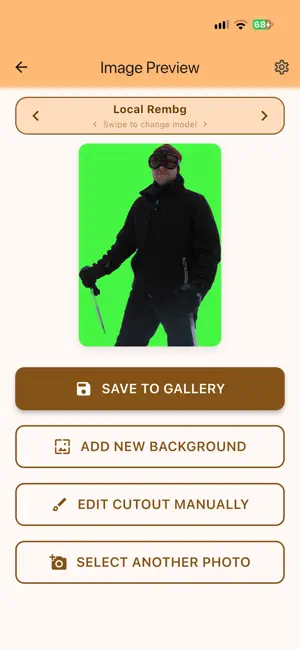
About Cut´n Convert PNG
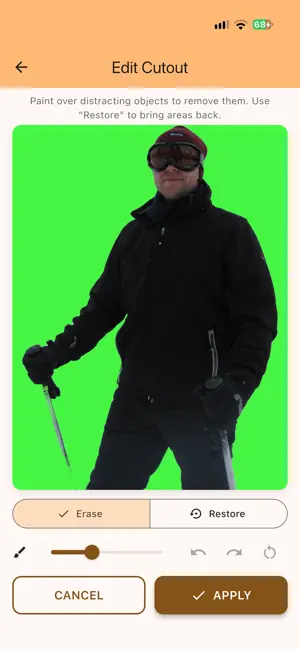
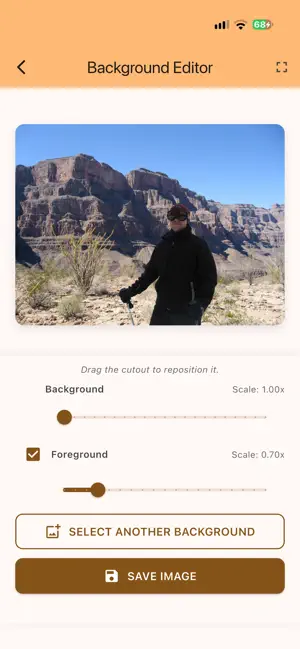
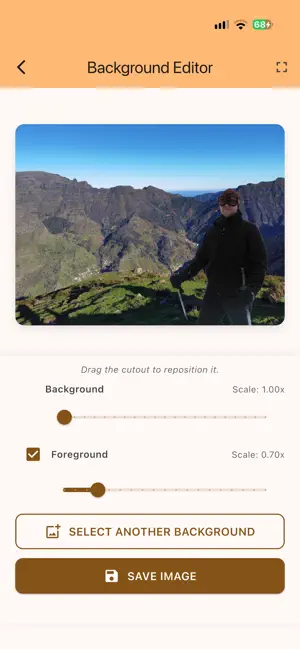
Cut’n Convert – Remove Backgrounds. Reimagine Your Images. With Cut’n Convert, you can remove backgrounds from your photos quickly and easily—whether you’re working with portraits, people, or objects. Simply choose an image from your photo library and let the app automatically remove the background. Your subject is turned into a transparent PNG and can then be edited further. Several models are available for different subjects and requirements. This allows you to choose the model that works best for your image—all completely offline and without uploading your photos to the internet. Even More Precise Results If unwanted image areas or distracting objects remain after automatic background removal, you can now refine your image manually. Use the integrated eraser to remove unwanted areas and optimize your cut-out with even greater precision. Get Creative with Your Images Use the integrated Background Editor to combine your cut-out subject with a new background: * Choose an image from your photo library as a new background. * Position your subject with simple drag-and-drop controls. * Move and scale the foreground and background independently. * Manually refine your subject with the integrated eraser after automatic background removal. * Adjust your composition quickly and intuitively. * Save the result as a finished image in your photo library. You can also save your subject as a PNG with a transparent background and use it in other apps—for creative projects, presentations, social media content, or personal image compositions. Simple. Fast. Offline. Cut’n Convert focuses on what matters and gives you powerful image editing without unnecessary extras: * Automatic background removal * Multiple models to choose from * Manual editing with an integrated eraser * Integrated editor for replacing backgrounds * Fully offline processing * No internet connection required * 100% ad-free * No subscriptions * No in-app purchases * Buy once and use it without limitations Your images remain on your device and can be edited even without an internet connection. Your Feedback Matters Cut’n Convert is designed to keep improving and to better meet your needs. Do you have a suggestion, miss a specific feature, or have an idea for a future update? We’d love to hear from you. Send us your feedback or leave a review in the app store. Your ideas help us improve Cut’n Convert and develop new features based on the wishes of our users. Cut’n Convert – Your image. Your background. Your creativity.
What’s new
Version 1.1.20 · Updated October 3, 2026
You can now manually refine cut-out images with the integrated eraser. Remove unwanted objects and improve your results with even greater precision.
App privacy
The developer, Frank Malzahn, reported these privacy practices to Apple.
Data Not Collected
The developer does not collect any data from this app.
Alternatives to Cut´n Convert PNG
Looking for apps like Cut´n Convert PNG? Here are 6 similar apps on the App Store. The highest rated is SnapGuru (5.0/5), and 5 of the 6 are free to download.





| App | Rating | Price | Last updated | Compare |
|---|---|---|---|---|
| Cut´n Convert PNG | – | 0.99 USD | October 3, 2026 | |
| CutPic | – | Free | Mar 28, 2026 | Compare |
| SnapGuru | 5.0 / 5 (2) | 8.99 USD | Aug 31, 2026 | Compare |
| Portrait | Photo Frame | 1.0 / 5 (1) | Free | Jun 16, 2026 | Compare |
| Cheese - Say Cheese! | 5.0 / 5 (1) | Free | Dec 9, 2025 | Compare |
| Top Plays Video | – | Free | Oct 13, 2023 | Compare |
| NeatPix | 5.0 / 5 (1) | Free | Mar 27, 2026 | Compare |
Compare Cut´n Convert PNG with the top alternatives: ratings, updates, ASO score and keyword gaps →