

Smart Budget – Money Manager
Carlo Di Giuseppe Finance iPhoneiPadiPod touch
Smart Budget – Money Manager is a free Finance app for iPhone and iPad by Carlo Di Giuseppe. Requires iOS 18.0. Updated September 2, 2026.
- Price
- Free
- on the App Store
- Size
- 14 MB
- Age 4+
- Updated
- Sep 2
- 2026 · v2.1.0
Screenshots


About Smart Budget – Money Manager
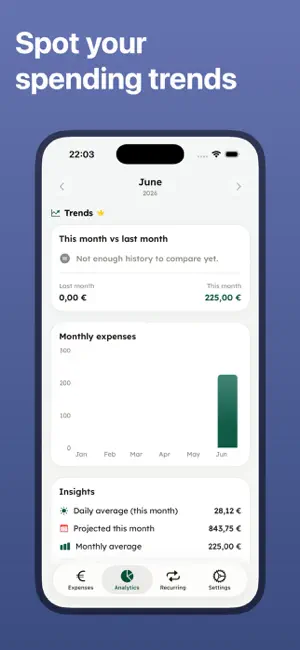
Smart Budget is the simplest way to track your spending, stick to a budget and finally understand where your money goes — now 100% ad-free. Log an expense in seconds, set a monthly budget, and see at a glance how much you have left to spend each day. WHY YOU'LL LOVE IT • No ads, ever — clean and distraction-free • Add expenses and income in seconds with a fast keypad • Monthly budget with a clear "left to spend" and daily allowance • Beautiful analytics: categories, charts and month-by-month trends • iCloud sync — your data on all your Apple devices, private and secure • Home Screen widgets to add and track on the go • Add an expense with Siri, from Control Centre or your Action Button • Lock Screen widgets with what's left to spend • Import your history from another app via CSV DO MORE WITH PRO • Spending trends: see if you're spending more than last month • Per-category budgets with smart alerts before you overspend • Multiple accounts (cash, card, bank) with separate balances • Scan receipts: snap a photo and the shop, date and amount are filled in for you • Smart notifications: daily reminders, recurring bills, weekly recap • Party Mode live on the Lock Screen, with split-the-bill and settle-up • Unlimited recurring transactions, CSV export and premium themes PRIVATE BY DESIGN Your financial data stays in your private iCloud account. We never see it. No tracking, no third-party ads. Try Pro free for 7 days, then keep it with a subscription or a one-time Lifetime purchase. Start today — your future self will thank you. ================================================================= LICENSED APPLICATION END USER LICENSE AGREEMENT https://www.apple.com/legal/internet-services/itunes/dev/stdeula/
What’s new
Version 2.1.0 · Updated September 2, 2026
Smart Budget now works without opening Smart Budget. • ASK SIRI — “Add an expense to Smart Budget” or “How much is left?” Expenses and your remaining budget now work from Siri, Spotlight and the Shortcuts app. • CONTROL CENTRE & ACTION BUTTON — add an expense in one press, from anywhere. • LOCK SCREEN WIDGETS — keep what's left to spend, and your daily allowance, right on the Lock Screen. • PARTY MODE GOES LIVE (Pro) — start an evening or a trip and the running total follows you on the Lock Screen and in the Dynamic Island. • SPLIT WITH FRIENDS (Pro) — add who's in, note who paid, and we work out who owes what with the fewest payments to settle up. Only your own share goes into your budget. • SMARTER RECEIPT SCANNING (Pro) — we now read the shop, the date and a suggested category too, not just the amount. Still entirely on your device. • IMPORT FROM CSV — coming from another app? Bring your history with you. Duplicates are skipped automatically. • REDESIGNED FOR iPAD — a real sidebar replaces the tab bar, so the whole screen is used. Also: faster expense entry and a pile of small fixes. Thanks for using Smart Budget — we read every review!
App privacy
The developer, Carlo Di Giuseppe, reported these privacy practices to Apple.
Data Not Collected
The developer does not collect any data from this app.
Alternatives to Smart Budget – Money Manager
Looking for apps like Smart Budget – Money Manager? Here are 6 similar apps on the App Store. The highest rated is Budget Flow - Money Tracker (5.0/5), and all 6 are free to download.
-
 MyFinances
-
 Budget Flow - Money Tracker
5.0
-
 My Budget Flow
5.0
-
 BudgetPlanning
-
 CashFlow Tracker Pro
-
 Moondane: Expense Tracker
| App | Rating | Price | Last updated | Compare |
|---|---|---|---|---|
| Smart Budget – Money Manager | – | Free | September 2, 2026 | |
| MyFinances | – | Free | Jun 6, 2026 | Compare |
| Budget Flow - Money Tracker | 5.0 / 5 (2) | Free | Aug 1, 2026 | Compare |
| My Budget Flow | 5.0 / 5 (1) | Free | Dec 5, 2025 | Compare |
| BudgetPlanning | – | Free | Feb 9, 2026 | Compare |
| CashFlow Tracker Pro | – | Free | Nov 19, 2024 | Compare |
| Moondane: Expense Tracker | – | Free | Oct 14, 2026 | Compare |