

QuantaTime
Talon Strike Software Productivity iPhoneiPadiPod touchApple Watch
QuantaTime is a free Productivity app for iPhone and iPad by Talon Strike Software. Requires iOS 18.0. Updated October 6, 2026.
- Price
- Free
- on the App Store
- Size
- 18 MB
- Age 4+
- Updated
- Oct 6
- 2026 · v1.1.3
Screenshots



About QuantaTime
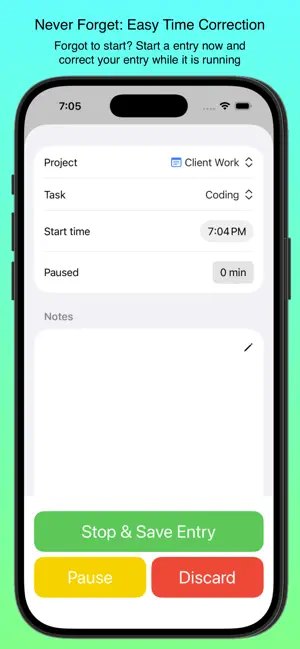
QuantaTime: Your Private, Powerful Time Manager Tired of complex, data-hungry time trackers? QuantaTime is the intuitive, privacy-first app designed to give you true insight into how you spend your day. Built by a professional for professionals, QuantaTime solves the problem of complicated apps and questionable data practices. Core Features for Effortless Tracking: - Projects & Tasks: Log your time with precision by tracking activities across custom Projects and the Tasks within them. - Quick Entry Cards: The Home screen features Entry Cards for project/task combinations you use often, allowing you to start tracking with a single tap. - iOS & watchOS Support: Track your time seamlessly on your iPhone and directly from your Apple Watch. - Complete Data Privacy: No account setup is required. Your data is stored securely on your device and in your personal iCloud account, never on third-party servers. Focus on Accountability & Accuracy: - Accountable Time: Mark projects as Accountable to filter your reporting and easily focus on hitting your work goals. - Time Correction Tools: If you forget to start or stop a task, easily edit the start or end time of any entry, even while it's running. - Detailed Views: Review your entries with dedicated screens for Today, This Week, and a full History view grouped by week. Unlock True Insight with QuantaTime Pro: - Upgrade to QuantaTime Pro to unlock the app’s full potential and turn your data into action: - Advanced Analytics: Access the Charts view to visualize your time usage by Week, Month, or Day, helping you spot trends and manage productivity. - Unlimited Tracking: Create an unlimited number of active Projects and Tasks to track every part of your day without restriction. - Secure Data Exports: Confidently generate and share PDF and CSV exports of your logged entries for billing, historical records, or deep-dive analysis in a spreadsheet. Stop guessing where your time goes. Download QuantaTime today and start managing your most valuable resource with power, simplicity, and privacy. Terms and conditions: https://www.apple.com/legal/internet-services/itunes/dev/stdeula/
What’s new
Version 1.1.3 · Updated October 6, 2026
General Changes: - Added a view version of the export page so you can see a quick glance of filtered entries without having to generate a report and view it in files - Added an overlay at the bottom of the main screen to avoid accidental task changes when exiting the app or using your device - Reworked how overlapping entries are indicated and saving of them - Reworked how notes are edited to provide more room for entry and to ensure accidentally opening the notes editor doesn't happen - Added the ability to show time, and particularly total times in decimals instead of seconds. This helps when your time accounting system wants you to enter time in decimal fractions of an hour as it is directly calculated. - Added an animation when a task is running to make it more clear a task is running - Reworked the lock screen widgets to show current accumulated time IPad Changes: - Now has four cards per row on home screen - Better layout on several screens - "Recent Tasks" limit is increased to 24 New Settings: - Show close button on dialogs: indicate if you want an explicit close button shown on dialogs - Show close button on right side: indicate where the close button should be shown (if enabled) - Show partial hours in decimals: indicate whether time should be shown in hours and minutes or hours and fractions of hours - where apprpriate - Allow saving overlapping entries: you can now indicate if you want the system to allow saving entries that overlap previously saved entries Bugs fixed: - Onboarding now disables the active option when creating the first project and task - I mean why would the first one of either of these be inactive - Fixed a color picker bug on tasks where before it would work, but the component didn't look like you had actually chosen a color until you saved it and came back. - Fixed issue when changing theme, tap actions only registered if the image or description was tapped - Some UI elements were not honoring theme changes immediately - Fixed issue with initial sizing when iPad was in landscape - Fixed issue where day charts did not immediately pick up date change
App privacy
The developer, Talon Strike Software, reported these privacy practices to Apple.
Data Not Linked to You
The following data, which may be collected but is not linked to your identity, may be used for the following purposes:
- Purchases: Purchase History
Used for: Analytics, App Functionality
Alternatives to QuantaTime
Looking for apps like QuantaTime? Here are 6 similar apps on the App Store. The highest rated is Goal Tracker: Track Progress (4.7/5), and all 6 are free to download.
-
 Fern QR
-
 World Clock - Time Calculator
-
 VoluMate: Volume Manager
-
 CallTime: Call Sheets & Pay
3.6
CallTime: Call Sheets & Pay
3.6
-
 Specops Fingerprint
3.2
Specops Fingerprint
3.2
-
 Goal Tracker: Track Progress
4.7
Goal Tracker: Track Progress
4.7
| App | Rating | Price | Last updated | Compare |
|---|---|---|---|---|
| QuantaTime | – | Free | October 6, 2026 | |
| Fern QR | – | Free | Nov 6, 2025 | Compare |
| World Clock - Time Calculator | – | Free | Dec 22, 2024 | Compare |
| VoluMate: Volume Manager | – | Free | May 11, 2026 | Compare |
| CallTime: Call Sheets & Pay | 3.6 / 5 (7) | Free | Oct 20, 2026 | Compare |
| Specops Fingerprint | 3.2 / 5 (5) | Free | Jan 22, 2024 | Compare |
| Goal Tracker: Track Progress | 4.7 / 5 (30) | Free | Sep 12, 2025 | Compare |
Compare QuantaTime with the top alternatives: ratings, updates, ASO score and keyword gaps →