

XovaPDF: Scanner & Editor
Hakan GOLGE Productivity iPhoneiPadiPod touch
XovaPDF: Scanner & Editor is a free Productivity app for iPhone and iPad by Hakan GOLGE. Requires iOS 16. Updated May 5, 2026.
- Price
- Free
- on the App Store
- Size
- 88 MB
- Age 4+
- Updated
- May 5
- 2026 · v1.1.0
Screenshots

About XovaPDF: Scanner & Editor
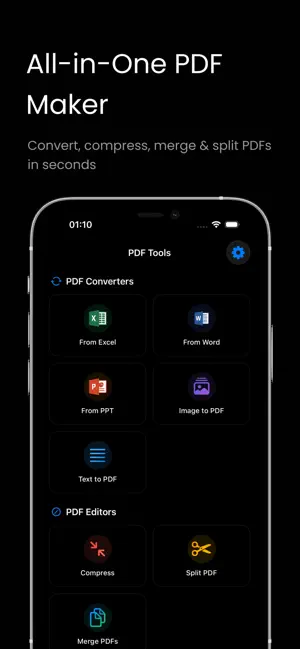
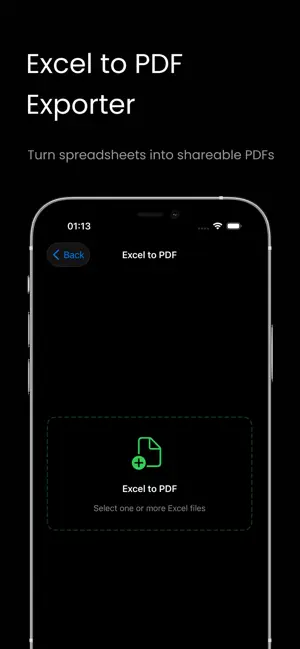
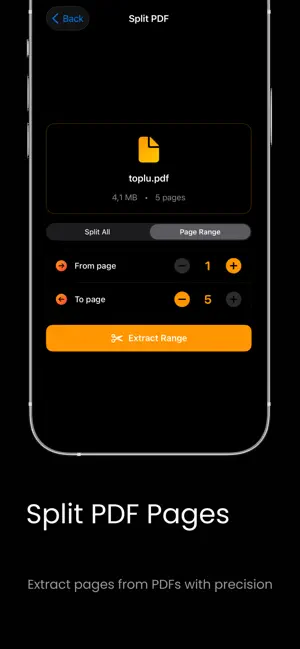
XOVAPDF — document scanner & PDF studio for iPhone Turn paper documents into searchable PDFs in seconds. Convert Office files, photos and text into clean, shareable PDFs. Then compress, split, merge, watermark or password-protect them. All in one app, fully offline. WHY XOVAPDF? • 12+ professional tools in one app — no need to juggle a separate scanner, converter and editor • OCR makes every scan searchable — find and copy text inside your PDFs • 100% offline — your documents never leave your device • Ad-free, clean, fast interface • Full English and Turkish support DOCUMENT SCANNING & OCR • Smart Scanner — Capture receipts, contracts, notebook pages and forms with auto edge detection • OCR (Optical Character Recognition) — Turn every scan into a searchable PDF; search and copy text inside • Manual Edge Adjust — Fine-tune crop corners with your finger when auto-detection isn't enough • Multi-page Mode — Scan as many pages as you need into one PDF • Split Mode — Export each scanned page as its own PDF • Automatic perspective correction — even pages shot at an angle look straight CONVERT TO PDF • Image to PDF — Turn one or many photos into a single PDF • Text to PDF — Make a PDF from any typed text • Word to PDF — Convert .doc / .docx with fonts and layout preserved • Excel to PDF — Convert .xls / .xlsx spreadsheets to PDF • PowerPoint to PDF — Convert .ppt / .pptx presentations to PDF EDIT & PROTECT • Compress PDF — Shrink file size without losing quality; no more PDFs that won't fit in an email • Split PDF — Pull out specific pages from any PDF • Merge PDFs — Combine multiple PDFs in any order into a single file • Watermark PDF — Stamp pages with "Confidential", "Draft" or your own custom text • Password Protect — Lock sensitive PDFs behind a password • PDF to Image — Export pages as high-resolution JPG or PNG WHO USES XOVAPDF? • Students — Scan lecture notes and book pages into a searchable archive • Freelancers — Keep contracts, invoices and receipts in one place • Professionals — Send Word and Excel reports as PDFs in seconds • Parents — Digitize homework, medical records and school forms • Anyone — Safely store ID, license and registration scans PRIVACY Your documents are yours. XovaPDF runs every conversion and edit on your device — receipts, IDs and contracts you scan never leave the phone. You don't even need an internet connection. KEY FEATURES • Refreshed red & black theme with an intuitive interface • Works fully offline — no internet required • Share PDFs to WhatsApp, email, Telegram or any other app • Save directly to the Files app or iCloud Drive • Open With handler — call XovaPDF from other apps to convert files FREE & PREMIUM Free: • Text to PDF • Image to PDF • PDF to Image Premium (free trial included): • Document Scanner with OCR • Word / Excel / PowerPoint → PDF • PDF compress, split and merge • Watermark and password protect • Ad-free experience • Unlimited PDF creation • Priority access to new features SUPPORT Need help? Drop us a line — we get back fast. Download XovaPDF now and turn every paper, photo and Office file into a perfect PDF. One app, every PDF need.
What’s new
Version 1.1.0 · Updated May 5, 2026
What's new in 1.1.0 • Document Scanner with OCR — scan papers into searchable PDFs • Manual edge adjustment for any image source • Split mode — export one PDF per scanned page • Watermark PDFs with custom text • Password-protect any PDF • PDF to Image export (JPG / PNG) • Refreshed look with a new red & black theme • Faster launch with a new branded splash screen • Plenty of small UX polish across every tool
App privacy
The developer, Hakan GOLGE, reported these privacy practices to Apple.
Data Not Collected
The developer does not collect any data from this app.
Alternatives to XovaPDF: Scanner & Editor
Looking for apps like XovaPDF: Scanner & Editor? Here are 6 similar apps on the App Store.
-
 Splitter | Multi Screen
-
 Onsio - Privacy First AI
-
 Photo to PDF: Scanner
-
 SimaFin
-
 PDF Converter - PDF Scanner.
-
 NGIE: Gaming AI Assistant
| App | Rating | Price | Last updated | Compare |
|---|---|---|---|---|
| XovaPDF: Scanner & Editor | – | Free | May 5, 2026 | |
| Splitter | Multi Screen | – | 0.99 USD | Feb 27, 2024 | Compare |
| Onsio - Privacy First AI | – | Free | May 9, 2025 | Compare |
| Photo to PDF: Scanner | – | Free | Jul 7, 2026 | Compare |
| SimaFin | – | Free | Sep 1, 2026 | Compare |
| PDF Converter - PDF Scanner. | – | Free | Jan 20, 2026 | Compare |
| NGIE: Gaming AI Assistant | – | Free | Sep 28, 2026 | Compare |