

Nocast: Weekly Planner & To-Do
DEMIR BAYDEMIR Productivity iPhoneiPadiPod touch
Nocast: Weekly Planner & To-Do is a free Productivity app for iPhone and iPad by DEMIR BAYDEMIR. Requires iOS 15.1. Updated October 26, 2026.
- Price
- Free
- on the App Store
- Size
- 38 MB
- Age 4+
- Updated
- Oct 26
- 2026 · v1.3.0
Screenshots


About Nocast: Weekly Planner & To-Do
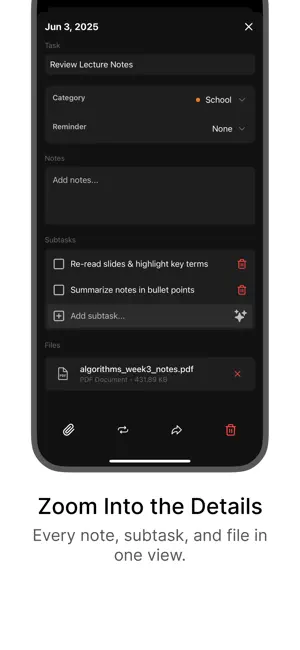
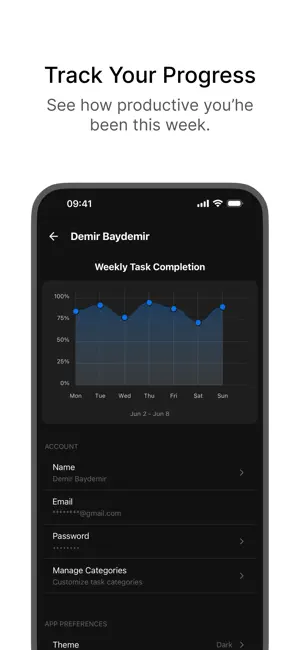
Nocast is a calm weekly planner. See your whole week on one screen, focus on today, and see where your time went. No ads, no subscriptions. PLAN YOUR WEEK • Every day of the week side by side, plus Someday for things without a date • Add tasks right into the day they belong to • Press and hold to reorder, or move a task to another day in a tap FOCUS ON TODAY • Today shows just today's tasks, nothing else • Overdue keeps unfinished tasks from the past days in view, ready to move to today • Tick tasks off and watch the day come together EVERYTHING A TASK NEEDS • Notes, subtasks and files • Reminders at the time you choose • Repeat daily, weekly, monthly or yearly • Categories with your own names and colors SEE YOUR PROGRESS • A weekly chart of done versus planned • Where your week went, category by category • Look back at earlier weeks WIDGETS • Today: your tasks on the Home Screen • Progress: this week's chart at a glance • Day Progress: how much of your day is left GENTLE REMINDERS • Task reminders, plus an optional morning overview and evening review • At most two check-ins a day, only when there's something left to do ALWAYS WITH YOU • Works offline and syncs when you're back online • Your tasks across your devices • Light and dark mode • Sign in with Apple, Google or email Plan your week, one day at a time.
What’s new
Version 1.3.0 · Updated October 26, 2026
A big update to Nocast: • New tabs: Today, Week, Progress and Search • Overdue: unfinished tasks from the past days, ready to move to today • Progress by category, and earlier weeks • Light mode • New Progress widget, and a refreshed Today widget • Morning overview and evening review check-ins (change them in Profile › Notifications) • Works offline: changes sync when you're back online • A short welcome to help you get started
App privacy
The developer, DEMIR BAYDEMIR, reported these privacy practices to Apple.
Data Linked to You
The following data, which may be collected and linked to your identity, may be used for the following purposes:
- Contact Info: Email Address
- Identifiers: User ID, Device ID
- Usage Data: Product Interaction, Other Usage Data
Used for: Analytics, Product Personalization, App Functionality
Data Not Linked to You
The following data, which may be collected but is not linked to your identity, may be used for the following purposes:
- Diagnostics: Crash Data, Performance Data
Used for: Analytics, App Functionality
Alternatives to Nocast: Weekly Planner & To-Do
Looking for apps like Nocast: Weekly Planner & To-Do? Here are 6 similar apps on the App Store. The highest rated is NimbleDay: Task & Goal Planner (4.3/5), and 4 of the 6 are free to download.
-
 Lucid: Second Brain
-
 Pravah: Focus Timer
-
 UnProductive
-
 NimbleDay: Task & Goal Planner
4.3
-
 Tri Clipper
-
 Calendio
| App | Rating | Price | Last updated | Compare |
|---|---|---|---|---|
| Nocast: Weekly Planner & To-Do | – | Free | October 26, 2026 | |
| Lucid: Second Brain | – | Free | Jun 25, 2026 | Compare |
| Pravah: Focus Timer | – | Free | Mar 16, 2026 | Compare |
| UnProductive | – | 0.99 USD | Feb 18, 2026 | Compare |
| NimbleDay: Task & Goal Planner | 4.3 / 5 (3) | Free | Apr 1, 2026 | Compare |
| Tri Clipper | – | 1.99 USD | Oct 16, 2026 | Compare |
| Calendio | – | Free | Nov 7, 2023 | Compare |