

My Documents: Digital Storage
Alexander Senin Productivity iPhoneiPadiPod touch
My Documents: Digital Storage is a free Productivity app for iPhone and iPad by Alexander Senin. Rated 2.5/5 from 2 ratings. Requires iOS 17.0.
- Rating
- 2.5
- 2 ratings
- Price
- Free
- on the App Store
- Size
- 4 MB
- Age 4+
- Updated
- Oct 23
- 2026 · v1.2
Screenshots
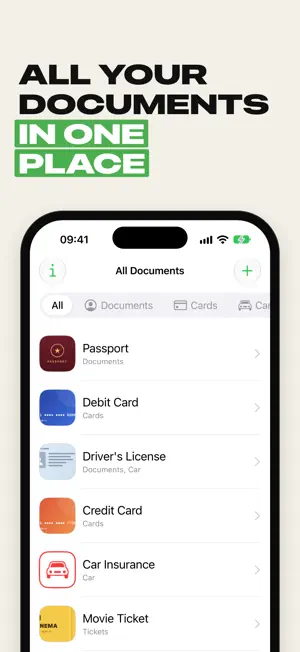
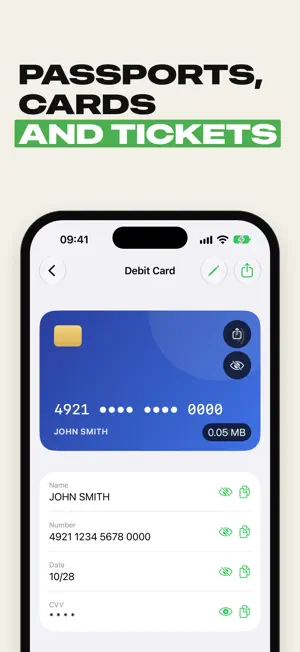
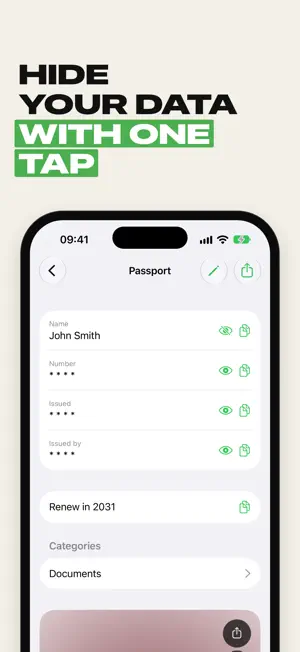
About My Documents: Digital Storage
My Documents keeps your passport, ID card, driver's license, bank cards and other important papers in one place on your iPhone — with the numbers and photos you need, whenever you need them. Create a document, add the fields you want (number, issue date, issued by, expiry date, CVV, anything else) and attach photos straight from the camera or your library. Everything is sorted into categories, so the right document is always two taps away. WHAT YOU CAN DO • Store passports, IDs, driver's licenses, insurance policies, bank cards, Wi-Fi passwords and any other data • Custom fields: add, rename and reorder fields for each document • Photos of documents from the camera or the photo library, with zoom • Hide sensitive values: card numbers, CVV codes and passwords stay masked until you tap the eye • Categories with your own colors and icons • Quick search across all documents • Share a document's details or photo in one tap • iCloud sync: your documents are on all your devices and safe if you change your phone • Works on iPhone, iPad and iPhone Duo No more digging through your camera roll at the bank, the airport or the doctor's office: all your documents are always at hand. FULL VERSION My Documents is free for up to 3 documents. The full version unlocks unlimited documents and categories: choose a monthly or yearly subscription, or buy it once and keep it forever. Subscriptions renew automatically unless cancelled at least 24 hours before the end of the current period. Payment is charged to your Apple Account. You can manage or cancel your subscription in your App Store account settings. Terms of Use: https://www.apple.com/legal/internet-services/itunes/dev/stdeula/ Privacy Policy: https://appbysnap.tilda.ws/privacypolice
What’s new
Version 1.2 · Updated October 23, 2026
• Fresh design for the latest iOS • On iPad and the unfolded iPhone Duo the list and the document now stand side by side • Faster opening of documents with photos • New full version plans: monthly, yearly or a one-time lifetime purchase. If you already bought the full version, it stays with you • Bug fixes and improvements
App privacy
The developer, Alexander Senin, reported these privacy practices to Apple.
Data Not Collected
The developer does not collect any data from this app.
Alternatives to My Documents: Digital Storage
Looking for apps like My Documents: Digital Storage? Here are 6 similar apps on the App Store. The highest rated is Pocket Docs - Document Storage (5.0/5), and all 6 are free to download.
-
 Digital Document Organizer
4.9
Digital Document Organizer
4.9
-
 Pocket Docs - Document Storage
5.0
Pocket Docs - Document Storage
5.0
-
 All Documents
3.8
All Documents
3.8
-
 Folio: Digital Wallet App
4.7
Folio: Digital Wallet App
4.7
-
 Files - File Manager & Browser
4.7
Files - File Manager & Browser
4.7
-
 Craft: Notes, Documents, AI
4.8
Craft: Notes, Documents, AI
4.8
| App | Rating | Price | Last updated | Compare |
|---|---|---|---|---|
| My Documents: Digital Storage | 2.5 / 5 (2 ratings) | Free | October 23, 2026 | |
| Digital Document Organizer | 4.9 / 5 (9) | Free | Jan 9, 2025 | Compare |
| Pocket Docs - Document Storage | 5.0 / 5 (40) | Free | Aug 1, 2024 | Compare |
| All Documents | 3.8 / 5 (8) | Free | Sep 30, 2026 | Compare |
| Folio: Digital Wallet App | 4.7 / 5 (6,922) | Free | Jun 23, 2026 | Compare |
| Files - File Manager & Browser | 4.7 / 5 (12,579) | Free | May 6, 2026 | Compare |
| Craft: Notes, Documents, AI | 4.8 / 5 (6,631) | Free | Oct 10, 2026 | Compare |