

Optimoz AI - Agents & More
Optimoz, Inc. Productivity iPhoneiPadiPod touch
Optimoz AI - Agents & More is a free Productivity app for iPhone and iPad by Optimoz, Inc. Rated 5.0/5 from 3 ratings. Requires iOS 16.4.
- Rating
- 5.0
- 3 ratings
- Price
- Free
- on the App Store
- Size
- 49 MB
- Age 4+
- Updated
- Oct 17
- 2026 · v1.0.3
Screenshots

About Optimoz AI - Agents & More
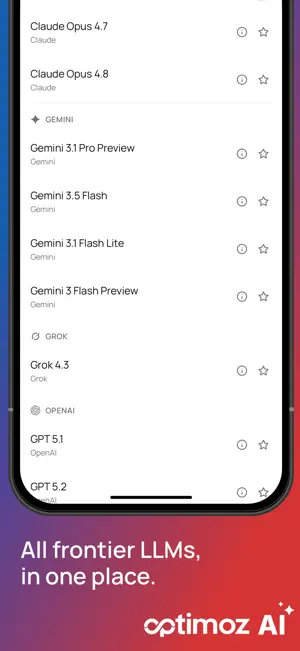
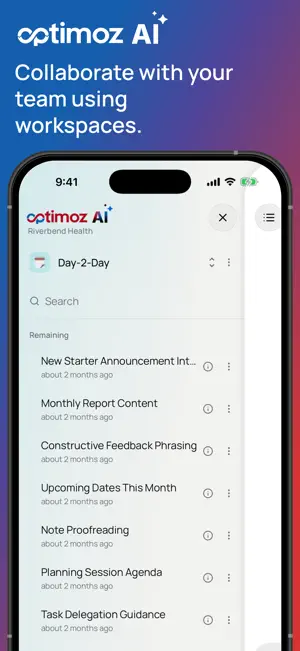
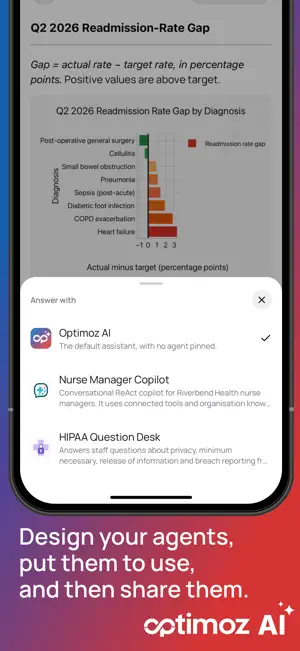
Optimoz AI brings your organization's assistant to your phone. Sign in with your work account and you are in the same workspaces, chats and files you use on the web - carried on mid-conversation rather than started again. ONE CHAT, EVERY MODEL YOUR ORGANIZATION ALLOWS Pick the model a question deserves and switch whenever you like. Star the one you reach for most and it is there next time, on the phone and on the web. THE AGENTS YOUR TEAM BUILT Answer with one of your published agents instead of the default assistant. They run the same way they do on the web, with their steps shown as they work, and they can stop to ask you something - a form arrives in the chat, you answer it, and the run picks up where it left off. YOUR FILES, IN THE ANSWER Upload documents, photos or a shot from the camera and ask about them. Answers cite what they drew on, and the quoted passage is a tap away, so you can check an answer instead of trusting it. Organize as you go: folders, favourites, and a move that takes a whole selection at once. WORKSPACES, PERSONAL AND SHARED Keep client work, internal work and your own notes apart. Team workspaces bring the team's files and context with them, and the chats you start there are visible to the people who share them. PROMPTS YOU HAVE ALREADY WRITTEN Your saved prompt templates open as a short form: fill in the blanks, send, and the conversation shows the prompt as you wrote it rather than a wall of text. INCOGNITO A conversation that is never saved. Nothing is written to your history, and it ends the moment you leave it - for the question you want answered but not kept. SPEAK AND LISTEN Dictate a message instead of typing it, transcribed on the device as you talk. Have an answer read aloud and keep listening with the screen locked. BUILT FOR THE WAY YOU ACTUALLY WORK Search your chats, pin the ones you keep coming back to, rename them, and pick up any of them on the web. Light and dark. Sign in with a password or your company's single sign-on. Optimoz AI is an account-based product: you need an Optimoz AI account with your organization to sign in. Talk to your administrator, or reach us at [email protected].
What’s new
Version 1.0.3 · Updated October 17, 2026
Notes you can write by hand On iPad, a note is now a pad of paper. Write with an Apple Pencil or a stylus — pressure-sensitive, with palm rejection, so you can rest your hand on the screen. Choose plain, ruled, grid or dotted paper, add pages wherever you need them, and jump between them from a thumbnail strip. There’s a pen in three widths, a highlighter, six ink colours and a colour wheel for the rest, erasers that take a tip’s worth or a whole stroke, and undo and redo throughout. A finger scrolls the page; the stylus writes on it. Place photos on a page and write over them — move, resize, rotate, crop. Useful for a printed form, a screenshot, or a photo of a whiteboard. Handwriting is saved as a real document, so you can ask questions about it the way you would about anything else you upload. A diagram, a worked calculation, a page of a notebook. Notes you type Type or paste text straight into a note and ask about it, without needing a file to upload first. Now with a live word count, undo and redo, and a summary after a long paste telling you how much went in. Unfinished notes are kept as drafts on your device, listed in the editor and at the top of the Files panel. Nothing leaves your phone until you upload it. Files and chats A file’s upload status now updates on its own — no more pulling the list down to find out it finished a minute ago. PDFs have their own icon. The sessions and files lists are tighter, so more fits on screen, and chat titles line up with the headings above them. Reopening a conversation brings back the model you were using in it, rather than resetting to your starred one. Smaller things The app opens again on iOS 27. Buttons on the chat page give a light tap when pressed. Opening a panel while typing puts the keyboard away instead of leaving it behind the panel. On iPad, turning the device keeps your panels, your menus and your place in a note where they were. And the app no longer asks for access to your photo library — the system picker is used instead, so nothing is shared beyond the file you pick.
App privacy
The developer, Optimoz, Inc., reported these privacy practices to Apple.
Data Linked to You
The following data, which may be collected and linked to your identity, may be used for the following purposes:
- Contact Info: Email Address, Name
- User Content: Photos or Videos, Audio Data, Other User Content
- Identifiers: User ID, Device ID
Used for: App Functionality
Alternatives to Optimoz AI - Agents & More
Looking for apps like Optimoz AI - Agents & More? Here are 6 similar apps on the App Store. The highest rated is Kanvly: AI Workspace & Tasks (5.0/5), and all 6 are free to download.
-
 Kanvly: AI Workspace & Tasks
5.0
Kanvly: AI Workspace & Tasks
5.0
-
 Noemi AI
-
 Dolos AI
-
 Nexora - AI Model Router
3.5
Nexora - AI Model Router
3.5
-
 Wrist AI Chat
-
 Kiri - Private offline AI App
| App | Rating | Price | Last updated | Compare |
|---|---|---|---|---|
| Optimoz AI - Agents & More | 5.0 / 5 (3 ratings) | Free | October 17, 2026 | |
| Kanvly: AI Workspace & Tasks | 5.0 / 5 (1) | Free | Jul 13, 2026 | Compare |
| Noemi AI | – | Free | Oct 7, 2026 | Compare |
| Dolos AI | – | Free | Mar 15, 2026 | Compare |
| Nexora - AI Model Router | 3.5 / 5 (2) | Free | Sep 22, 2026 | Compare |
| Wrist AI Chat | – | Free | Oct 11, 2026 | Compare |
| Kiri - Private offline AI App | – | Free | Oct 18, 2026 | Compare |