

myPefy: Web to PDF
Pardeep Kumar Productivity iPhoneiPadiPod touch
myPefy: Web to PDF is a free Productivity app for iPhone and iPad by Pardeep Kumar. Requires iOS 16.0. Updated April 4, 2026.
- Price
- Free
- on the App Store
- Size
- 7 MB
- Age 4+
- Updated
- Apr 4
- 2026 · v1.0.3
Screenshots


About myPefy: Web to PDF
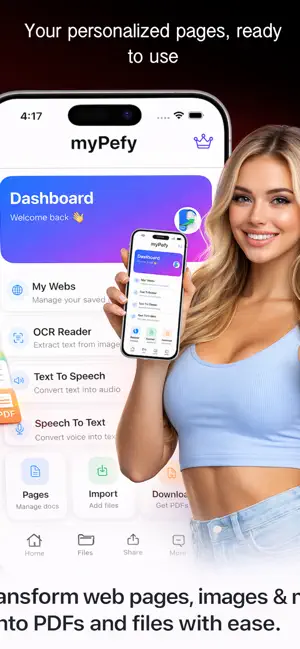
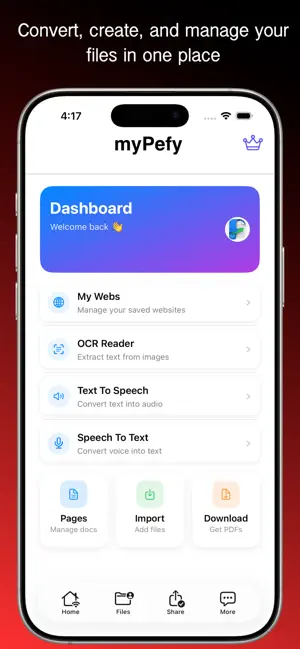
myPefy: Web to PDF Converter & Document Manager Convert web pages to PDF, manage documents, and boost your productivity with myPefy – the ultimate all-in-one PDF converter and document manager for iOS. Easily save webpages, extract text, create documents, and work hands-free with powerful smart tools. myPefy is designed for students, professionals, and everyday users who want a fast, reliable, and simple way to handle PDFs and documents on their iPhone or iPad. Key Features Web to PDF Converter Convert any webpage, URL, or HTML content into high-quality PDF files instantly. Save articles, blogs, and web content for offline reading. Text to PDF and TXT Converter Turn plain text or notes into organized PDF or TXT files for easy sharing and storage. OCR Text Scanner Extract text from images, scanned documents, or photos using advanced OCR technology. Perfect for digitizing printed content. Text to Speech (TTS) Listen to documents, articles, or PDFs with natural voice output. Ideal for multitasking and accessibility. Speech to Text Convert your voice into written text in real time. Create notes, documents, or content hands-free. PDF Downloader Download and save PDF files directly to your device for offline access anytime. Document Viewer and Manager Organize, view, and manage all your PDF files in one place. Quickly open, edit, and share documents. File Sharing Share PDFs and documents easily via apps, email, or cloud services. Custom Search Engines Add and use your favorite search engines directly from the app for faster browsing. Save Custom Websites Bookmark frequently visited websites and access them instantly from your dashboard. Why Choose myPefy Fast and efficient PDF conversion Simple and user-friendly interface All-in-one document management solution Powerful OCR and voice tools Perfect for work, study, and daily use Who Can Use myPefy Students saving study material and notes Professionals managing documents and reports Content readers who want offline access Anyone needing a reliable PDF converter and document tool Download myPefy: Web to PDF Converter and take full control of your documents, PDFs, and productivity today.
What’s new
Version 1.0.3 · Updated April 4, 2026
All-new redesigned user interface for a modern experience. Faster performance and smoother workflow. Bug fixes and overall improvements.
App privacy
The developer, Pardeep Kumar, reported these privacy practices to Apple.
Data Used to Track You
The following data may be used to track you across apps and websites owned by other companies:
- Usage Data: Advertising Data
Data Not Linked to You
The following data, which may be collected but is not linked to your identity, may be used for the following purposes:
- Usage Data: Advertising Data
- Identifiers: Device ID
Used for: Third-Party Advertising, App Functionality
Alternatives to myPefy: Web to PDF
Looking for apps like myPefy: Web to PDF? Here are 6 similar apps on the App Store. The highest rated is Cluster AI: Ask, Work, Build (5.0/5), and all 6 are free to download.
-
 Web to PDF Converter Pro
2.0
Web to PDF Converter Pro
2.0
-
 Web to PDF: Converter & Reader
-
 Html to PDF Converter Plus
-
 Cluster AI: Ask, Work, Build
5.0
Cluster AI: Ask, Work, Build
5.0
-
 Du-It - Reminders
-
 ZenTrack: Habit & Life Tracker
| App | Rating | Price | Last updated | Compare |
|---|---|---|---|---|
| myPefy: Web to PDF | – | Free | April 4, 2026 | |
| Web to PDF Converter Pro | 2.0 / 5 (1) | Free | Aug 28, 2024 | Compare |
| Web to PDF: Converter & Reader | – | Free | Oct 31, 2026 | Compare |
| Html to PDF Converter Plus | – | Free | May 8, 2026 | Compare |
| Cluster AI: Ask, Work, Build | 5.0 / 5 (6) | Free | Oct 30, 2026 | Compare |
| Du-It - Reminders | – | Free | Aug 10, 2026 | Compare |
| ZenTrack: Habit & Life Tracker | – | Free | Aug 11, 2026 | Compare |
Compare myPefy: Web to PDF with the top alternatives: ratings, updates, ASO score and keyword gaps →