

Hearem TTS: Text Read Aloud
SHARCOTECH LIMITED Utilities iPhoneiPadiPod touch
Hearem TTS: Text Read Aloud is a free Utilities app for iPhone and iPad by SHARCOTECH LIMITED. Rated 5.0/5 from 2 ratings. Requires iOS 16.0.
- Rating
- 5.0
- 2 ratings
- Price
- Free
- on the App Store
- Size
- 87 MB
- Age 4+
- Updated
- Oct 12
- 2026 · v2.11.4
Screenshots


About Hearem TTS: Text Read Aloud
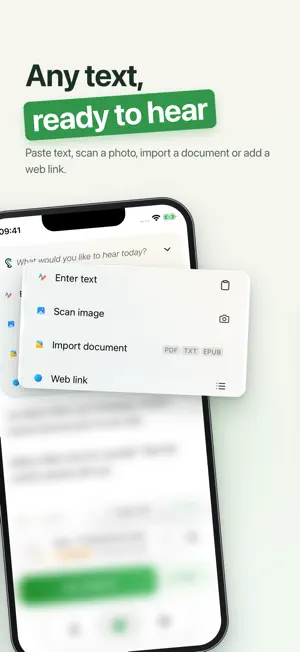
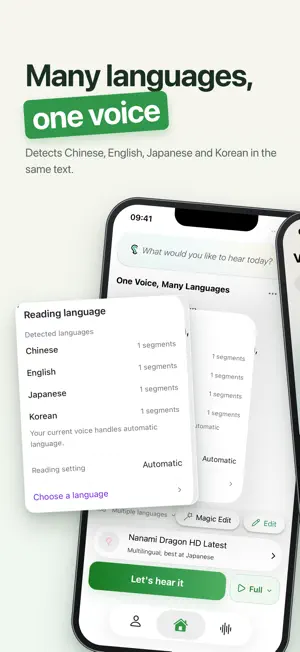
Turn anything you want to read into audio you can take with you. Bring in study notes, novels, web articles, meeting notes, PDFs, ebooks, or a photo of a page. Pick a natural voice, press play, and keep listening while you walk, commute, cook, or rest your eyes. LISTEN RIGHT AWAY ▶ Live Reading Start listening while audio is still being generated. Long texts play in segments and save to History automatically. ▶ Natural Text-to-Speech Natural voices across many languages and accents, with uninterrupted background and lock-screen playback. ▶ Free Apple Voices Use Apple's built-in voices free and without limits. They run on your device and use no premium characters. BRING IN ANY TEXT ▶ Documents: import PDF, EPUB, Word (DOC/DOCX), TXT, Markdown, and RTF files. ▶ Web Articles: paste a link, or let Hearem detect one on your clipboard, and it extracts the main article. ▶ Photos & Scans: recognize text from the camera or photos, with cleaned-up formatting ready to play. ▶ Paste or Type: drop in any text directly. VOICES THAT FIT YOU ▶ Premium Voice Library: browse and compare voices from several leading voice services in one place. ▶ Voice Cloning: create a voice from a short audio sample, compare two versions, and keep your favorite. Only clone your own voice or one you have clear permission to use. ▶ Fine Controls: adjust emotion, pitch, and volume for premium, custom, and cloned voices. ▶ My Voices: keep custom voices, cloned voices, and favorites together. SHAPE LONG TEXT ▶ Magic Editor: translate, summarize, and split long text into clean segments before playback. ▶ Translate & Listen: hear content in another language, great for language learning and travel. ▶ Smart Summary: hear the main points first, then decide whether to listen to the full text. ▶ Language Detection: Hearem detects the language automatically, and you can set it manually anytime. LISTEN YOUR WAY ▶ Playback speed from 0.5x to 2x, with finer steps when you need precise control. ▶ History with progress tracking, so you pick up exactly where you left off. ▶ Export audio to keep or share. ▶ Clean, ad-free design. No tutorial needed. PRIVACY Local-first where possible. Apple voices and image text recognition can run on your device. Online voices and features only send the content needed to the service you choose. GOOD FOR • Students: textbooks, research papers, exam prep, and language learning • Professionals: reports, meeting notes, and long emails on the go • Creators: draft voiceovers and consistent branded voices • Eye strain & reading difficulties: listen instead of reading, in a voice that's comfortable to hear • Multitaskers: listen while exercising, driving, cooking, or doing chores PRICING & SUBSCRIPTION Hearem offers a free version and a premium subscription. Details: https://hearem.cc/pricing Terms of Service: https://hearem.cc/terms-of-service Privacy Policy: https://hearem.cc/privacy-policy CONTACT • Website: https://hearem.cc • Email: [email protected] Less screen. More room.
What’s new
Version 2.11.4 · Updated October 12, 2026
- Added Live reading: start listening while audio is being generated, with support for long texts and automatic saving to History. - Compare two versions of your cloned voice, preview both, and save your favorite. - Added phone number sign-up and sign-in. - Added finer playback speed adjustments. Press and hold the speed button during Live reading to open the speed picker. - Improved formatting for text scanned from images and long-text processing, with language detection details and manual language selection. - Refreshed the voice library, player, and account screens, with improved Liquid Glass styling on iOS 26. - Fixed voice library scrolling, custom-text previews, and voice changes in History. Improved audio export and purchase restoration. - Reduced unnecessary background activity and improved performance and stability.
App privacy
The developer, SHARCOTECH LIMITED, reported these privacy practices to Apple.
Data Linked to You
The following data, which may be collected and linked to your identity, may be used for the following purposes:
- Contact Info: Email Address
- Purchases: Purchase History
- User Content: Other User Content
- Identifiers: User ID
- Usage Data: Product Interaction
Used for: Product Personalization, App Functionality
Data Not Linked to You
The following data, which may be collected but is not linked to your identity, may be used for the following purposes:
- Diagnostics: Crash Data, Performance Data, Other Diagnostic Data
Used for: App Functionality
Alternatives to Hearem TTS: Text Read Aloud
Looking for apps like Hearem TTS: Text Read Aloud? Here are 6 similar apps on the App Store. The highest rated is Voicer: AI Voice Clone & TTS (5.0/5), and all 6 are free to download.
-
 子衿听书-TXT,PDF,EPUB电子书AI配音阅读神器
-
 Natural Aloud Reader (TTS)
-
 Text to speech⁺
4.6
Text to speech⁺
4.6
-
 Voicer: AI Voice Clone & TTS
5.0
Voicer: AI Voice Clone & TTS
5.0
-
 Text to Speech - TTS Reader
4.3
Text to Speech - TTS Reader
4.3
-
 Read To Me - TTS Reader
4.2
Read To Me - TTS Reader
4.2
| App | Rating | Price | Last updated | Compare |
|---|---|---|---|---|
| Hearem TTS: Text Read Aloud | 5.0 / 5 (2 ratings) | Free | October 12, 2026 | |
| 子衿听书-TXT,PDF,EPUB电子书AI配音阅读神器 | – | Free | Sep 15, 2026 | Compare |
| Natural Aloud Reader (TTS) | – | Free | Aug 7, 2024 | Compare |
| Text to speech⁺ | 4.6 / 5 (24) | Free | Sep 16, 2026 | Compare |
| Voicer: AI Voice Clone & TTS | 5.0 / 5 (1) | Free | Oct 13, 2026 | Compare |
| Text to Speech - TTS Reader | 4.3 / 5 (3) | Free | Jun 11, 2025 | Compare |
| Read To Me - TTS Reader | 4.2 / 5 (5) | Free | Jan 8, 2026 | Compare |