

Photo Editor Aesthetic Filters
wallace bezerra da silva Photo & Video iPhoneiPadiPod touch
Photo Editor Aesthetic Filters is a free Photo & Video app for iPhone and iPad by wallace bezerra da silva. Rated 5.0/5 from 1 ratings. Requires iOS 16.0.
- Rating
- 5.0
- 1 ratings
- Price
- Free
- on the App Store
- Size
- 131 MB
- Age 4+
- Updated
- Jul 3
- 2026 · v5.0.4
Screenshots


About Photo Editor Aesthetic Filters
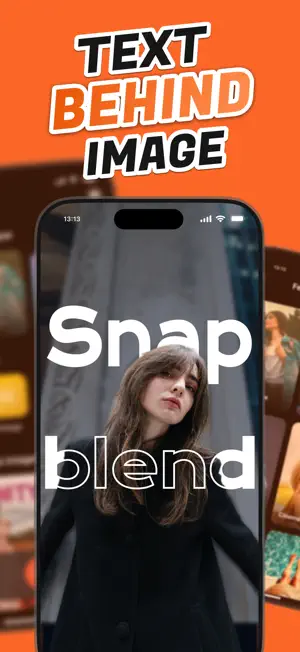
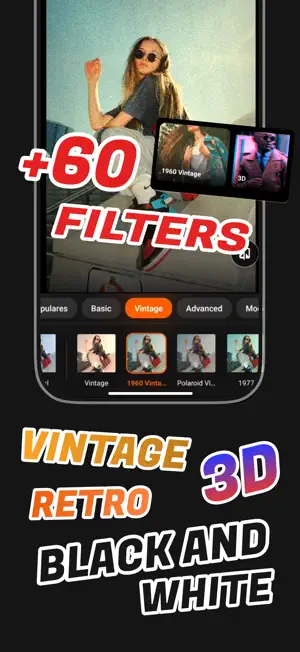
• SnapBlend – Put Your Text Behind Elements in Your Photo! SnapBlend is the ultimate photo editor for creating aesthetic art with style and creativity. Easily position text behind objects in your images, apply retro effects like VHS and Polaroid, and transform your photos into amazing posts for Instagram, TikTok, Pinterest, and much more! • Main Features of SnapBlend: • Text Behind the Image Precisely place text behind photo elements to create unique and professional effects. • Perfect Adjustment Use intuitive pinch gestures to resize and position text with complete control. • Customize Your Style Choose from a wide variety of fonts, colors, gradients, shadows, and outlines to make your art truly unique. • Smart Background Removal Quickly remove backgrounds to create layered and creative compositions. • Advanced Shader Filters Enhance your photos with high-quality filters using professional shader technology: – Vintage: Sepia tones, grain, and soft colors for an authentic retro look – Cinema: Cinematic scenes with anamorphic effect – Neo Tokyo: Futuristic cyberpunk vibe with vibrant colors – 3D Anaglyph: 3D effect with color channel separation • Exclusive VHS Mode – Bring back the nostalgia of VHS tapes with full nostalgic effects: – Multiple templates such as REC Camera, Side Date, Viewer, and Digital Camera – Flashing REC indicator with adjustable position – Customizable date/time formats – Color overlay and opacity control – Adjustable scan lines, noise, and glitches – Special fonts that mimic videocassette subtitles • Authentic Polaroid Mode Turn your photos into instant memories with: – Various templates including Classic, 2025, Metadata, Full, Wide, and Duo – Realistic and customizable borders – Gradual film texture effect – Optional date and metadata on borders – Intuitive gestures for positioning – Vintage finish for a perfect nostalgic look • Available in Multiple Languages SnapBlend supports users worldwide with multilingual accessibility. • Easy Sharing Save your creations in high quality or share directly on social media with one tap. • PRO Version Enjoy all features without limits or ads by unlocking the PRO version, or use it free with ads. • Want to Learn More? For tutorials, updates, and advanced editing tips, follow SnapBlend on social media: – Instagram: @snapblend.app – TikTok: @snapblend Terms of Use: https://www.apple.com/legal/internet-services/itunes/dev/stdeula/
What’s new
Version 5.0.4 · Updated July 3, 2026
bug fixes and improvements
App privacy
The developer, wallace bezerra da silva, reported these privacy practices to Apple.
Data Used to Track You
The following data may be used to track you across apps and websites owned by other companies:
- Usage Data: Advertising Data
Data Linked to You
The following data, which may be collected and linked to your identity, may be used for the following purposes:
- Financial Info: Payment Info
- Usage Data: Advertising Data
Used for: Third-Party Advertising
Alternatives to Photo Editor Aesthetic Filters
Looking for apps like Photo Editor Aesthetic Filters? Here are 6 similar apps on the App Store. The highest rated is Add Text to Video - TEXT+IMAGE (5.0/5), and all 6 are free to download.
-
 Add Text to Video - TEXT+IMAGE
5.0
-
 Picadd-Add Text On Photo Image
5.0
-
 Text Behind Image - Tebi
4.6
-
 Digicam: Photo Editor, Filters
5.0
-
 TxtBehi: Text Behind Image
5.0
-
 FilmLab Pro
| App | Rating | Price | Last updated | Compare |
|---|---|---|---|---|
| Photo Editor Aesthetic Filters | 5.0 / 5 (1 rating) | Free | July 3, 2026 | |
| Add Text to Video - TEXT+IMAGE | 5.0 / 5 (1) | Free | Jan 16, 2026 | Compare |
| Picadd-Add Text On Photo Image | 5.0 / 5 (1) | Free | Nov 22, 2024 | Compare |
| Text Behind Image - Tebi | 4.6 / 5 (188) | Free | May 23, 2026 | Compare |
| Digicam: Photo Editor, Filters | 5.0 / 5 (11) | Free | Oct 15, 2026 | Compare |
| TxtBehi: Text Behind Image | 5.0 / 5 (11) | Free | Jan 14, 2026 | Compare |
| FilmLab Pro | – | Free | Sep 18, 2026 | Compare |