

MP3 Ringtone Maker for iPhone
Vladimir Ivakhnenko Music iPhoneiPadiPod touch
MP3 Ringtone Maker for iPhone is a free Music app for iPhone and iPad by Vladimir Ivakhnenko. Rated 4.0/5 from 6 ratings. Requires iOS 18.6.
- Rating
- 4.0
- 6 ratings
- Price
- Free
- on the App Store
- Size
- 46 MB
- Age 4+
- Updated
- Oct 25
- 2026 · v1.2.1
Screenshots



About MP3 Ringtone Maker for iPhone
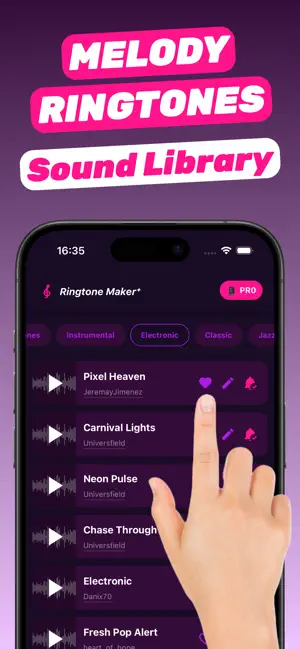
MP3 Ringtone Maker for iPhone is an iOS app that turns your own songs, videos, and audio files into custom ringtones, text tones, and alarm tones — right on your phone, with no computer, cables, or iTunes. Use it as a ringtone editor and text tone maker: pick a song or a video, trim the part you love, and save it as a ringtone in under a minute. HOW TO MAKE A RINGTONE ON IPHONE 1. Choose a source: a video from your gallery, an audio file from Files, a video shared from another app, or a track from the built-in ringtone library. 2. Trim the exact moment you want — the chorus, a movie quote, a voice message, a beat drop. 3. Make it louder or clearer with volume boost, Bass, Voice, and noise reduction. 4. Tap Save Ringtone, then Use as Ringtone in the share menu. 5. Open Settings → Sounds & Haptics and pick your new tone for calls, texts, or alarms. If Use as Ringtone does not appear on your device, the app walks you through a step-by-step GarageBand setup instead. CREATE RINGTONES FROM YOUR MUSIC • Make a ringtone from any song or MP3 file saved in Files • Supports common audio formats such as MP3, M4A, and WAV • Cut a song to the perfect 30-second ringtone length • Preview the clip before you save it TURN VIDEOS INTO RINGTONES • Make a ringtone from a video in your gallery • Extract the sound from a clip, screen recording, or saved reel • Share a video from Photos or another app straight into MP3 Ringtone Maker • Trim the video timeline visually to grab the exact sound CUSTOM TEXT TONES, NOTIFICATION AND ALARM SOUNDS • Replace the default iPhone ringtone with your own sound • Create a custom text tone or message sound • Make a personal alarm sound you will actually wake up to • Give each contact a unique ringtone so you know who is calling LOUD AND CLEAR RINGTONES • Volume boost for quiet songs and recordings, so you never miss a call • Bass enhancement for a fuller sound on the iPhone speaker • Voice enhancement to make speech and vocals stand out • Noise reduction for clips recorded in noisy places READY-MADE RINGTONE LIBRARY • Browse ringtones by category: instrumental, electronic, classical, and jazz • Save favorites and edit any track before you set it • Reopen a saved project to edit your ringtone later FAQ Can I make a ringtone on iPhone without a computer? Yes. MP3 Ringtone Maker creates and exports ringtones entirely on your iPhone. You do not need a Mac, a PC, iTunes, or cables. How do I make a song my ringtone? Import the song from Files, trim the part you want, tap Save Ringtone, and choose Use as Ringtone. Then select it in Settings → Sounds & Haptics → Ringtone. Can I make a ringtone from a video? Yes. Pick a video from your gallery or share one from another app, then trim its sound and save it. Can I use a custom sound for texts and alarms? Yes. Once saved, your tone appears in the iPhone sound lists for ringtones, text tones, and alarms. How long can an iPhone ringtone be? iPhone ringtones play up to about 30 seconds, so trim your clip to that length for the best result. Is my audio uploaded anywhere? No. Trimming and sound processing happen on your iPhone, and your music and videos stay on your device. PRICING MP3 Ringtone Maker for iPhone includes a daily limit of saved ringtones. A Pro subscription removes all limits. Download MP3 Ringtone Maker for iPhone and make your first custom ringtone from your own music or video today. Terms of Use: https://rington101.com/terms.html Privacy Policy: https://rington101.com/privacy.html
Ratings & reviews
4.0
6 ratings
What’s new
Version 1.2.1 · Updated October 25, 2026
This version of MP3 Ringtone Maker for iPhone includes bugs fixes and improvements
App privacy
The developer, Vladimir Ivakhnenko, reported these privacy practices to Apple.
Data Not Linked to You
The following data, which may be collected but is not linked to your identity, may be used for the following purposes:
- Purchases: Purchase History
- Identifiers: User ID, Device ID
- Diagnostics: Crash Data, Other Diagnostic Data
Used for: Analytics, App Functionality
Alternatives to MP3 Ringtone Maker for iPhone
Looking for apps like MP3 Ringtone Maker for iPhone? Here are 6 similar apps on the App Store. The highest rated is Ringtone Maker - Extract Music (5.0/5), and all 6 are free to download.
-
 Ringtone Maker - Extract Music
5.0
-
 Garage Ringtone Maker Ringtuna
4.8
-
 VC AI Ringtone Maker
-
 RinglyCut: Ringtone Maker MP3
5.0
-
 RingPop: Ringtone Maker
4.7
-
 Ringtones for iPhone + Maker
4.3
| App | Rating | Price | Last updated | Compare |
|---|---|---|---|---|
| MP3 Ringtone Maker for iPhone | 4.0 / 5 (6 ratings) | Free | October 25, 2026 | |
| Ringtone Maker - Extract Music | 5.0 / 5 (1) | Free | Nov 30, 2024 | Compare |
| Garage Ringtone Maker Ringtuna | 4.8 / 5 (12) | Free | Nov 18, 2024 | Compare |
| VC AI Ringtone Maker | – | Free | Jun 28, 2026 | Compare |
| RinglyCut: Ringtone Maker MP3 | 5.0 / 5 (1) | Free | May 29, 2026 | Compare |
| RingPop: Ringtone Maker | 4.7 / 5 (10) | Free | Oct 23, 2026 | Compare |
| Ringtones for iPhone + Maker | 4.3 / 5 (6) | Free | Jun 30, 2026 | Compare |