

PowerDialer Pro
Foshan Qizhizhu Technology Co., Ltd. Utilities iPhoneiPadiPod touch
PowerDialer Pro is a free Utilities app for iPhone and iPad by Foshan Qizhizhu Technology Co., Ltd. Requires iOS 15. Updated August 24, 2026.
- Price
- Free
- on the App Store
- Size
- 29 MB
- Age 4+
- Updated
- Aug 24
- 2026 · v4.0.1
Screenshots



About PowerDialer Pro
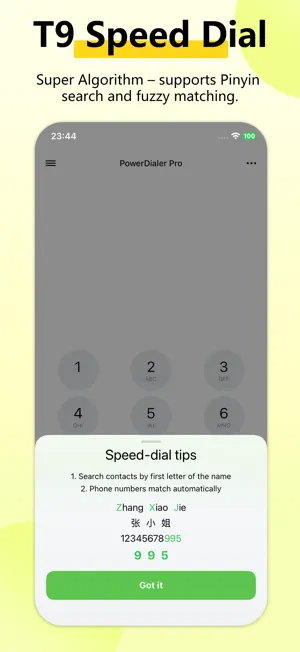
All‑in‑One Smart Dialer – Boost Sales & Daily Productivity AI‑assisted · Auto‑dial · CRM‑ready · Fully Customizable Love a dialer that works as hard as you do? Whether you're in telemarketing, sales, or just want a smarter way to manage calls, this is your go‑to tool. Perfect for work, perfect for everyday use – and it looks great too. Hot Features You’ll Love: Smart Contact Match – Instantly loads call history with location‑based contact matching right after installation. Lightning‑Fast T9 Search – Fully optimized pinyin/letter matching, now 2x faster – even with 10,000+ contacts, results appear in a snap. CRM‑Grade Customer Management – Ideal for outbound sales and customer follow‑up. Add detailed profiles (phone, address, status, tags, notes), track every customer’s interaction timeline, attach contracts, and batch‑select contacts into an auto‑dial queue for one‑tap sequential calling. Group Address Book – Create groups and invite members via QR code. Everyone can upload their own contacts, while only the group creator has delete permissions – perfect for team collaboration. Cloud Sync + Excel Import – Seamlessly sync your local contacts across devices, or bulk‑import from Excel (.xls/.xlsx). Also works with our PC Assistant – push Excel contacts directly from your computer to the phone’s auto‑dial queue wirelessly. Auto‑Dial Queue – Load numbers from Excel or the PC assistant, and let the app dial automatically – hands‑free efficiency at its best. Quick‑Swipe Dialing – Just swipe sideways on any contact to call instantly. Custom Themes & Skins – Personalize the UI with your favorite colors and styles – make it truly yours. Fake / Simulated Incoming Call (must‑have for graceful exits) – Set a custom audio file to play when “answered”, and choose between earpiece or speaker output. And that’s not all – there are more surprises waiting for you. This is the dialer that actually gets things done. Try it now and feel the difference!
What’s new
Version 4.0.1 · Updated August 24, 2026
Version 4.0.1 Major overhaul! Brand new UI design for a more enjoyable experience. Added support for syncing data with PC. Added group address book. Enhanced compatibility for importing Excel file formats. Customer management now includes cloud backup and cloud sync. Supports importing contacts via shared spreadsheet files. Fixed multiple known issues.
App privacy
The developer, Foshan Qizhizhu Technology Co., Ltd., reported these privacy practices to Apple.
Data Used to Track You
The following data may be used to track you across apps and websites owned by other companies:
- Identifiers: Device ID
Data Not Linked to You
The following data, which may be collected but is not linked to your identity, may be used for the following purposes:
- Identifiers: Device ID
- Contacts: Contacts
Used for: Third-Party Advertising, App Functionality
Alternatives to PowerDialer Pro
Looking for apps like PowerDialer Pro? Here are 6 similar apps on the App Store. The highest rated is 轻松拨号-T9拨号·备注提醒·联系人管理 (5.0/5), and all 6 are free to download.


| App | Rating | Price | Last updated | Compare |
|---|---|---|---|---|
| PowerDialer Pro | – | Free | August 24, 2026 | |
| 易电销 | – | Free | Jan 23, 2024 | Compare |
| 轻松拨号-T9拨号·备注提醒·联系人管理 | 5.0 / 5 (5) | Free | Oct 23, 2026 | Compare |
| 电销冠军 | – | Free | Apr 15, 2025 | Compare |
| 电销外呼-AI外呼机器人外呼智能体虚拟手机小号营销防封电话 | – | Free | Oct 22, 2026 | Compare |
| 自动拨号 | – | Free | Sep 24, 2026 | Compare |
| 电销宝 | – | Free | Sep 3, 2026 | Compare |
Compare PowerDialer Pro with the top alternatives: ratings, updates, ASO score and keyword gaps →