

Fundeer: Expense Tracker
Andrii Zahreichuk Finance iPhoneiPadiPod touch
Fundeer: Expense Tracker is a free Finance app for iPhone and iPad by Andrii Zahreichuk. Requires iOS 18.0. Updated November 13, 2026.
- Price
- Free
- on the App Store
- Size
- 85 MB
- Age 4+
- Updated
- Nov 13
- 2026 · v1.63
Screenshots
Save to Pinterest


About Fundeer: Expense Tracker
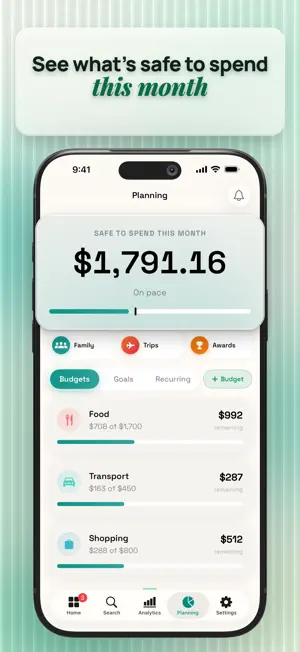
Fundeer tracks spending, splits trip costs and runs shared family budgets. You can start without an account, and tracking works without internet. Log purchases without typing Set up Apple Pay tracking once in Settings. After that, a purchase in a shop is added with the merchant and the currency you paid in. Connect Monobank, the Ukrainian bank, and card spending arrives on its own. Three other ways to add an expense Say "coffee, 45" and the entry fills in, ready for you to check. Point your camera at a receipt and Fundeer reads the merchant, the items, and the total. The things you log most stay one tap away on quick-add buttons and shortcuts. Split trip costs Start a trip, invite the people on it, and everyone logs as they go. At the end, one screen shows who pays whom back. Equal splits, exact amounts, shares, or percentages, in as many currencies as your trip needs. Trip Mode Turn on Trip Mode when your trip starts and everything you add goes to that trip. Card purchases wait in a list only you see until you add them. Each trip gets its own report: total spent, daily spending, and where the money went. Shared family budgets Share a budget with your family and track everyone's contributions and shared expenses in one place. Each member's role sets what they can change. Balances update live for everyone in the family. Import from your bank or another app Import a statement downloaded from your bank. If Fundeer doesn't recognize the file, you choose which column is which. Backups from other budget apps come across too. Activity One Activity screen gathers what happened across your trips and shared budgets: new expenses, settlements, invitations and budget warnings. Analytics Overview scores your month on savings rate, budget control, consistency, income flow, and balance. Breakdown shows every category and every day. Forecast (Plus) projects how the month ends from your own habits. Rearrange the cards to put what you care about first. Early retirement planning Set your target number and retirement age, and see when you could reach financial independence. Budgets and savings goals Set a monthly limit and see how much room is left. Create savings goals with a date and see how much to set aside each month. Privacy Lock the app with Face ID, Touch ID, or your device passcode. The screen blurs the moment you switch away. You can turn off analytics and crash reports in Settings. Also included - Monobank connection; statement import from Monobank, PrivatBank, Wise and others - Tags and categories on many transactions at once - Multi-currency: USD, EUR, GBP, UAH, PLN, and more - Available in 10 languages: English, Ukrainian, German, Polish, Czech, Spanish, French, Dutch, Italian and Portuguese - Recurring transactions - Custom categories with your own icons and colors - Export to CSV and JSON - Home Screen, Lock Screen, and Control Center widgets - Streaks, levels, and achievements - Dark mode Free and paid Fundeer is free to download, with no ads. The free version includes 5 receipt scans and 10 voice entries a month, one budget, one running trip and one device for your own entries. Logging by hand, Apple Pay, statement import, family budgets and CSV export are free. Fundeer Plus is an optional subscription, monthly or yearly. It removes the monthly limits on scans and voice entries, allows more budgets, trips and devices, and adds Forecast and PDF and Excel reports. Payment goes through your Apple Account. The subscription renews automatically unless you cancel at least 24 hours before the end of the period. Manage or cancel it in your App Store account settings. Terms of Use: https://www.apple.com/legal/internet-services/itunes/dev/stdeula/ Privacy Policy: https://fundeer.app/privacy
What’s new
Version 1.63 · Updated November 13, 2026
Family members can share their income, and the whole group sees how much is left after shared spending. • Budgets run every month, every week or between two dates. • Add a receipt photo from Add expense and Add income. • Import Revolut statements saved as a spreadsheet. • Choose the number format in Settings → Money, whatever the phone’s region. Fixes • The Apple Pay banner no longer cuts off the amount. • Totals no longer drift from amounts typed in your main currency. • Planning’s monthly total is no longer about 8% short on weekly payments.
App privacy
The developer, Andrii Zahreichuk, reported these privacy practices to Apple.
Data Linked to You
The following data, which may be collected and linked to your identity, may be used for the following purposes:
- Location: Coarse Location
- Identifiers: User ID, Device ID
- Usage Data: Product Interaction
- Diagnostics: Performance Data, Crash Data, Other Diagnostic Data
- Purchases: Purchase History
- Financial Info: Payment Info, Other Financial Info
- Contact Info: Email Address, Name, Other User Contact Info
- User Content: Photos or Videos, Other User Content
Used for: Analytics, App Functionality
Alternatives to Fundeer: Expense Tracker
Looking for apps like Fundeer: Expense Tracker? Here are 6 similar apps on the App Store.
-
 DyvoBudget: Budget & Money
-
 Clario — Smart Budget Tracker
-
 Moneo: Expense Tracker, Budget
-
 Eazy Finance
-
 STATOK: AI Money Manager
-
 Shahy — Expense Tracker
| App | Rating | Price | Last updated | Compare |
|---|---|---|---|---|
| Fundeer: Expense Tracker | – | Free | November 13, 2026 | |
| DyvoBudget: Budget & Money | – | Free | Sep 10, 2026 | Compare |
| Clario — Smart Budget Tracker | – | Free | Aug 18, 2026 | Compare |
| Moneo: Expense Tracker, Budget | – | Free | Nov 8, 2026 | Compare |
| Eazy Finance | – | Free | Nov 10, 2026 | Compare |
| STATOK: AI Money Manager | – | Free | Nov 11, 2026 | Compare |
| Shahy — Expense Tracker | – | Free | Oct 28, 2026 | Compare |