

Facepop: Hide & blur faces
Eunchan Kim Photo & Video iPhoneiPadiPod touch
Facepop: Hide & blur faces is a free Photo & Video app for iPhone and iPad by Eunchan Kim. Requires iOS 18.0. Updated October 3, 2026.
- Price
- Free
- on the App Store
- Size
- 23 MB
- Age 4+
- Updated
- Oct 3
- 2026 · v1.1.3
Screenshots

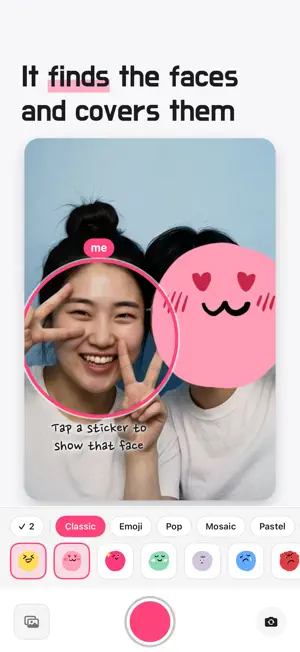


About Facepop: Hide & blur faces
The moment you shoot, the faces on screen get stickers automatically. (No ads!) A friend who'd rather not show their face doesn't have to step out of the group shot. By the time you press the shutter, the stickers are already on. WHAT IT DOES - Stickers land on faces automatically, right in the live preview - Pick two or more stickers and each face gets its own - Tap your own face and its sticker comes off. Everyone else keeps their sticker - Mosaic or blur instead of a sticker, if you'd rather - Keep the original as you shoot: with it on, you keep both the original and the photo with stickers. With it off, you keep only the photo with stickers - Move, resize, rotate, or remove any sticker after the shot, or flip it to face the other way - Bring in a photo you've already taken and put stickers on the faces - Four cuts: turn four photos into one photo booth print, with a line of your own under the logo - Doodle over a photo or a four-cut print with one of four pens, in the color and thickness you pick NO ACCOUNT, NO UPLOADS Facepop finds faces right on your phone. You don't need an account, and we don't run a server for your photos, so it works just the same in airplane mode. The only time Facepop sends a photo anywhere is when you share it. FREE The camera, the Classic, Emoji and Chuseok packs, mosaic and blur, the doodle brush, stickers on photos from your library, and photo booth prints with four frame styles. Save and edit as much as you like. The free plan adds a small Facepop watermark. FACEPOP PRO Pay once. It's not a subscription. - Every Pro sticker pack, including the ones we add later - Keep the stickers you make in your photos - Turn off the Facepop watermark Making stickers is free. Try one before you decide.
What’s new
Version 1.1.3 · Updated October 3, 2026
Fixed: on some iPhone 17 models, stickers in the selfie preview didn't line up with faces. Your photos always came out right, and now the preview matches them.
App privacy
The developer, Eunchan Kim, reported these privacy practices to Apple.
Data Not Collected
The developer does not collect any data from this app.
Alternatives to Facepop: Hide & blur faces
Looking for apps like Facepop: Hide & blur faces? Here are 6 similar apps on the App Store. The highest rated is ShotText: Filter/Overlay/Text (4.0/5), and all 6 are free to download.
-
 Petari: Cutout Scrapbook
-
 SnapFit
-
 ShotText: Filter/Overlay/Text
4.0
ShotText: Filter/Overlay/Text
4.0
-
 Blurin: Face Blur & Emoji Hide
-
 Face Blur: Mosaic & Emoji
-
 Video Compressor : Reduce MB
| App | Rating | Price | Last updated | Compare |
|---|---|---|---|---|
| Facepop: Hide & blur faces | – | Free | October 3, 2026 | |
| Petari: Cutout Scrapbook | – | Free | Sep 27, 2026 | Compare |
| SnapFit | – | Free | Aug 31, 2024 | Compare |
| ShotText: Filter/Overlay/Text | 4.0 / 5 (19) | Free | Jul 6, 2026 | Compare |
| Blurin: Face Blur & Emoji Hide | – | Free | Oct 20, 2026 | Compare |
| Face Blur: Mosaic & Emoji | – | Free | Sep 4, 2026 | Compare |
| Video Compressor : Reduce MB | – | Free | Mar 26, 2026 | Compare |