

Imgs2PDF - Image to PDF
书培 王 Utilities iPhoneiPadiPod touchMac
Imgs2PDF - Image to PDF is a free Utilities app for iPhone and iPad by 书培 王. Rated 5.0/5 from 6 ratings. Requires iOS 17.0. Updated October 10, 2026.
- Rating
- 5.0
- 6 ratings
- Price
- Free
- on the App Store
- Size
- 17 MB
- Age 4+
- Updated
- Oct 10
- 2026 · v2.1.5
Screenshots



About Imgs2PDF - Image to PDF
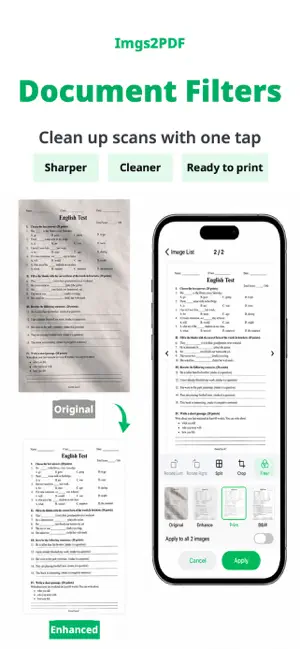
Imgs2PDF is a lightweight PDF tool for converting images to PDF, PDF to images, and for merging, splitting and compressing PDFs. Files are processed locally without uploads, making it ideal for photos, scans, homework, contracts, receipts and everyday documents. Features - Image to PDF - Batch convert JPG, PNG and more into a single PDF, then share or save to Files - Document scanning (iPhone/iPad) - Scan multiple pages with automatic cropping and perspective correction, arrange them and create a PDF - Document filters - Apply Original, Enhance, Grayscale or Black & White to scanned pages and selected images, with live previews, undo and batch application - PDF to Images - Export PDF pages as images, then save or share them - Merge PDF - Combine multiple PDF files in order into one document - Split PDF - Select the pages you need and create a new PDF file - Compress PDF - Choose light, standard or deep compression to balance file size and clarity - Crop and Split Images - Crop an image to a selected area, or split it into multiple images with a grid - OCR Text Recognition - Recognize text in images or PDF pages and copy it - PDF Layout Settings - Supports A3, A4, A5, A6, B4, B5, Letter, Legal and Tabloid paper sizes, with portrait or landscape output - Custom Watermark - Set watermark text, position, angle and size to add your own mark to exported PDFs or images - Image Quality Settings - Adjust output quality to balance clarity and file size - Conversion History - Browse, preview, rename and re-export previous results - Cross-platform - Works on iPhone, iPad and Mac - Free use - Access core conversion, merge, split, export, and compression tools for free - Premium - Unlock higher limits, batch compression, custom watermarks, and advanced features How to cancel an App Store subscription Open Settings on your iPhone or iPad Tap your Apple ID at the top Tap Subscriptions Find the subscription you want to cancel Tap Cancel Subscription Confirm the cancellation Note: after cancellation, you can continue using the service until the end of the current subscription period. Terms of Use: https://www.apple.com/legal/internet-services/itunes/dev/stdeula/ Privacy Policy: https://hp60.com/imgs2pdf/about/privacy/
Ratings & reviews
5.0
6 ratings
What’s new
Version 2.1.5 · Updated October 10, 2026
What's New: - Added support for iPhone Duo. - Improved batch image importing to reduce memory usage. - Improved rotation, cropping and image previews to reduce lag and repeated loading. - Fixed incorrect pixel dimensions after rotating images on macOS. - Fixed an issue where cancelling a conversion and immediately retrying could leave the interface in an incorrect state. - Fixed an issue where history entries could point to the wrong file after a failed rename. - Improved protection for original images to prevent editing from modifying the source file when importing fails. - Enlarged the text recognition button’s tap area for easier use. - Added freeform cropping mode for images. - Fixed an issue where scanned documents might not be cleaned up automatically. - Fixed an issue that caused PDF files to be too large. - Improved document filters by intelligently adjusting enhancement strength based on image content. - Fixed a perspective correction issue caused by incorrect edge detection when scanning documents. - Improved the image editor with multi-image navigation, page navigation and a refined action panel layout. Added document scanning on iPhone and iPad, with support for multi-page scans, automatic cropping, perspective correction, and PDF creation. Added Original, Enhance, Grayscale, and Black & White document filters with live previews, undo, and batch application. - Improved image reordering with a clearer list-based drag-and-drop experience for more stable and convenient sorting. - Improved image cropping and editing for better touch and accessibility support. - PDF settings summaries on the Home screen now clearly show paper size and orientation. - Improved support for larger text and Reduce Motion for a more comfortable experience. - Updated free usage limits and clarified Premium benefits.
App privacy
The developer, 书培 王, reported these privacy practices to Apple.
Data Not Collected
The developer does not collect any data from this app.
Alternatives to Imgs2PDF - Image to PDF
Looking for apps like Imgs2PDF - Image to PDF? Here are 6 similar apps on the App Store. The highest rated is Photo Cleaner - Swipli (5.0/5), and 5 of the 6 are free to download.
-
 Photo Cleaner - Swipli
5.0
Photo Cleaner - Swipli
5.0
-
 facEmoji -fun photo
-
 My Progress Tracker & Widgets
4.2
My Progress Tracker & Widgets
4.2
-
 ScanBox:Fast find scanned docs
5.0
ScanBox:Fast find scanned docs
5.0
-
 Now Write-日记打卡手账本
-
 ClipSnap
4.8
ClipSnap
4.8
| App | Rating | Price | Last updated | Compare |
|---|---|---|---|---|
| Imgs2PDF - Image to PDF | 5.0 / 5 (6 ratings) | Free | October 10, 2026 | |
| Photo Cleaner - Swipli | 5.0 / 5 (4) | Free | Sep 19, 2026 | Compare |
| facEmoji -fun photo | – | Free | Jul 21, 2025 | Compare |
| My Progress Tracker & Widgets | 4.3 / 5 (8) | Free | Mar 11, 2026 | Compare |
| ScanBox:Fast find scanned docs | 5.0 / 5 (4) | Free | Apr 2, 2026 | Compare |
| Now Write-日记打卡手账本 | – | Free | Oct 14, 2026 | Compare |
| ClipSnap | 4.8 / 5 (4) | 9.99 USD | May 5, 2025 | Compare |