

Currency Converter: Widget
Salman Lartey Finance iPhoneiPadiPod touch
Currency Converter: Widget is a free Finance app for iPhone and iPad by Salman Lartey. Rated 4.5/5 from 38 ratings. Requires iOS 15.0.
- Rating
- 4.5
- 38 ratings
- Price
- Free
- on the App Store
- Size
- 59 MB
- Age 4+
- Updated
- Oct 7
- 2026 · v1.2.0
Screenshots
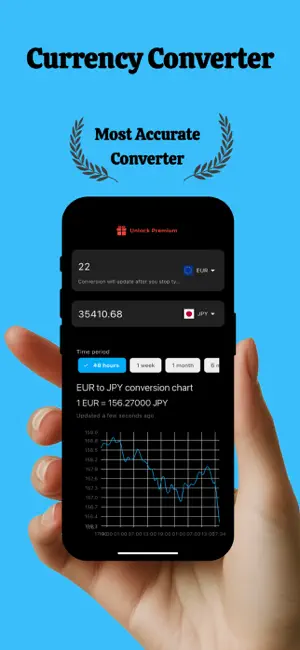
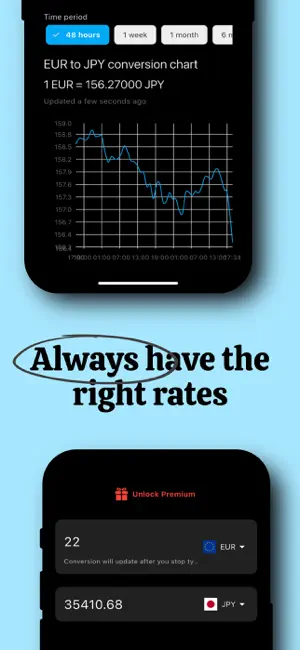

About Currency Converter: Widget
Convert 150+ world currencies at live exchange rates — plus 30 cryptocurrencies and gold, silver, platinum and palladium — and keep the pairs you care about on your Home Screen. Built for people who check rates constantly: travelers comparing prices abroad, freelancers invoicing in another currency, shoppers working out what an international checkout really costs, and anyone watching a rate before they move money. HOME SCREEN WIDGET Pin your main currency pair to the Home Screen and read the current rate without opening anything. The widget updates as rates move, so the number you glance at is the number that matters. LIVE EXCHANGE RATES Rates for more than 150 world currencies, refreshed through the day. Set any currency as your base and every other currency converts against it instantly. SEE EVERY CURRENCY AT ONCE Most converters show one pair at a time. This one shows a list. Enter an amount once and read it in every currency you follow, in the same view — which is what you actually want when you are planning a multi-country trip or comparing prices across suppliers. RATE HISTORY CHARTS See how any pair has moved over 1 day, 1 week, 1 month, 6 months, 1 year or 5 years. Enough context to tell whether today is an unusually good moment to exchange, or an unusually bad one. CRYPTO AND PRECIOUS METALS Bitcoin, Ethereum, Solana, XRP, Cardano, Dogecoin, Litecoin and 23 more sit in the same list as ordinary currencies — so you can read BTC straight into euros, or your local currency into an ounce of gold, without switching apps. Gold, silver, platinum and palladium are priced per ounce. WORKS OFFLINE The rates you last loaded stay available with no connection at all. Landing in a new country before you have a SIM or Wi-Fi is exactly when a converter needs to still work. BUILT TO BE QUICK A dedicated number pad for fast entry, drag-and-drop reordering, and favorites so the currencies you use most stay at the top of the list. No account, no sign-up, no setup. CURRENCIES INCLUDED US Dollar, Euro, British Pound, Japanese Yen, Swiss Franc, Canadian Dollar, Australian Dollar, Chinese Yuan, Indian Rupee, Brazilian Real, Mexican Peso, Turkish Lira, Saudi Riyal, UAE Dirham, Singapore Dollar, Hong Kong Dollar, South Korean Won, South African Rand, Polish Zloty, Czech Koruna, Swedish Krona, Norwegian Krone, Danish Krone, Thai Baht, Vietnamese Dong, Indonesian Rupiah, Malaysian Ringgit, Philippine Peso, Pakistani Rupee, Bangladeshi Taka, Nigerian Naira, Kenyan Shilling, Egyptian Pound, Moroccan Dirham, Argentine Peso, Chilean Peso, Colombian Peso, New Zealand Dollar, Israeli Shekel, Ukrainian Hryvnia, Romanian Leu, Hungarian Forint — and over 100 more. Missing a currency, or found something that looks wrong? There is a feedback option in Settings and it reaches a real person. Terms of Service: https://sites.google.com/view/currencyconversionprivacy/terms Privacy: https://sites.google.com/view/currencyconversionprivacy/homepage
Ratings & reviews
4.5
38 ratings
What’s new
Version 1.2.0 · Updated October 7, 2026
HOLD TO REORDER Press and hold any currency in your list, then drag it where you want it, just like rearranging apps on your Home Screen. No more trips to Edit Currencies. Tapping a currency still opens the keypad, and swiping still removes it. The Currency Board widget follows your new order too. ALSO IN THIS UPDATE • Crypto icons are back in full color. Avalanche, BNB, Cosmos and Filecoin no longer show up as black circles, and Aave, Chainlink and others have their colors back. Currency Converter handles 150+ world currencies plus 30 cryptocurrencies and gold, silver, platinum and palladium — with offline access, rate history charts and a Home Screen widget. Found something wrong, or want a currency added? There is a feedback option in Settings and it reaches a real person.
App privacy
The developer, Salman Lartey, reported these privacy practices to Apple.
Data Used to Track You
The following data may be used to track you across apps and websites owned by other companies:
- Usage Data: Advertising Data
Data Not Linked to You
The following data, which may be collected but is not linked to your identity, may be used for the following purposes:
- Identifiers: Device ID
- Usage Data: Advertising Data, Product Interaction
- Diagnostics: Crash Data, Performance Data
- Purchases: Purchase History
Used for: Third-Party Advertising, Analytics, App Functionality
Alternatives to Currency Converter: Widget
Looking for apps like Currency Converter: Widget? Here are 6 similar apps on the App Store. The highest rated is Money Planner: RainyDay (4.8/5), and all 6 are free to download.
-
 Money Planner: RainyDay
4.8
Money Planner: RainyDay
4.8
-
 Expense Now – Money Organizer
4.5
Expense Now – Money Organizer
4.5
-
 Spending & Expense Tracker
4.6
Spending & Expense Tracker
4.6
-
 Portfolio X - Stock Tracker
4.7
Portfolio X - Stock Tracker
4.7
-
 Savings Tracker FINdependence
-
 Budget Planner - Piedget
4.8
Budget Planner - Piedget
4.8
| App | Rating | Price | Last updated | Compare |
|---|---|---|---|---|
| Currency Converter: Widget | 4.5 / 5 (38 ratings) | Free | October 7, 2026 | |
| Money Planner: RainyDay | 4.8 / 5 (31) | Free | Oct 20, 2025 | Compare |
| Expense Now – Money Organizer | 4.5 / 5 (48) | Free | Aug 27, 2026 | Compare |
| Spending & Expense Tracker | 4.6 / 5 (37) | Free | Apr 27, 2025 | Compare |
| Portfolio X - Stock Tracker | 4.7 / 5 (53) | Free | Oct 19, 2026 | Compare |
| Savings Tracker FINdependence | – | Free | Aug 8, 2026 | Compare |
| Budget Planner - Piedget | 4.8 / 5 (12) | Free | Aug 19, 2026 | Compare |