

VivaRead: PDF, EPUB Voice & AI
Van Hung Nguyen Education iPhoneiPadiPod touch
VivaRead: PDF, EPUB Voice & AI is a free Education app for iPhone and iPad by Van Hung Nguyen. Rated 4.3/5 from 3 ratings. Requires iOS 16.0.
- Rating
- 4.3
- 3 ratings
- Price
- Free
- on the App Store
- Size
- 150 MB
- Age 12+
- Updated
- Oct 22
- 2026 · v6.2.1
Screenshots



About VivaRead: PDF, EPUB Voice & AI
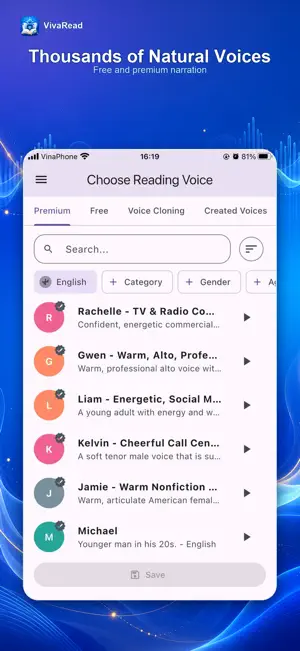
Study & Research Assistant: • Contextual AI Suggestions: Automatically classifies book genres (Academic, Finance, Literature...) and suggests relevant questions for text, images, and formulas. • Instant Answers on Selection: Solve exercises and analyze text passages or scanned PDF images instantly. • Accurate Source Citations: Answers clearly display reference sources for both PDF, DOCX and EPUB. PDFs can be difficult to read on a small screen. VivaRead helps you read more clearly, listen more naturally, and keep books, stories, and documents organized in one easy-to-use library. READ PDFs YOUR WAY • Switch between the original PDF layout and a text-only view that automatically reflows to fit your screen. • Lock horizontal movement so enlarged pages stay steady while you scroll. • Fit content to screen width for larger, more readable text. • Use OCR to recognize text in scanned PDFs, then listen, copy, and follow along. • See each word highlighted as it is spoken. • Search, highlight, bookmark, and jump directly to the page you need. • ChatPDF & ChatEPUB: Ask questions about PDF and EPUB content to find information faster. • Personalize fonts, text size, line spacing, margins, dark mode, and reading colors. POWERFUL WORD (.DOCX) READER & EDITOR • Flawless Document Rendering: View complex Word documents with accurate layouts, virtualized smooth tables, and sharp embedded images. • Highlights & Annotations: Color-code key points, attach personal notes. LISTEN WITH NATURAL STORYTELLER VOICES Choose from thousands of natural-sounding voices in multiple languages, including free voices and premium options. You can also use your own voice or a family member’s voice to create a personal storyteller for children, loved ones, or yourself. VivaRead also lets you: • Listen in the background and continue from where you stopped. • Create audio from text you type or paste. • Recognize text in a photo and turn it into speech. • Scan documents and listen to their content. READ EPUBS, DOCX AND BUILD YOUR OWN LIBRARY • Keep PDFs, DOCX and EPUBs together in one app. • Import books and documents from your device or Google Drive. • Search, copy, translate, highlight, and personalize EPUB reading. • Create collections for study, work, stories, reference materials, or reading later. • Add favorites and search by title or author. Reading Statistics & Insights • Brand new reading statistics section on the Home screen to track your reading habits. • Monitor total reading time, daily streaks, and interactive charts by day, month, and per-book distribution. • Stay motivated and build a consistent reading habit. Smart Area OCR & Magnifier for Scanned PDFs • Select and extract text on scanned or copy-restricted PDF pages with Laser OCR. • Built-in magnifier loupe for pixel-perfect corner handle adjustment. • Edit recognized quotes before saving them as highlights or notes. Highlight Notes & Tag Management • Add notes directly to your highlights in both EPUB and PDF readers. • Organize quotes with tags and easily filter them in your highlight collection. • Improved Home highlights preview with smoother browsing. Seamless Google Drive Cloud Sync • Full synchronization for your books, highlights, notes, reading progress, and reading duration. • Optimized sync engine for faster loading and reliable cloud backups. Reading Reminders • Schedule daily reading notifications and alarms to keep your reading momentum going. All-in-One Book Creator • Web to eBook: Turn web links and online serials into beautifully packaged EPUB books for offline reading. • Document Scanner: Quickly scan physical pages using your camera and convert them into digital books. • Merge EPUB & PDF: Combine multiple EPUB or PDF files into a single volume with an organized table of contents. DISCOVER MULTILINGUAL BOOKS AND STORIES From study materials and long reports to ebooks and bedtime stories, VivaRead makes every page easier to read and every story feel closer.
What’s new
Version 6.2.1 · Updated October 22, 2026
Fix some bugs
App privacy
The developer, Van Hung Nguyen, reported these privacy practices to Apple.
Data Used to Track You
The following data may be used to track you across apps and websites owned by other companies:
- Identifiers: Device ID
Data Not Linked to You
The following data, which may be collected but is not linked to your identity, may be used for the following purposes:
- Identifiers: Device ID
- Usage Data: Advertising Data, Product Interaction
- Diagnostics: Crash Data, Other Diagnostic Data
Used for: Third-Party Advertising, Analytics
Alternatives to VivaRead: PDF, EPUB Voice & AI
Looking for apps like VivaRead: PDF, EPUB Voice & AI? Here are 6 similar apps on the App Store. The highest rated is BibliON (5.0/5), and all 6 are free to download.
-
 Read My Paper
3.0
Read My Paper
3.0
-
 Text To Speech – Audio Reader
3.9
Text To Speech – Audio Reader
3.9
-
 BibliON
5.0
BibliON
5.0
-
 WebOutLoud: Web Text to Speech
4.6
WebOutLoud: Web Text to Speech
4.6
-
 EmAudio Concursos
5.0
EmAudio Concursos
5.0
-
 Simulado OAB 2026
| App | Rating | Price | Last updated | Compare |
|---|---|---|---|---|
| VivaRead: PDF, EPUB Voice & AI | 4.3 / 5 (3 ratings) | Free | October 22, 2026 | |
| Read My Paper | 3.0 / 5 (1) | Free | Mar 4, 2026 | Compare |
| Text To Speech – Audio Reader | 3.9 / 5 (145) | Free | Jun 12, 2025 | Compare |
| BibliON | 5.0 / 5 (2) | Free | Oct 17, 2026 | Compare |
| WebOutLoud: Web Text to Speech | 4.6 / 5 (771) | Free | Sep 15, 2026 | Compare |
| EmAudio Concursos | 5.0 / 5 (4) | Free | Oct 23, 2026 | Compare |
| Simulado OAB 2026 | – | Free | Oct 10, 2026 | Compare |