

ScanEase : AI PDF Scanner
PLUS INFOSYS Productivity iPhoneiPadiPod touch
ScanEase : AI PDF Scanner is a free Productivity app for iPhone and iPad by PLUS INFOSYS. Requires iOS 15.0. Updated July 14, 2026.
- Price
- Free
- on the App Store
- Size
- 58 MB
- Age 4+
- Updated
- Jul 14
- 2026 · v3.0
Screenshots


About ScanEase : AI PDF Scanner
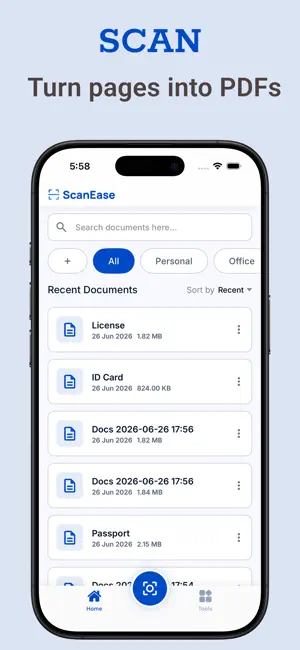
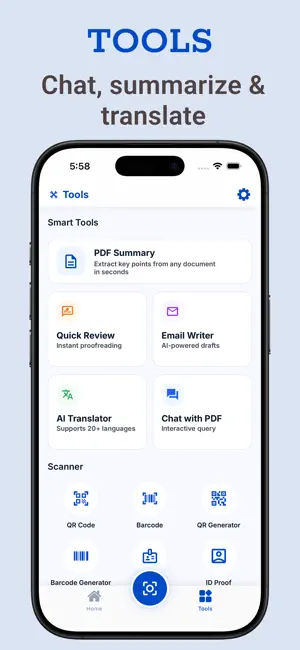
Transform your smartphone into a high-performance document scanner with ScanEase! Whether you need to scan, edit, annotate, sign, or share documents, ScanEase offers a seamless and feature-packed experience. Key Features: Scan Single & Multiple Pages – Capture documents effortlessly with crystal-clear scans. * Retake Scans – Retake any document for a perfect result. * Text Recognition (OCR) – Extract text from scanned documents with multi-language translation. * Add Text & Digital Signature – Annotate and sign your files with ease. * Smart Filters & Cropping – Enhance clarity and remove unnecessary parts. * Rearrange & Resize Pages – Organise your scans exactly how you need them. * Export as PDF, JPG, or Zip – Save and share in multiple formats. * Password-Protect PDFs – Keep your sensitive documents secure. * Instant Sharing & Printing – Send via email, messages, or print with one tap. * QR & Barcode Tools – Scan and generate QR codes and barcodes effortlessly. * File Converters – Convert TXT, Word, and Excel files to PDF and vice versa. * Advanced PDF Tools – Lock, unlock, merge, split, and sign PDFs with ease. * Fill Forms & Add Watermarks – Complete PDF forms and customize them with watermarks. * Apple Intelligence PDF tools - PDF Summary, Quick Review, Email Writing, Translation, Chat with PDF, and Text Recognition. * Apple Intelligence features are supported on iPhone 15 Pro, iPhone 15 Pro Max, newer supported iPhone models, iPads with A17 Pro or M1 (or later). Who is ScanEase for? Professionals – Scan, sign, and send documents on the go. Students – Digitize notes, assignments, and research papers. Personal Use – Organize receipts, IDs, and important papers securely. Ad-Free Experience with Subscription Enjoy all features for FREE with ads, or upgrade to an ad-free experience with a one-time purchase or subscription: ** Lifetime Purchase – Remove ads forever with a one-time payment. ** Weekly & Monthly Subscriptions – Includes a 14-day free trial for an uninterrupted experience. ** Cancel anytime before the trial ends to avoid charges. Download ScanEase today and experience the easiest way to scan, edit, and share documents – anytime, anywhere! Privacy policy: https://plusinfosys.com/mobile_app_privacy.html Terms of use: https://plusinfosys.com/mobile_app_privacy.html
What’s new
Version 3.0 · Updated July 14, 2026
* Introducing Apple Intelligence PDF tools: summarize, review, translate, write emails, and chat with your PDFs. * Added intelligent text recognition for faster document processing. * Enjoy a completely redesigned interface with a smoother experience.
App privacy
The developer, PLUS INFOSYS, reported these privacy practices to Apple.
Data Used to Track You
The following data may be used to track you across apps and websites owned by other companies:
- Location: Precise Location
Data Not Linked to You
The following data, which may be collected but is not linked to your identity, may be used for the following purposes:
- Location: Precise Location
- Diagnostics: Crash Data
Used for: Third-Party Advertising, Analytics
Alternatives to ScanEase : AI PDF Scanner
Looking for apps like ScanEase : AI PDF Scanner? Here are 6 similar apps on the App Store.
-
 PMPeople: PPM AI
-
 Webito Lens
-
 Sift: PDF Scanner & OCR
-
 Falz – Document Scanner
-
 Leaf: Document Scanner & PDF
-
 WTM3PS
| App | Rating | Price | Last updated | Compare |
|---|---|---|---|---|
| ScanEase : AI PDF Scanner | – | Free | July 14, 2026 | |
| PMPeople: PPM AI | – | Free | Feb 26, 2026 | Compare |
| Webito Lens | – | Free | Sep 8, 2026 | Compare |
| Sift: PDF Scanner & OCR | – | Free | Aug 24, 2026 | Compare |
| Falz – Document Scanner | – | Free | Jul 17, 2026 | Compare |
| Leaf: Document Scanner & PDF | – | Free | Oct 25, 2026 | Compare |
| WTM3PS | – | Free | May 20, 2026 | Compare |