

BerryFilm - Korean Style Cam
Seungyun Kim Photo & Video iPhoneiPadiPod touch
BerryFilm - Korean Style Cam is a paid Photo & Video app for iPhone and iPad by Seungyun Kim. Rated 4.9/5 from 82 ratings. Requires iOS 15.0.
- Rating
- 4.9
- 82 ratings
- Price
- 1.99 USD
- on the App Store
- Size
- 76 MB
- Age 4+
- Updated
- Oct 11
- 2026 · v1.3.40
Screenshots


About BerryFilm - Korean Style Cam
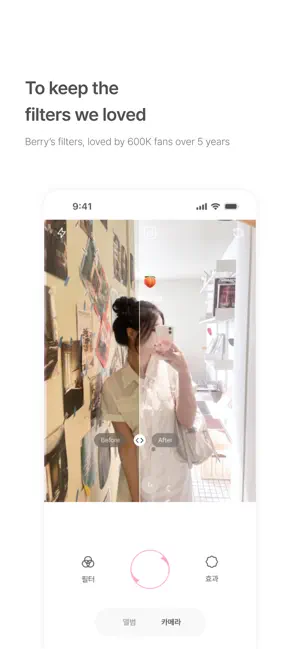
Hi, I’m Berry, a filter creator from South Korea. Some of you may know me from Instagram as @berryveryloveyou. Many of the filters I once shared on social media are now gone— but I wanted to preserve the soft tones I’ve created over the past 5 years. That’s why I built this space: BerryFilm. New filters will be added regularly. Natural skin tone effects and soft light features are also in the works. Please enjoy the filters I’ve poured my heart into. -- Features - Soft and subtle Korean-style filters From airy milk tones to cool, warm, and vintage moods— you’ll find filters that bring out your natural atmosphere. - Photos and videos in your favorite tone Transform your gallery into a soft, aesthetic feed with gentle color correction and minimalist touch. - Simple, quiet, and easy to use Apply filters with one tap, save favorites, and shoot with a silent shutter—anytime, anywhere. - New filters every month Always something new, designed to match the season or your mood. - Built with feedback from real users We’re constantly improving the app through your suggestions. -- Recommended For - Fans of Berry’s Instagram filters - Anyone looking for soft, natural Korean-style filters - Users who love subtle selfies without heavy edits - Those who enjoy discovering new filters each month -- Included Filters Featuring over 40 carefully designed filters like milk, iPhone 7, butter, cool, warm, and blossom — with more coming soon. -- Contact & Sharing Tag @seesun.app on Instagram to share your photos. For questions or feedback, feel free to DM or email us. Email: [email protected] Instagram: @berryfilm.app
Ratings & reviews
4.9
82 ratings
What’s new
Version 1.3.40 · Updated October 11, 2026
Use BerryFilm right when you need it, wherever you are. - Select BerryFilm from the Share menu in the Photos app to open it directly. - Apply BerryFilm filters right from the editing screen in the built-in Photos app. - Press the camera button on the side of your iPhone to launch BerryFilm quickly.
App privacy
The developer, Seungyun Kim, reported these privacy practices to Apple.
Data Not Collected
The developer does not collect any data from this app.
Alternatives to BerryFilm - Korean Style Cam
Looking for apps like BerryFilm - Korean Style Cam? Here are 6 similar apps on the App Store. The highest rated is CHAKK - Stickers for Stories (5.0/5), and 4 of the 6 are free to download.
-
 filmhwa - @hwa.min's filter
4.8
filmhwa - @hwa.min's filter
4.8
-
 WalkColor
4.8
WalkColor
4.8
-
 Unsharp
4.2
Unsharp
4.2
-
 Soft Focus Lite 〜beauty selfie
4.7
Soft Focus Lite 〜beauty selfie
4.7
-
 Colorby: AI Color Editor & Cam
4.9
Colorby: AI Color Editor & Cam
4.9
-
 CHAKK - Stickers for Stories
5.0
CHAKK - Stickers for Stories
5.0
| App | Rating | Price | Last updated | Compare |
|---|---|---|---|---|
| BerryFilm - Korean Style Cam | 4.9 / 5 (82 ratings) | 1.99 USD | October 11, 2026 | |
| filmhwa - @hwa.min's filter | 4.8 / 5 (436) | 2.99 USD | Sep 3, 2026 | Compare |
| WalkColor | 4.8 / 5 (60) | Free | Oct 14, 2026 | Compare |
| Unsharp | 4.2 / 5 (5) | 0.99 USD | Sep 18, 2026 | Compare |
| Soft Focus Lite 〜beauty selfie | 4.7 / 5 (897) | Free | Jan 15, 2026 | Compare |
| Colorby: AI Color Editor & Cam | 4.9 / 5 (135) | Free | Oct 11, 2026 | Compare |
| CHAKK - Stickers for Stories | 5.0 / 5 (8) | Free | Oct 7, 2026 | Compare |