

Teleprompter - InCue
Ori Meir Productivity iPhoneiPadiPod touchApple Watch
Teleprompter - InCue is a free Productivity app for iPhone and iPad by Ori Meir. Rated 4.7/5 from 101 ratings. Requires iOS 16.4. Updated December 12, 2025.
- Rating
- 4.7
- 101 ratings
- Price
- Free
- on the App Store
- Size
- 18 MB
- Age 4+
- Updated
- Dec 12
- 2025 · v1.1.1
Screenshots
About Teleprompter - InCue
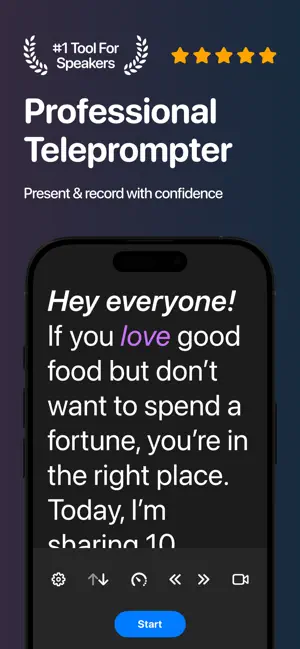
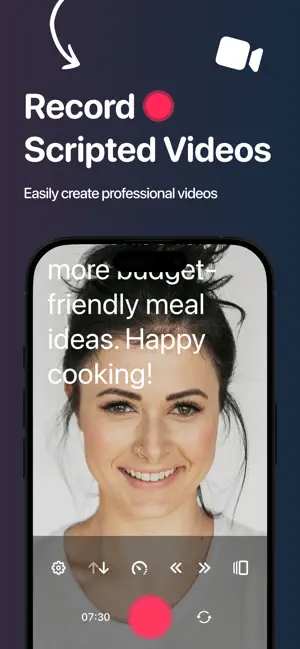
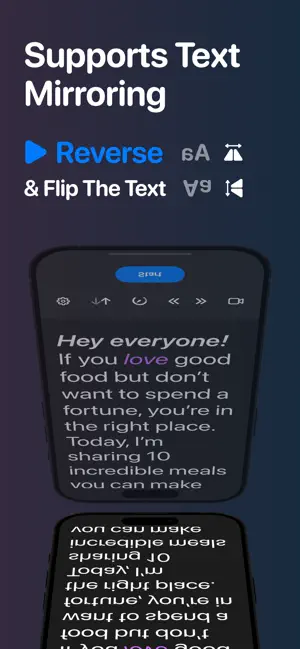
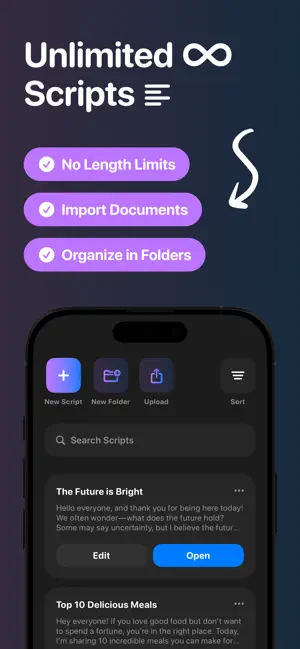
InCue is a powerful and easy-to-use teleprompter app designed to help you deliver flawless speeches, videos, or presentations with confidence. Turn your device into a fully-featured teleprompter — for free! ■ Key Features - Record While You Read – Read your script and record your video at the same time - Text Mirroring – Flip or reverse the text for use with physical teleprompter rigs - Rich Text Editing – Style your scripts with bold, italic, underline, colors, font sizes and more - Import Files – Upload .txt, .pdf, .docx and more — your formatting stays intact - Unlimited Scripts – No limits on how many scripts you can have or how long they can be - Custom Cue Indicator – Add a visual guide to help stay on track - Fully Customizable Teleprompter – Adjust size, speed, margins, colors, layout and more - Apple Watch Support – Control the teleprompter right from your wrist - Cloud Sync – Automatically back up and sync scripts across devices - Offline Mode - Use InCue without an internet connection, so you can perform anywhere ■ Why Use InCue - Simple and intuitive — no confusing setup or learning curve - Helps you speak naturally and stay focused - Perfect for creators, speakers, educators, streamers, and anyone who uses a script - Saves time and reduces stress when filming or presenting - Clean, modern design that works great on both iPhone and iPad ■ How Does It Work? - Write or import your script - Customize the look — font, size, color, layout, and more - Open your script, hit play, and start reading. You can also record your video directly in the app - Use your device or Apple Watch to control the teleprompter - Keep your scripts organized, synced, and ready to use anytime ■ Get Started Today! Join a growing community of users and download InCue today! ■ You Matter to Us We’d love to hear your honest feedback. It helps us improve InCue and make your experience even better. Thank you! ■ Questions? If you have any questions or suggestions, feel free to reach out and send us an email at [email protected]. Legal Jargon: Eula: https://bit.ly/43Qyv3k Privacy Policy: https://bit.ly/3FDqUep Disclaimer: https://bit.ly/4hx8YQ4
Ratings & reviews
4.7
101 ratings
What’s new
Version 1.1.1 · Updated December 12, 2025
Teleprompter - InCue Update! - A few bug fixes
App privacy
The developer, Ori Meir, reported these privacy practices to Apple.
Data Not Linked to You
The following data, which may be collected but is not linked to your identity, may be used for the following purposes:
- Purchases: Purchase History
- Location: Coarse Location
- Identifiers: User ID
- Usage Data: Product Interaction
Used for: Analytics, App Functionality
Alternatives to Teleprompter - InCue
Looking for apps like Teleprompter - InCue? Here are 6 similar apps on the App Store. The highest rated is Paraphrase tool: Fluxkey (4.7/5), and all 6 are free to download.
-
 TranscribeAI: Note Taker
3.7
TranscribeAI: Note Taker
3.7
-
 ZEENIA: Teleprompter for video
4.5
ZEENIA: Teleprompter for video
4.5
-
 Paraphrase tool: Fluxkey
4.7
Paraphrase tool: Fluxkey
4.7
-
 Teleprompter App - Autokue
4.1
Teleprompter App - Autokue
4.1
-
 Data Drop: QR File Transfer
4.7
Data Drop: QR File Transfer
4.7
-
 Aı Note Taker - YapNote
4.6
Aı Note Taker - YapNote
4.6
| App | Rating | Price | Last updated | Compare |
|---|---|---|---|---|
| Teleprompter - InCue | 4.7 / 5 (101 ratings) | Free | December 12, 2025 | |
| TranscribeAI: Note Taker | 3.7 / 5 (58) | Free | Jan 11, 2026 | Compare |
| ZEENIA: Teleprompter for video | 4.5 / 5 (117) | Free | Oct 25, 2025 | Compare |
| Paraphrase tool: Fluxkey | 4.7 / 5 (226) | Free | Aug 30, 2026 | Compare |
| Teleprompter App - Autokue | 4.1 / 5 (107) | Free | Oct 23, 2026 | Compare |
| Data Drop: QR File Transfer | 4.7 / 5 (157) | Free | Jan 30, 2026 | Compare |
| Aı Note Taker - YapNote | 4.6 / 5 (184) | Free | Jul 17, 2025 | Compare |