

Simple Stepper: Step Counter
Nikolas Brock Health & Fitness iPhoneiPadiPod touch
Simple Stepper: Step Counter is a free Health & Fitness app for iPhone and iPad by Nikolas Brock. Requires iOS 18.2. Updated July 4, 2026.
- Price
- Free
- on the App Store
- Size
- 24 MB
- Age 4+
- Updated
- Jul 4
- 2026 · v1.0.5
Screenshots
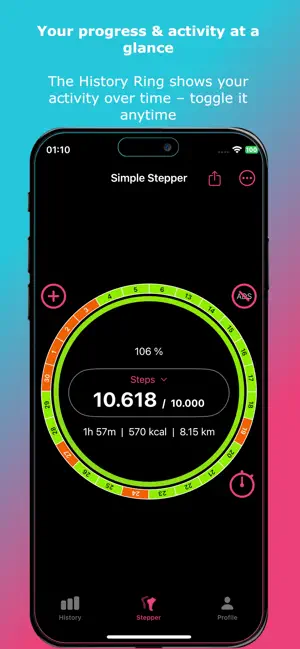


About Simple Stepper: Step Counter
Stay active without overcomplicated fitness apps. Simple Stepper combines step tracking, GPS workouts and powerful performance insights — all in a clean, distraction-free design. No clutter. No confusion. Just your progress. KEY FEATURES: • Track your daily activity Follow your steps, distance, calories and active time in real time. • Visual progress rings See your daily progress instantly and stay motivated throughout the day. • 24-day history overview Understand your consistency with a clear visual activity timeline. • GPS workout tracking Record walks, runs and workouts with detailed route maps and live stats. • Detailed workout insights Analyze every session with pace, speed, distance and full performance metrics. • Elevation profile analysis View altitude changes using GPS and barometer data with a clear elevation graph. • Split analysis per kilometer Break down your performance by kilometer including pace, speed and elevation changes. • Smart goals & personal stats Set your own daily goals and track your improvement over time. • Clean & simple design Focus on what matters — your movement and progress. • Flexible tracking Works automatically in the background, no setup needed. EXTRAS & SUPPORT: • Backup & restore your data anytime • Available in English, Chinese, French, German, Italian, Portuguese, Russian, Spanish, and Ukrainian AD-FREE OPTION: Use Simple Stepper for free or enjoy an uninterrupted experience with an optional subscription. Start your journey today and turn every step into meaningful progress. --- Legal Information: • Terms of Use: https://www.apple.com/legal/internet-services/itunes/dev/stdeula/ • Privacy Policy: https://sites.google.com/view/wargrids/privacypolicy
What’s new
Version 1.0.5 · Updated July 4, 2026
Version 1.0.5 - Fixed an issue with the calculation of active time in live workouts and the daily overview - Fixed an issue causing the user interface to stutter - Adjusted the calculation of split times - Adjusted the way positions are updated in GPS live workouts
App privacy
The developer, Nikolas Brock, reported these privacy practices to Apple.
Data Used to Track You
The following data may be used to track you across apps and websites owned by other companies:
- Identifiers: User ID, Device ID
- Usage Data: Product Interaction, Advertising Data, Other Usage Data
- Diagnostics: Crash Data, Performance Data
Data Not Linked to You
The following data, which may be collected but is not linked to your identity, may be used for the following purposes:
- Identifiers: User ID, Device ID
- Usage Data: Product Interaction, Advertising Data, Other Usage Data
- Diagnostics: Crash Data, Performance Data
Used for: Third-Party Advertising, Developer’s Advertising or Marketing, Analytics, Product Personalization
Alternatives to Simple Stepper: Step Counter
Looking for apps like Simple Stepper: Step Counter? Here are 6 similar apps on the App Store. The highest rated is Fawnly: Step Tracker (5.0/5), and all 6 are free to download.
-
 Fawnly: Step Tracker
5.0
Fawnly: Step Tracker
5.0
-
 Stepby Daily Weekly Pedometer
2.5
Stepby Daily Weekly Pedometer
2.5
-
 Step One - The Steps Counter
-
 Workout Simplicity
-
 Brim: Water Tracker
-
 ChronoPace - Running Metronome
| App | Rating | Price | Last updated | Compare |
|---|---|---|---|---|
| Simple Stepper: Step Counter | – | Free | July 4, 2026 | |
| Fawnly: Step Tracker | 5.0 / 5 (3) | Free | Oct 11, 2026 | Compare |
| Stepby Daily Weekly Pedometer | 2.5 / 5 (2) | Free | Jan 8, 2026 | Compare |
| Step One - The Steps Counter | – | Free | Feb 11, 2026 | Compare |
| Workout Simplicity | – | Free | Mar 18, 2026 | Compare |
| Brim: Water Tracker | – | Free | Aug 21, 2026 | Compare |
| ChronoPace - Running Metronome | – | Free | Sep 1, 2026 | Compare |