

Infinity Vaults + Private AI
333i Utilities iPhoneiPadiPod touch
Infinity Vaults + Private AI is a free Utilities app for iPhone and iPad by 333i. Rated 4.5/5 from 8 ratings. Requires iOS 17.6. Updated October 23, 2026.
- Rating
- 4.5
- 8 ratings
- Price
- Free
- on the App Store
- Size
- 225 MB
- Age 17+
- Updated
- Oct 23
- 2026 · v3.200
Screenshots



About Infinity Vaults + Private AI
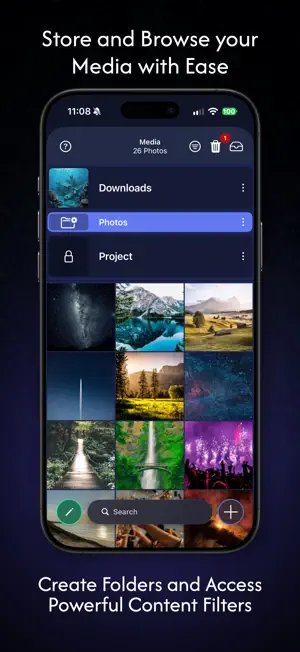
Protect your most sensitive photos, videos, and files with strong, on-device encryption. Infinity Vaults brings together an encrypted vault, a private web browser and camera, and a fully on-device AI assistant. Your files AND your AI never leave your phone. Only you have access. UNMATCHED SECURITY & PRIVACY • Secure "Vaults": Protect your data in one or more separate vaults. Create a vault for your personal data, your work data, or even a decoy for prying eyes. • Keychains: Protect each vault with a unique PIN, pattern, password, or 2FA OTP, and add Face ID and/or geofence lock—presented each time the app opens. Combine multiple layers for maximum protection, with brute-force prevention built in. • Break-In Alerts: Capture a photo, timestamp, and location of anyone attempting unauthorized access. • AES-256 Encryption: Each vault has its own unique key you can rotate or export, locked to a passphrase only you control. • Server-less by Default: Infinity Vaults keeps all your data on your device—nothing is uploaded to a server you don't control. Optionally create Cloud Vaults and connect your own Google Drive or Dropbox to store files as encrypted data on servers you trust. We can't see your data, and neither can your cloud provider. PRIVATE, ON-DEVICE AI • AI Assistant: Chat, summarize your documents and web pages, and generate images—processed entirely on your iPhone/iPad. No account required, nothing sent to a server. • Optional Cloud Models: Connect OpenAI, Gemini, or Anthropic for extra power when you want it—clearly labeled and off by default. • Image Tools: Upscale images, optimize file sizes, auto-tag photos, and find duplicates. SMART STORAGE & ORGANIZATION • Folders: Organize media and files like on a desktop with custom folders (including nested folders and drag-and-drop) and optional extra password protection. • Powerful Search & Filters: Filter by type, keywords, tags, or dates, and sort by name, date, size, and more. PRIVATE BROWSING, APP LOCKER & SECURE CAMERA • Private Browser: Browse securely, download photos and videos, save pages as PDFs, or take screenshots. Add Progressive Web Apps (PWAs) to the home screen for quick access. Over 40,000 trackers blocked. • App Locker: Keep favorite services off your iPhone's home screen and behind your vault instead—66 web apps are included, spanning AI tools, social networks, secure file sharing, and more. • Discreet Camera: Capture photos and videos directly into a secure Vault, with full zoom and exposure controls. No more media left unprotected. EVERYDAY PROTECTION BEYOND FILES • Password Manager: Store and autofill passwords securely. • Cards, Contacts & Notes: Keep financial info, contacts, notes, and reminders protected. • Audio and Podcasts YOUR DATA, YOUR CONTROL Unlike apps that rely on external backups, Infinity Vaults is built for privacy by default—offline first, uploading only when, where, and how you choose. Back up through standard iPhone backups or the app's built-in local backup and export tools. For a full list of features visit infinityvaults.com/features.html ---- Users of this application can subscribe to optional auto-renewing subscriptions for IV Professional to obtain access to additional features. Should you choose to subscribe, please be aware that it will automatically renew each month and your credit card will be charged through your iTunes account. Your account will be charged for renewal within 24 hours prior to the end of the current period at the subscription cost agreed upon at the time of the original auto-renewing subscription purchase. You can turn off auto-renew at anytime from your iTunes account settings but it must be turned off at least 24 hours before the end of a current period to avoid being charged for that time period. No cancellation of the current subscription is allowed during an active subscription period. Please go to infinityvaults.com/privacy and infinityvaults.com/terms for more information.
Ratings & reviews
4.5
8 ratings
What’s new
Version 3.200 · Updated October 23, 2026
This release adds a stronger encryption option, a VPN safeguard for the browser, better AI photo enhancement, and iPhone Duo support. Key-Bound Encryption Professional users can turn on Key-Bound Encryption in a Keychain's Security settings. Your PIN, pattern, or password becomes part of the key that opens that Keychain's Vaults, so nothing stored on the device can open them without it. A Vault password inside a bound Keychain becomes a second key for that Vault. Unlock with Face ID A bound Keychain can now be unlocked with Face ID or Touch ID. A copy of the Keychain's encryption key is held in the Secure Enclave and released only by your enrolled biometrics, with no passcode fallback. Enter your first key, and Face ID opens the Keychain and the Vaults you had unlocked without having to enter the remaining keys. Require VPN for Browser A new Security setting pauses the browser and its downloads whenever no VPN is connected. Pages resume on their own as soon as the VPN reconnects. It works with any VPN provider. Network Status The browser can now show you what the internet sees for your device, including your address, country, city, and network. Each check asks you to confirm the server first and stores nothing. You can change the server or turn the feature off in Browser settings. Better AI Upscale and AI Sharpen You can now download higher quality image enhancement models and choose between them and the built-in model each time you upscale or sharpen a photo. All of them run entirely on your device. Devices with more memory now enhance photos at up to twice the previous resolution.
App privacy
The developer, 333i, reported these privacy practices to Apple.
Data Not Linked to You
The following data, which may be collected but is not linked to your identity, may be used for the following purposes:
- User Content: Customer Support, Photos or Videos, Audio Data, Other User Content
- Identifiers: Device ID
- Usage Data: Product Interaction, Other Usage Data
- Diagnostics: Crash Data, Other Diagnostic Data
- Location: Precise Location
- Browsing History: Browsing History
Used for: Analytics, App Functionality
Alternatives to Infinity Vaults + Private AI
Looking for apps like Infinity Vaults + Private AI? Here are 6 similar apps on the App Store. The highest rated is iSetting-Lock App & Hide App (4.8/5), and all 6 are free to download.
-
 Hide Pictures Videos
4.3
-
 App Lock : Hide App & Lock App
2.2
-
 Best Secret Folder
4.7
-
 iSetting-Lock App & Hide App
4.8
-
 Secure Folder : Private Vault
4.5
-
 Photo Vault: Secure Gallery
4.4
| App | Rating | Price | Last updated | Compare |
|---|---|---|---|---|
| Infinity Vaults + Private AI | 4.5 / 5 (8 ratings) | Free | October 23, 2026 | |
| Hide Pictures Videos | 4.3 / 5 (126) | Free | Sep 14, 2026 | Compare |
| App Lock : Hide App & Lock App | 2.2 / 5 (5) | Free | Sep 20, 2024 | Compare |
| Best Secret Folder | 4.7 / 5 (12,914) | Free | Sep 14, 2025 | Compare |
| iSetting-Lock App & Hide App | 4.8 / 5 (81) | Free | Dec 16, 2024 | Compare |
| Secure Folder : Private Vault | 4.5 / 5 (695) | Free | Aug 14, 2026 | Compare |
| Photo Vault: Secure Gallery | 4.4 / 5 (471) | Free | Oct 16, 2026 | Compare |