

Little Ledger
Nicole Garcia Finance iPhoneiPadiPod touch
Little Ledger is a free Finance app for iPhone and iPad by Nicole Garcia. Rated 4.7/5 from 6 ratings. Requires iOS 18.2. Updated March 16, 2025.
- Rating
- 4.7
- 6 ratings
- Price
- Free
- on the App Store
- Size
- 4 MB
- Age 4+
- Updated
- Mar 16
- 2025 · v1.2
Screenshots
About Little Ledger
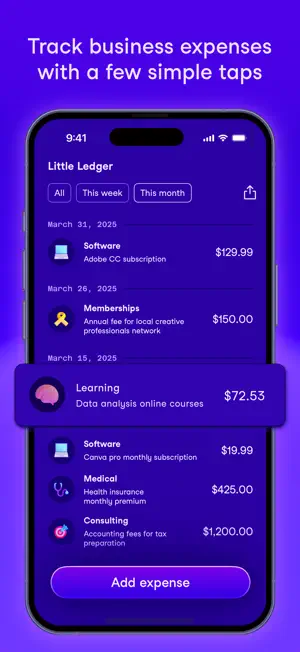
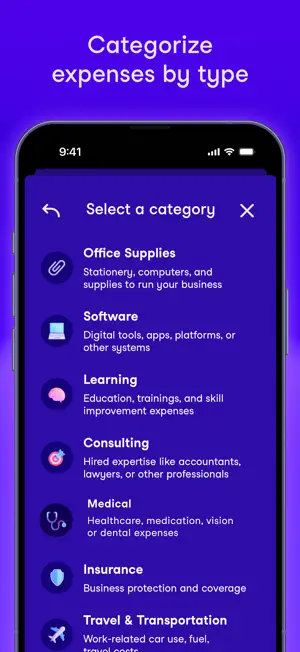
As a freelancer, if you want to get more money back in your wallet, expense tracking is a crucial step toward lowering your taxable income. But expense tracking is tiresome: it requires going through your various accounts, hunting down details about what was purchased and how it relates to your business. It's usually the last thing we want to do (or have time for). Automated systems can make this easier, but they often come at the risk of your financial privacy and security. These problems are solved through Little Ledger. The simple, straightforward design allows for logging new expenses on-the-go, wherever and whenever. With all your expenses in one place, Little Ledger is the perfect companion for your bookkeeping routine. With Little Ledger, you can: 1. Log new business expenses, including details like the amount and a description of what the expense is 2. Organize expenses by pre-populated tax-deductible categories, including office supplies, software, professional memberships, learning and education, and more 3. View all expenses in a easy-to-scan list, organized by date For self-employed freelancers, those running a side hustle, or business owners who are just starting out, we hope Little Ledger will support your bookkeeping habits and make your tax season easier.
Ratings & reviews
4.7
6 ratings
What’s new
Version 1.2 · Updated March 16, 2025
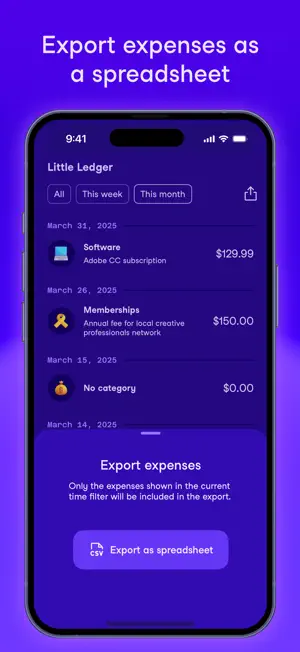
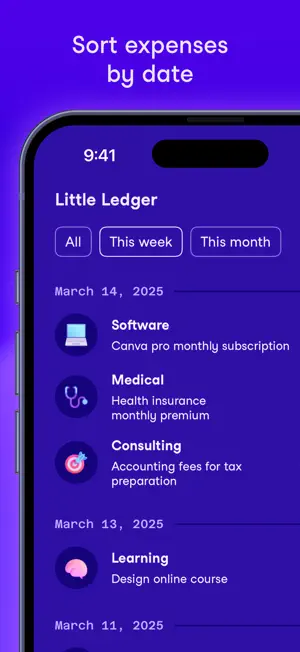
Date filtering: You can now focus on expenses from specific time periods with the new filtering options found at the top of your expenses list. Tapping a filter will update your expenses list dynamically. So if you’re reviewing your expenses on a weekly or monthly basis, or if you just want to see fewer expenses at a time, try out the new filters! Export expenses as a spreadsheet: Seamlessly integrate Little Ledger with your other accounting workflows. The new export button, found at the top right, lets you save filtered expenses as a spreadsheet file. Share directly to your computer, Google Drive, Dropbox, or any other place where you manage your finances. Your review matters: Leaving a review for Little Ledger helps me improve the app, and it also helps other freelancers and small businesses discover what the app has to offer. If you see the prompt show up, I encourage you to leave a review. (You can leave a new review with each version update!)
App privacy
The developer, Nicole Garcia, reported these privacy practices to Apple.
Data Not Collected
The developer does not collect any data from this app.
Alternatives to Little Ledger
Looking for apps like Little Ledger? Here are 6 similar apps on the App Store. The highest rated is My Ledger: Modern Budgeting (5.0/5), and all 6 are free to download.
-
 BeanGo: Beancount Ledger
-
 My Ledger: Modern Budgeting
5.0
My Ledger: Modern Budgeting
5.0
-
 Clear Ledger App
-
 Mduyen Ledger
5.0
Mduyen Ledger
5.0
-
 Mizentra: Small Biz Accounting
-
 PocketLedger: Track Expenses
| App | Rating | Price | Last updated | Compare |
|---|---|---|---|---|
| Little Ledger | 4.7 / 5 (6 ratings) | Free | March 16, 2025 | |
| BeanGo: Beancount Ledger | – | Free | Mar 25, 2026 | Compare |
| My Ledger: Modern Budgeting | 5.0 / 5 (1) | Free | Oct 21, 2026 | Compare |
| Clear Ledger App | – | Free | Feb 17, 2026 | Compare |
| Mduyen Ledger | 5.0 / 5 (1) | Free | Sep 25, 2026 | Compare |
| Mizentra: Small Biz Accounting | – | Free | Sep 26, 2026 | Compare |
| PocketLedger: Track Expenses | – | Free | Mar 24, 2026 | Compare |
Compare Little Ledger with the top alternatives: ratings, updates, ASO score and keyword gaps →