

Key Moments – Video Bookmarks
Andre Bohna Photo & Video iPhoneiPadiPod touchMac
Key Moments – Video Bookmarks is a free Photo & Video app for iPhone and iPad by Andre Bohna. Requires iOS 18. Updated October 14, 2026.
- Price
- Free
- on the App Store
- Size
- 11 MB
- Age 4+
- Updated
- Oct 14
- 2026 · v2.4.1
Screenshots

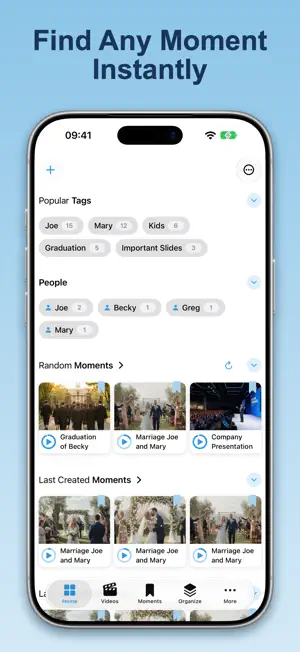


About Key Moments – Video Bookmarks
Jump to any moment in your videos in 1 tap. No more scrubbing. No more guessing. Key Moments lets you save exact scenes as visual bookmarks — and instantly jump back to them anytime. — HOW IT WORKS 1. Watch Play your video in the built-in player. 2. Save Tap once to capture the exact moment as a visual bookmark. 3. Jump back Tap the screenshot to instantly return to that moment. — WHY IT'S FASTER • Visual Video Bookmarks Screenshots aren't just images — they're precise entry points into your video. • Scenes Mark and name whole segments as you watch — then replay, loop, or export them as standalone clips. Scenes show right on the player timeline and in their own tab. • One-Tap Capture Save the perfect frame instantly, without interrupting playback. • Smart Organization Tags and smart folders automatically keep your moments organized. • Powerful Home Tab Jump straight to your most watched and recently played moments. • AirPlay Support Stream to Apple TV while keeping full playback control on your device. • Backup & Restore Export your entire library and import it on any device. • Sync Across Devices Your videos and moments stay in sync on iPhone, iPad, and Mac via iCloud. • Private by Design No cloud. No uploads. Your videos stay on your device. • Beautiful Themes Choose from Default, Lavender, Sage, or Rose. — PERFECT FOR • Learning — revisit explanations instantly • Personal videos — relive your best moments • Work — bookmark key points in meetings • Creators — mark scenes before editing — Save it once. Jump back anytime. Available on iPhone, iPad, and Mac. Terms of Use: https://getkeymoments.com/terms.html
What’s new
Version 2.4.1 · Updated October 14, 2026
New in this version: • iPhone Duo support — Key Moments adapts to the cover display, and when you stand the phone up, your video plays above the fold while the controls sit below it • Optimised for iPad — a roomier layout that uses the full screen • Variable grid size — choose how large your video and moment previews appear, from the ••• menu on any grid • Optional titles — show a video's title when playback starts, and a moment's title while it plays. Turn it on in Settings • Export to Mac — send a video to your Mac with its title, tags and moments in a JSON file beside it, and get all of it back when you bring one in • Fixes to moment gallery order and scrolling, and general performance improvements
App privacy
The developer, Andre Bohna, reported these privacy practices to Apple.
Data Not Collected
The developer does not collect any data from this app.
Alternatives to Key Moments – Video Bookmarks
Looking for apps like Key Moments – Video Bookmarks? Here are 6 similar apps on the App Store.
-
 NGXSP Video
-
 VoxaVerse Beacon
-
 ScribbleView
-
 Video Highlights — Momently
-
 VisuMarc: Video Collection
-
 Moments Pick: Video to Photo
| App | Rating | Price | Last updated | Compare |
|---|---|---|---|---|
| Key Moments – Video Bookmarks | – | Free | October 14, 2026 | |
| NGXSP Video | – | Free | Oct 14, 2026 | Compare |
| VoxaVerse Beacon | – | Free | Aug 27, 2026 | Compare |
| ScribbleView | – | 1.99 USD | Jan 14, 2026 | Compare |
| Video Highlights — Momently | – | Free | Oct 12, 2026 | Compare |
| VisuMarc: Video Collection | – | Free | Oct 29, 2026 | Compare |
| Moments Pick: Video to Photo | – | Free | Aug 27, 2026 | Compare |