

Spectro - Video Compressor
Mengke WANG Photo & Video iPhoneiPadiPod touch
Spectro - Video Compressor is a free Photo & Video app for iPhone and iPad by Mengke WANG. Rated 5.0/5 from 4 ratings. Requires iOS 16.0.
- Rating
- 5.0
- 4 ratings
- Price
- Free
- on the App Store
- Size
- 28 MB
- Age 4+
- Updated
- Aug 4
- 2025 · v1.2.0
Screenshots


About Spectro - Video Compressor
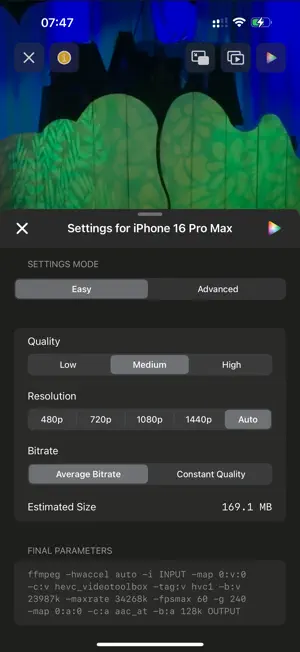
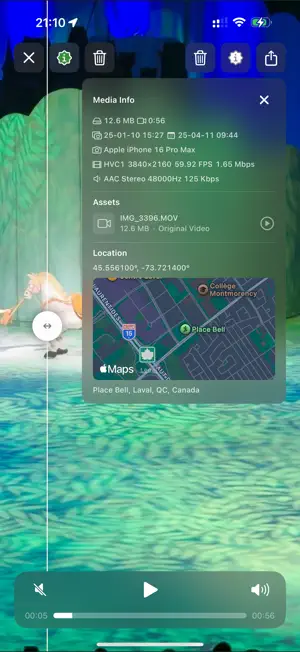
Spectro is the ultimate video compression tool designed to help you maximize storage space without sacrificing quality. Key features include: • Smart Bitrate Optimization – Analyzes video content to determine the optimal bitrate, significantly reducing file sizes. • Hardware Acceleration – Utilizes Apple’s media engine for fast compression, support Average Bitrate mode and Constant Quality mode. • Advanced Encoding Algorithms – Preserves critical details while efficiently compressing less essential areas. • Intuitive Video Management – Easily browse, organize, and sort videos with comprehensive file details. • Advanced Playback Features – Supports Picture-in-Picture, autoplay, zoom control, lock screen playback, Apple Watch support, Kiosk read-only mode, and keyboard shortcuts. • Metadata and Resource Viewer – Inspect all metadata and sub-resources of a video, play each resource individually, including hidden originals. • Task Queue – Batch compress multiple videos, perfect for overnight processing. • Multi-Device Support – Monitor compression progress across all Apple devices, view progress from your iPhone, and remotely manage tasks. • Quality Comparison – Compare compressed videos with originals to check visual and audio quality, and easily manage or delete original files. • Privacy First – Built-in privacy protection with Face ID/Touch ID support for photo library access. Whether you're a professional video creator or an everyday user, Spectro provides an efficient, reliable solution for video compression and management. Download now and start saving storage space! Terms of Use (EULA): https://www.apple.com/legal/internet-services/itunes/dev/stdeula/
What’s new
Version 1.2.0 · Updated August 4, 2025
New features: • Multi-select Mode: The Delete button is now a menu for batch management. • Cleaned Tasks Queue: Swipe or tap left/right keys to quickly switch between videos. Improvements • Device Picker: Displays the number of videos while editing. • Library View: A favorite icon is now shown for favorited videos. • Queues: Video file names are now displayed in the task queues. Fixes • Fixed an issue where the same video might be compressed twice. • Video thumbnails and metadata will be updated when video is edited outside the app. • Deleted tasks are now hidden if their associated compressed videos are also deleted. • Prevented misleading completion notifications when a task is cancelled. • Resolved an issue that sometimes showed incorrect video resolutions (e.g., 4K, 2K, FHD, HD, SD). • Fixed several potential crash scenarios.
App privacy
The developer, Mengke WANG, reported these privacy practices to Apple.
Data Not Collected
The developer does not collect any data from this app.
Alternatives to Spectro - Video Compressor
Looking for apps like Spectro - Video Compressor? Here are 6 similar apps on the App Store. The highest rated is OnClip: Teleprompter for Video (4.9/5), and all 6 are free to download.
-
 X2D GPS Companion
-
 Sorter: Photo Manager Pro
4.8
Sorter: Photo Manager Pro
4.8
-
 Swan Cam – AI Film Camera
4.2
Swan Cam – AI Film Camera
4.2
-
 Conflux - Video Player
4.2
Conflux - Video Player
4.2
-
 PhotonCam: Pro Camera & Editor
4.7
PhotonCam: Pro Camera & Editor
4.7
-
 OnClip: Teleprompter for Video
4.9
OnClip: Teleprompter for Video
4.9
| App | Rating | Price | Last updated | Compare |
|---|---|---|---|---|
| Spectro - Video Compressor | 5.0 / 5 (4 ratings) | Free | August 4, 2025 | |
| X2D GPS Companion | – | Free | Feb 8, 2026 | Compare |
| Sorter: Photo Manager Pro | 4.8 / 5 (22) | Free | Oct 20, 2026 | Compare |
| Swan Cam – AI Film Camera | 4.2 / 5 (16) | Free | Oct 19, 2026 | Compare |
| Conflux - Video Player | 4.2 / 5 (67) | Free | Oct 24, 2026 | Compare |
| PhotonCam: Pro Camera & Editor | 4.7 / 5 (59) | Free | Oct 30, 2026 | Compare |
| OnClip: Teleprompter for Video | 4.9 / 5 (66) | Free | Oct 22, 2026 | Compare |