

Cloud Pinyin: Convert Chinese
Michael Chin Reference iPhoneiPadiPod touch
Cloud Pinyin: Convert Chinese is a free Reference app for iPhone and iPad by Michael Chin. Rated 5.0/5 from 3 ratings. Requires iOS 18.0.
- Rating
- 5.0
- 3 ratings
- Price
- Free
- on the App Store
- Size
- 87 MB
- Age 4+
- Updated
- Jul 6
- 2026 · v1.7.2
Screenshots
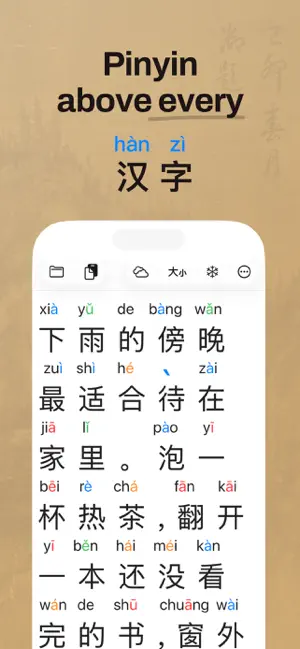


About Cloud Pinyin: Convert Chinese
Convert Chinese text to Pinyin — instantly, right in the editor. Paste, Share, or type hanzi and see real-time Pinyin above every character, or copy the romanization out to use anywhere. Read, practice, and review faster with live pronunciation guidance while you edit. Works with both Simplified and Traditional Chinese — and converts between them, too. FEATURES • Hanzi → Pinyin — Convert any Chinese text to pinyin, then copy the romanization out to use in other apps. • Live Pinyin Overlays — Instant pronunciation guidance while you edit. • Tone Colors — Tint tone-bearing vowels and tone marks with a configurable color scheme so each of the four tones is recognizable at a glance. • Simplified ↔ Traditional — Convert between Simplified and Traditional Chinese with one tap. Auto-detects the direction from your text. • Share Extension — Import text from Safari, PDFs, images, and other apps. Preview with pinyin annotations before importing. Includes OCR support. • Clipboard History — Paste from recent clipboard entries with a single tap. Long-press for insert options on longer text. Copy Pinyin text to your clipboard for use in other apps. • Clipboard Suggestions — Automatically detects Chinese text on your clipboard and offers to paste it. • Freeze Mode — Override display settings for selected text to always show pinyin, tone, or hide overlays. • Adjustable Text Size — Tune character and Pinyin size for comfortable reading. • Text Formatting — Emphasize text with bold, underline, and highlight. Formatting carries through to pinyin overlays. • Undo/Redo — Conveniently available on the keyboard toolbar. PLUS FEATURES • Smart Pinyin — More accurate, context-aware Pinyin using word segmentation and tone sandhi rules. • Reading Aids — Word Spacing groups each word and joins its pinyin (西安 → Xi'an), Erhua shows r-suffixed words (哪儿 → nǎr), and Fade Grammar Words dims particles and measure words so content words stand out. • Smart Conversion — Word-aware Simplified → Traditional that picks the right character for the meaning (e.g., 头发 → 頭髮). • Freeze List — Set global per-character pinyin overrides that apply across all your documents. Sort entries the way you study. • Unlimited Documents — Save texts to revisit and study later. Everyone gets 3 documents free; PLUS removes the cap. • iCloud Sync — Access your documents across all your devices. PLUS is available via subscription or a one-time lifetime purchase. Whether you're learning, teaching, or reviewing, Cloud Pinyin keeps practice focused in a clean, distraction-free editor. Available in English, Simplified Chinese (简体中文), Traditional Chinese (繁體中文), Korean (한국어), and Vietnamese. Privacy: Cloud Pinyin collects anonymous usage analytics via TelemetryDeck. No personal information or user content is collected. See our full privacy policy at https://mikechin.github.io. Terms (EULA): https://www.apple.com/legal/internet-services/itunes/dev/stdeula/
What’s new
Version 1.7.2 · Updated July 6, 2026
3 Free Documents - Save up to 3 documents without a subscription - PLUS unlocks unlimited documents with iCloud sync New Reading Aids (PLUS) - Word Spacing — characters of the same word sit closer together, and the word's pinyin joins into one label (西安 → Xi'an) - Erhua — show 儿化 words with their r-suffix (哪儿 → nǎr), or spell 儿 out as ér - Fade Grammar Words — dim particles (的, 了, 吗) and measure words so content words stand out Per-Document Formatting - Smart Pinyin, Tone Sandhi, Word Spacing, Erhua, and Fade Grammar Words now save with each document - Every document keeps its exact look, and your settings become the default for new ones Polish & Performance - Simplified ↔ Traditional conversion confirms in a cleaner sheet, with "Don't ask again" - Pinyin and tone marks are precisely centered over their characters - Smoother, faster pinyin updates while editing long documents - More accurate word segmentation for compound words - Redesigned PLUS plans screen with one-tap plan selection
App privacy
The developer, Michael Chin, reported these privacy practices to Apple.
Data Not Linked to You
The following data, which may be collected but is not linked to your identity, may be used for the following purposes:
- Usage Data: Product Interaction
Used for: Analytics
Alternatives to Cloud Pinyin: Convert Chinese
Looking for apps like Cloud Pinyin: Convert Chinese? Here are 6 similar apps on the App Store. The highest rated is Learn Chinese: Pinyin Keyboard (5.0/5), and all 6 are free to download.
-
 Chinese To Pinyin - Un
4.0
-
 Chinese Pinyin LearningMachine
4.7
-
 Learn Chinese: Pinyin Keyboard
5.0
-
 Mandarin Chinese Pinyin
5.0
-
 Coco : Read & Learn Chinese
5.0
-
 Chinese Mandarin Handwriting
4.9
| App | Rating | Price | Last updated | Compare |
|---|---|---|---|---|
| Cloud Pinyin: Convert Chinese | 5.0 / 5 (3 ratings) | Free | July 6, 2026 | |
| Chinese To Pinyin - Un | 4.0 / 5 (1) | Free | Jun 26, 2025 | Compare |
| Chinese Pinyin LearningMachine | 4.7 / 5 (15) | Free | Aug 3, 2026 | Compare |
| Learn Chinese: Pinyin Keyboard | 5.0 / 5 (7) | Free | Sep 23, 2026 | Compare |
| Mandarin Chinese Pinyin | 5.0 / 5 (1) | Free | Apr 5, 2026 | Compare |
| Coco : Read & Learn Chinese | 5.0 / 5 (5) | Free | Oct 28, 2026 | Compare |
| Chinese Mandarin Handwriting | 4.9 / 5 (43) | Free | Oct 27, 2026 | Compare |