

Zultron
Nicholas Payton Productivity iPhoneiPadiPod touch
Zultron is a free Productivity app for iPhone and iPad by Nicholas Payton. Requires iOS 18.2. Updated December 14, 2025.
- Price
- Free
- on the App Store
- Size
- 39 MB
- Age 4+
- Updated
- Dec 14
- 2025 · v2.5
Screenshots

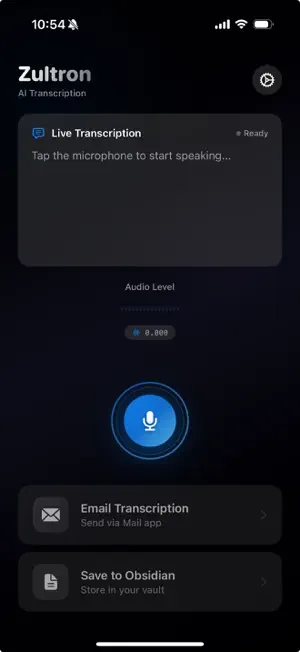
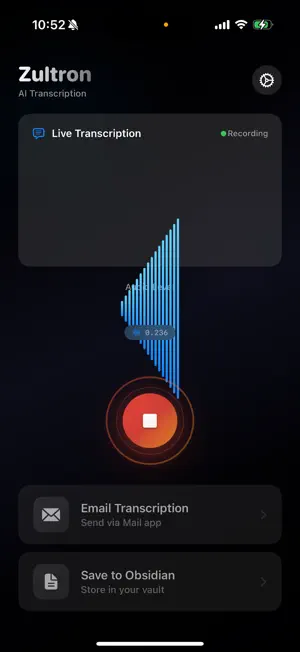
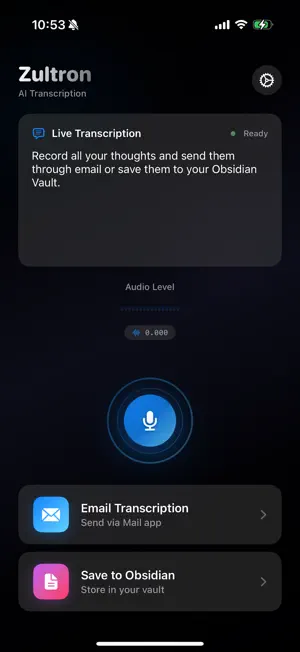
About Zultron
Description: Transform your voice into seamless, organized notes with Zultron! This intuitive app allows you to transcribe your thoughts and ideas effortlessly. Whether you're brainstorming, recording a lecture, or simply capturing quick notes, Zultron ensures your words are accurately transcribed and ready to share or save. Key Features: - Voice Transcription: Record your voice and watch as it’s instantly converted into text with high accuracy. - Markdown Formatting: Save your transcriptions in Markdown format for compatibility with Obsidian and other note-taking apps. - Easy Sharing: Email your transcriptions with just a tap, making collaboration and sharing quick and hassle-free. - Obsidian Vault Integration: Directly save your notes to your Obsidian Vault for easy access and organization. - User-Friendly Interface: Simple and elegant design ensures a smooth experience for everyone. Why Choose Zultron? - Accuracy: Powered by advanced voice recognition technology, delivering precise transcriptions every time. - Efficiency: Streamline your workflow by saving and sharing notes effortlessly. - Versatility: Perfect for professionals, students, and anyone who values productivity and organization. How It Works: 1. Open the app 2. Set your Obsidian Vault path if applicable (requires iCloud Vault storage) 3. Press the record button. 4. Speak naturally as the app transcribes your words. 5. Preview the text and choose your next step: - Send it via email. - Save it directly to your Obsidian Vault in Markdown format. Take control of your notes and ideas like never before. Download Zultron today and experience the ease of turning your voice into actionable text!
What’s new
Version 2.5 · Updated December 14, 2025
Transcription History: All your transcriptions are now automatically saved Search through past transcriptions by title or content - Filter by template type (General, Meeting, Journal, Ideas) - Swipe to delete or mark favorites - Tap any transcription to view, edit, or re-export Smart Templates: Choose how to format your transcriptions - General - Clean, simple format - Meeting Notes - With sections for attendees, action items, and follow-ups - Journal Entry - Personal reflection format with gratitude prompts - Idea Capture - Brainstorming format with next steps Quick Actions: - New Copy button for instant clipboard access - New Share button to send transcriptions anywhere - Messages, Notes, Slack, and more
App privacy
The developer, Nicholas Payton, reported these privacy practices to Apple.
MZStorePlatform.privacyNutritionLabels.protectionCategory.DATA_NOT_COLLECTED.title
MZStorePlatform.privacyNutritionLabels.protectionCategory.DATA_NOT_COLLECTED.detailsDescription
Alternatives to Zultron
Looking for apps like Zultron? Here are 6 similar apps on the App Store. The highest rated is Lines | Beyond Notes (4.3/5), and all 6 are free to download.
-
 SnapTap for Widgets & Control
-
 Thinking Hats
-
 HopPT
HopPT
-
 ADHD Focus Friend :TwinMind
1.0
ADHD Focus Friend :TwinMind
1.0
-
 Lines | Beyond Notes
4.3
Lines | Beyond Notes
4.3
-
 Print(Notes)
4.0
Print(Notes)
4.0
| App | Rating | Price | Last updated | Compare |
|---|---|---|---|---|
| Zultron | – | Free | December 14, 2025 | |
| SnapTap for Widgets & Control | – | Free | Sep 29, 2024 | Compare |
| Thinking Hats | – | Free | Dec 22, 2024 | Compare |
| HopPT | – | Free | Dec 13, 2025 | Compare |
| ADHD Focus Friend :TwinMind | 1.0 / 5 (1) | Free | Apr 13, 2026 | Compare |
| Lines | Beyond Notes | 4.3 / 5 (6) | Free | Jun 17, 2024 | Compare |
| Print(Notes) | 4.0 / 5 (4) | Free | May 11, 2026 | Compare |
Compare Zultron with the top alternatives: ratings, updates, ASO score and keyword gaps →