

DocMatic: Document Scanner
Paul Roden II Productivity iPhoneiPadiPod touch
DocMatic: Document Scanner is a free Productivity app for iPhone and iPad by Paul Roden II. Rated 5.0/5 from 2 ratings. Requires iOS 18.2.
- Rating
- 5.0
- 2 ratings
- Price
- Free
- on the App Store
- Size
- 54 MB
- Age 4+
- Updated
- Sep 14
- 2025 · v2.1.0
Screenshots



About DocMatic: Document Scanner
DocMatic: The Smarter Way to Scan Documents Turn your iPhone or iPad into a powerful document scanner with DocMatic. Whether you’re scanning receipts, forms, notes, or full reports, DocMatic makes it fast, secure, and intuitive. Key Features: - Fast & Easy Scanning: Capture high-quality scans effortlessly—no extra equipment needed. - Multi-Page PDFs: Scan multiple pages and combine them into a single, clean PDF. - Biometric Security: Use Face ID or Touch ID to lock sensitive scans for added privacy. - Import from Anywhere You Work: Bring in existing PDFs from the Files app, import from a website URL, or use drag & drop for even faster workflow. - Document Preview & Editing: Crop, rotate, and enhance scans before saving or sharing—right from the preview. - Seamless Sharing: Export documents as PDFs and share via email, messages, AirDrop, or save directly to the Files app. Note: DocMatic requires access to your device's camera for functionality.
What’s new
Version 2.1.0 · Updated September 14, 2025
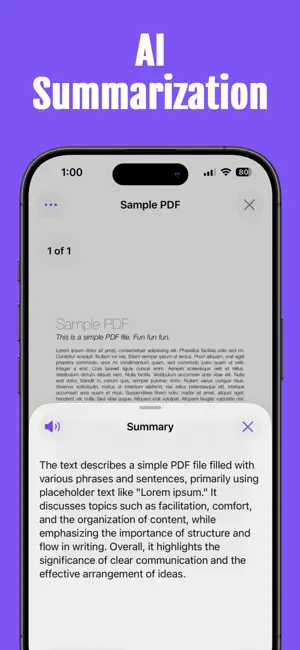
Thank you for using DocMatic! This app update includes: What's New: - Optimized for iOS 26. - Profile images: add your own photo or design a profile image with Image Playground. - Redesigned document view UI for a more polished and intuitive experience. - AI Summarized information about your document. Bug Fixes: - Minor fixes and stability improvements. We’re always working to make DocMatic better—thank you for being part of the journey! Have questions or feedback? Reach out to us anytime at [email protected]
App privacy
The developer, Paul Roden II, reported these privacy practices to Apple.
Data Linked to You
The following data, which may be collected and linked to your identity, may be used for the following purposes:
- Contact Info: Email Address, Name
- Identifiers: User ID
Used for: App Functionality
Data Not Linked to You
The following data, which may be collected but is not linked to your identity, may be used for the following purposes:
- Diagnostics: Crash Data, Other Diagnostic Data
- Other Data: Other Data Types
- Purchases: Purchase History
- Identifiers: Device ID
Used for: Analytics, App Functionality
Alternatives to DocMatic: Document Scanner
Looking for apps like DocMatic: Document Scanner? Here are 6 similar apps on the App Store. The highest rated is Voti: HIPAA AI Medical Scribe (5.0/5), and all 6 are free to download.
-
 Voti: HIPAA AI Medical Scribe
5.0
-
 StuffKit
-
 Lite PDF Reader
-
 B L and Company
-
 AllDocs - Document Viewer
-
 BLE Scanner – Find Devices
| App | Rating | Price | Last updated | Compare |
|---|---|---|---|---|
| DocMatic: Document Scanner | 5.0 / 5 (2 ratings) | Free | September 14, 2025 | |
| Voti: HIPAA AI Medical Scribe | 5.0 / 5 (2) | Free | Jun 9, 2026 | Compare |
| StuffKit | – | Free | Aug 21, 2025 | Compare |
| Lite PDF Reader | – | Free | Mar 17, 2026 | Compare |
| B L and Company | – | Free | Sep 12, 2025 | Compare |
| AllDocs - Document Viewer | – | Free | Jun 25, 2026 | Compare |
| BLE Scanner – Find Devices | – | Free | Jun 25, 2026 | Compare |