

Signal Swift
A2Z FG Corp Finance iPhoneiPadiPod touch
Signal Swift is a free Finance app for iPhone and iPad by A2Z FG Corp. Requires iOS 15.0. Updated October 19, 2026.
- Price
- Free
- on the App Store
- Size
- 132 MB
- Age 17+
- Updated
- Oct 19
- 2026 · v2027.0.55
Screenshots


About Signal Swift
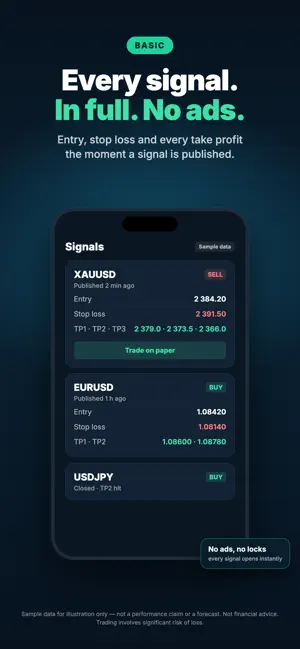
Signal Swift places the forex signals you follow on the MetaTrader account you already own — entry, stop loss and take profits set for you, automatically. No broker account yet? Trade every signal on paper first and build a record scored against funded-challenge rules. PREMIUM — AUTO COPY TO YOUR MT4/MT5 Everything in Basic, plus: • Connect the MT4 or MT5 account you opened with your own broker • Auto Copy: the signals you follow are placed on it automatically, stop loss and take profits included • Signal updates (stop moved, target hit, signal closed) are applied to the positions they opened • Risk Manager: choose your volume and see what each target is worth before anything is sent • Manual Trade and Paste Signal: place any setup live in a few taps, limit orders included • Signal Backtester: paste a signal and see how its setup would have behaved over the last 12 months • Get notified when a position hits its TP or SL BASIC — EVERY SIGNAL, ON PAPER • Every signal opens in full as soon as it is published: entry, stop loss, every take profit — no ads • Paper Trading: follow any signal, or place your own Manual and Paste trades, with no broker and no money at risk • Your paper record is scored live against a two-step funded-challenge rule set: profit target, max daily loss, max total loss, minimum trading days • See which rule you are passing, and which one would have ended your run • Once your record passes, the funded-account challenge (FTMO) is one tap away FREE • Browse the signal history and the results of closed signals ALSO IN THE APP • AI Trade Journal coaching after closed trades • PnL, TP statistics, streaks and trade history in one place HOW IT WORKS 1) Browse the signals and how they closed 2) Go Basic to open every signal and trade it on paper 3) Go Premium and connect MT4/MT5 to have the signals you follow placed for you SUBSCRIPTIONS Basic and Premium are auto-renewing subscriptions. Payment is charged to your Apple Account and the subscription renews unless cancelled at least 24 hours before the end of the current period. Manage or cancel it anytime in your Apple Account settings. IMPORTANT Trading involves significant risk of loss and is not suitable for all investors. Past performance does not guarantee future results. Stop losses are not guaranteed: gaps and slippage can fill an order beyond its level. Signal Swift is trade-automation software, not a broker: it offers no financial instrument, holds no funds and takes no commission on trades. Orders are sent only to the MetaTrader account you opened yourself with your own broker, and that broker decides which markets are available to you. Signal Swift provides market signals and software tools for informational purposes only. This is not financial advice. Signal Swift does not provide brokerage services, investment recommendations, or custody of funds. Always consult a qualified financial advisor before trading. Funded-account challenges are run by independent third parties, not by Signal Swift. Signal Swift is not affiliated with or endorsed by FTMO, and links to their challenge are affiliate links. Passing the paper record in the app does not guarantee passing a real challenge, and these challenges are not available in every country, including the United States. LINKS Privacy Policy: https://www.signal-swift.com/privacy-policy.html Terms & Conditions: https://www.signal-swift.com/terms.html Support: [email protected]
What’s new
Version 2027.0.55 · Updated October 19, 2026
What's new: • Signing up with Google or Apple is fixed. • A simpler setup: your risk, your alerts, then today's signal — and your 72 h of Basic start on their own. • The end-of-Discovery banner is now translated into every language. • Fixes and reliability improvements.
App privacy
The developer, A2Z FG Corp, reported these privacy practices to Apple.
Data Not Linked to You
The following data, which may be collected but is not linked to your identity, may be used for the following purposes:
- Purchases: Purchase History
- Identifiers: User ID, Device ID
- Usage Data: Product Interaction
- Diagnostics: Crash Data
- Contact Info: Email Address
- User Content: Customer Support
Used for: Analytics, App Functionality
Alternatives to Signal Swift
Looking for apps like Signal Swift? Here are 6 similar apps on the App Store. The highest rated is FundMeUp Ai (5.0/5), and all 6 are free to download.
-
 FundSmart by Fun Digital Data
-
 OctopusTerminal
-
 Pipsy: Trading Coach & Signals
-
 FundMeUp Ai
5.0
-
 Dashing Crypto: USDT Wallet
5.0
-
 Sacred Bot
| App | Rating | Price | Last updated | Compare |
|---|---|---|---|---|
| Signal Swift | – | Free | October 19, 2026 | |
| FundSmart by Fun Digital Data | – | Free | Oct 20, 2026 | Compare |
| OctopusTerminal | – | Free | May 1, 2026 | Compare |
| Pipsy: Trading Coach & Signals | – | Free | Sep 25, 2026 | Compare |
| FundMeUp Ai | 5.0 / 5 (5) | Free | Apr 12, 2026 | Compare |
| Dashing Crypto: USDT Wallet | 5.0 / 5 (1) | Free | Oct 12, 2026 | Compare |
| Sacred Bot | – | Free | Sep 10, 2026 | Compare |
Compare Signal Swift with the top alternatives: ratings, updates, ASO score and keyword gaps →