

Collagio: Photo Collage Editor
Oh Nice AB Graphics & Design iPhoneiPadiPod touch
Collagio: Photo Collage Editor is a free Graphics & Design app for iPhone and iPad by Oh Nice AB. Requires iOS 15.1. Updated October 11, 2025.
- Price
- Free
- on the App Store
- Size
- 150 MB
- Age 4+
- Updated
- Oct 11
- 2025 · v0.1.16
Screenshots

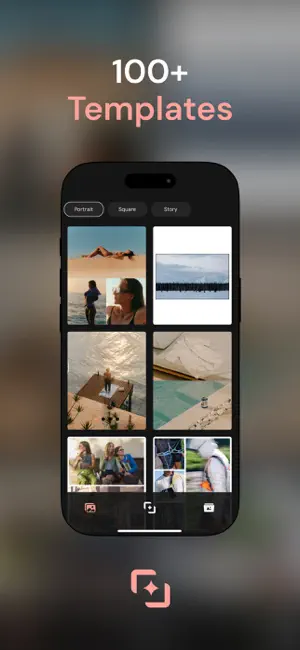


About Collagio: Photo Collage Editor
Collagio is the revolutionary app that transforms the way you create, share, and enjoy your photos. With advanced features powered by cutting-edge technology, collagio turns your images into something extraordinary—whether you’re a casual photographer or a creative enthusiast. Originally crafted by a passionate team of developers (who still love using it every day!), collagio is designed to help you capture, enhance, and organize your precious memories, all in one easy-to-use platform. Whether you're looking to create stunning collages, add text to your photos, or share your picture-perfect moments on social media, collagio has everything you need to make your photos shine. → collagio’s standout features include… • Easy-to-use image editor: Transform your photos with powerful editing tools that let you crop, adjust, and apply filters with ease. You can also apply text to your photos, adding a personal touch with fonts, sizes, and colors. • Stunning photo collages: Create beautiful photo collages with our variety of templates and design options. Whether you're showcasing a special event or a collection of memories, collagio makes it easy to put together stunning collages. • Creative filters and frames: Experiment with a wide range of filters and frames to enhance your images. From vintage vibes to modern styles, you can easily add personality to your photos. • Instagram carousel maker: Create engaging carousels for Instagram that capture attention. Simply select your photos, arrange them, and let collagio automatically format them for Instagram’s carousel feature. • Customizable photo layouts: Organize your photos into clean, stylish layouts, perfect for sharing on social media or saving as keepsakes. Choose from a variety of layouts that suit your unique style. • Fun stickers and text overlays: Add stickers, text overlays, and fun elements to your photos, making every image more engaging and unique. Perfect for creating personalized greeting cards, invitations, or social media posts. • Seamless sharing: Once your photos are ready, share them directly to social media platforms or save them to your gallery. collagio makes sharing your photos easy and hassle-free. — At collagio, we’re proud to offer an all-in-one photo experience that is both powerful and fun. But don’t just take our word for it—here’s what our users have to say about it: ""collagio is my go-to photo app! I love how easy it is to create collages and add text to my images. The filters and frames are amazing!"" ""This app has transformed the way I share photos. The carousel feature for Instagram is so helpful, and the editor is top-notch. Highly recommend!"" ""I’m obsessed with collagio! The photo layouts are perfect for creating stories and sharing memories. I can't believe how much more professional my photos look."" ""I’ve tried a lot of photo editing apps, but collagio is by far the best. It’s user-friendly and the results are always impressive. Worth every penny!"" ""Love the stickers and text overlays! They make my photos so much more fun and creative. It's like having a mini photo studio right on my phone."" ""This app has everything I need to edit and share my photos. The collage creator is amazing, and I can quickly post to Instagram without any hassle."" ""A game-changer for anyone who loves photography! The variety of editing tools and creative features make this app a must-have."" ""The customer support is great too. I had a question about one of the features, and they responded quickly and helped me out. Really appreciate the service!"" So why wait? Download collagio today and unlock your photo potential! Whether you're editing, creating, or sharing, collagio is the perfect tool to bring your images to life."
What’s new
Version 0.1.16 · Updated October 11, 2025
- Improved UX design
App privacy
The developer, Oh Nice AB, reported these privacy practices to Apple.
Data Used to Track You
The following data may be used to track you across apps and websites owned by other companies:
- Usage Data: Product Interaction
Data Not Linked to You
The following data, which may be collected but is not linked to your identity, may be used for the following purposes:
- Usage Data: Product Interaction
- Diagnostics: Crash Data
Used for: Analytics, App Functionality
Alternatives to Collagio: Photo Collage Editor
Looking for apps like Collagio: Photo Collage Editor? Here are 6 similar apps on the App Store. The highest rated is Highlight Cover Maker・Story (5.0/5), and all 6 are free to download.
-
 Carousel Collage Maker
4.4
-
 Luminar Collage Photo Maker
2.0
-
 CRSL Carousel Insta Post Maker
4.4
-
 SWVY: Seamless Carousel Maker
4.6
-
 Highlight Cover Maker・Story
5.0
-
 AIbrush - AI Art Generator
3.5
| App | Rating | Price | Last updated | Compare |
|---|---|---|---|---|
| Collagio: Photo Collage Editor | – | Free | October 11, 2025 | |
| Carousel Collage Maker | 4.4 / 5 (139) | Free | Oct 22, 2024 | Compare |
| Luminar Collage Photo Maker | 2.0 / 5 (4) | Free | Jun 2, 2025 | Compare |
| CRSL Carousel Insta Post Maker | 4.4 / 5 (9) | Free | May 23, 2026 | Compare |
| SWVY: Seamless Carousel Maker | 4.6 / 5 (20) | Free | Sep 10, 2026 | Compare |
| Highlight Cover Maker・Story | 5.0 / 5 (12) | Free | Apr 7, 2024 | Compare |
| AIbrush - AI Art Generator | 3.5 / 5 (49) | Free | Aug 25, 2025 | Compare |