

Expenses Excel
Vladyslav Tkachenko Finance iPhoneiPadiPod touch
Expenses Excel is a free Finance app for iPhone and iPad by Vladyslav Tkachenko. Requires iOS 15.5. Updated September 9, 2026.
- Price
- Free
- on the App Store
- Size
- 83 MB
- Age 4+
- Updated
- Sep 9
- 2026 · v2.11.0
Screenshots

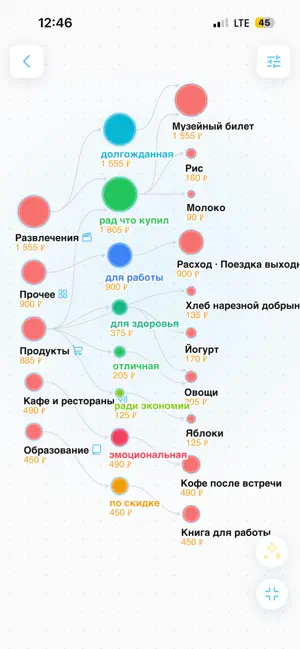
About Expenses Excel
Expenses — a fast and simple expense tracker. Add an item by entering a name and amount, or just take a photo of a receipt — the app will fill in the rest automatically. QUICK ENTRY • Two fields: name and amount. Tap "Add", enter the next one, repeat. • Popular items are suggested with one tap based on past entries. • Save a batch of items in one action — no forced categories or long forms. RECEIPT SCANNING • Open the scanner, take a photo of the receipt. • Built-in iOS text recognition (Apple Vision) reads the receipt directly on your device. • A language model parses the text into clean items: name, amount, category. • Review and adjust the result before saving. EXPENSE LIST • View expenses by period. • Grouped by day — see where and how much you spent. • Tap an item to edit or delete. SETTINGS • Show cents — on/off. • Dark theme. • 24 interface languages. YOUR DATA Expenses are stored on your device, not on our servers. Receipt photos are processed locally — only the recognized text (not the image) is sent to AI, without any personal data. No ads, Just a fast way to know where your money goes. Terms of Use (Apple Standard EULA): https://www.apple.com/legal/internet-services/itunes/dev/stdeula/
What’s new
Version 2.11.0 · Updated September 9, 2026
- Исправление: Использовать стабильную ручную подпись iOS - Доработка: Стабилизировать масштабирование финансового графика - Документация: Зафиксировать production-релиз 2.10.2609060804 - Доработка: Улучшить финансовый график и сценарии записи трат - Доработка: Синхронизировать физику графа до отрисовки - Доработка: Перекрасить основной интерфейсный акцент в красный - Доработка: Открывать dev-приложение через Tailscale Funnel - Улучшение: Добавлен интерактивный макет карточного финансового списка
App privacy
The developer, Vladyslav Tkachenko, reported these privacy practices to Apple.
Data Not Collected
The developer does not collect any data from this app.
Alternatives to Expenses Excel
Looking for apps like Expenses Excel? Here are 6 similar apps on the App Store. The highest rated is Expense,multi currency/account (3.3/5), and all 6 are free to download.
-
 Cut Cash – Budget & Finance
-
 ToSpend: Expense Tracker
-
 Spendise: Spending Tracker
-
 Expense,multi currency/account
3.2
Expense,multi currency/account
3.2
-
 Expense & Budget: Peggy
-
 ChequeMate: Cheque Tracker
| App | Rating | Price | Last updated | Compare |
|---|---|---|---|---|
| Expenses Excel | – | Free | September 9, 2026 | |
| Cut Cash – Budget & Finance | – | Free | Oct 12, 2026 | Compare |
| ToSpend: Expense Tracker | – | Free | Aug 8, 2026 | Compare |
| Spendise: Spending Tracker | – | Free | Jun 22, 2026 | Compare |
| Expense,multi currency/account | 3.3 / 5 (4) | Free | Jul 5, 2024 | Compare |
| Expense & Budget: Peggy | – | Free | Aug 25, 2026 | Compare |
| ChequeMate: Cheque Tracker | – | Free | Feb 13, 2026 | Compare |
Compare Expenses Excel with the top alternatives: ratings, updates, ASO score and keyword gaps →