

Speakr — AI Voice Notes
Aleksei Egin Productivity iPhoneiPadiPod touch
Speakr — AI Voice Notes is a free Productivity app for iPhone and iPad by Aleksei Egin. Rated 5.0/5 from 2 ratings. Requires iOS 15.3.
- Rating
- 5.0
- 2 ratings
- Price
- Free
- on the App Store
- Size
- 74 MB
- Age 4+
- Updated
- Oct 15
- 2026 · v1.9.2
Screenshots

About Speakr — AI Voice Notes
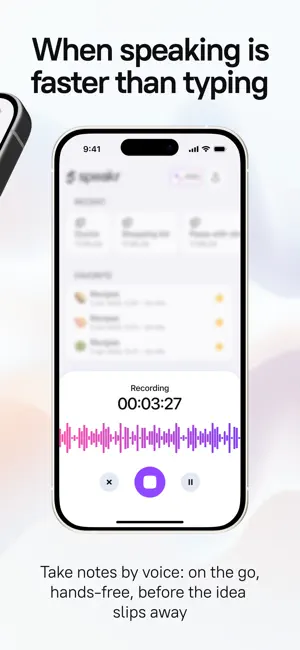
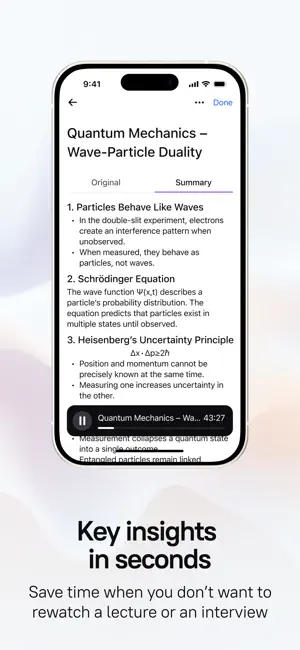
Speakr AI Note Taker: Audio and Video Transcription, Note-Taking & More Capture every moment and stay organized with Speakr—whether it’s a meeting, lecture, or video call, never miss a key detail. With powerful audio and video summaries, advanced note editing, and smart folder organization, Speakr transforms your conversations and content into actionable insights. Put Speakr to work today to summarize, edit, and organize your ideas effortlessly. KEY FEATURES OF SPEAKR Audio & Video Summaries • Summarize audio recordings from meetings, interviews, or personal notes with AI precision. Get concise takeaways instantly. • Transform video content—lectures, webinars, or calls—into clear summaries, so you focus on what matters most. Note Editing • Edit your summaries and notes with ease. Refine text, add details, or highlight priorities to make every note your own. • Perfect for students, professionals, or anyone who wants polished, actionable records.Perfect for students, professionals, or anyone who wants polished, actionable records. Intelligent Summaries • Speakr’s advanced AI technology transforms lengthy audio and video content into concise, actionable summaries. • Whether it’s a conversation, lecture, or video call, you’ll get key takeaways at a glance. • Includes organized lists, editable notes, and to-dos so you can focus on what matters most. Privacy & Security Focus • Your audio, video recordings, and notes are fully secure with Speakr. • You’re in complete control—easily export or delete your files whenever you need. • Ensures your data stays private and protected. Unlimited Recording Time • Speakr lets you record without limits, from quick voice memos to extended video sessions. • You’ll never have to worry about running out of time mid-recording. • Offers total flexibility for all your needs. Easy Organization and Sharing • Speakr’s intuitive interface simplifies categorizing and organizing recordings and summaries into custom folders. • All content is easily searchable—perfect for students, professionals, and everyday users. FLEXIBLE USE CASES For Professionals: • Delivers precise summaries of meetings and video calls. • Lets you stay engaged without scrambling to take notes. • Edit and organize them for seamless follow-ups. For Students and Educators: • Record and summarize lectures, video tutorials, or study sessions with ease. • Organize notes into folders for quick review before exams or projects. For Journalists: • Capture interviews or video footage and summarize them into editable text. • Speeds up editing and article writing. For Everyone: • Use Speakr as a digital notepad, memo recorder, or to capture key moments from calls. • Versatile and user-friendly design works for every type of user. DESIGNED FOR MAXIMUM PRODUCTIVITY Speakr streamlines your workflow: • Boost efficiency with instant audio and video summaries — no more endless replaying. • Stay in control with editable notes tailored to your needs. • Organize effortlessly with folders, making every file easy to locate and share. Get Started with Speakr Today Terms of Use: https://agreement.speakr.app/terms.html Privacy Policy: https://agreement.speakr.app/privacy_policy.html
What’s new
Version 1.9.2 · Updated October 15, 2026
• Recording no longer takes over the whole screen. Swipe the recorder down and it shrinks to a small bar that keeps listening while you read other notes or search. You can pause or stop it right from the bar. • Have a video or a voice memo worth keeping? Bring it to Speakr and you get a note back. The audio is extracted right on your device. • Add Speakr to Control Center (iOS 18 and later) and your next idea is one tap away from being recorded. You can also just ask Siri. • You remember saying it, but not which note it was in. Search now reads your transcripts too, and your notes show up in Spotlight. • If the transcript spelled a name the way it sounded, tap the passage and fix it. Same goes for any word it misheard. • Notes now export as DOCX, plain text or Markdown, not just PDF.
App privacy
The developer, Aleksei Egin, reported these privacy practices to Apple.
Data Used to Track You
The following data may be used to track you across apps and websites owned by other companies:
- Identifiers: Device ID
Data Linked to You
The following data, which may be collected and linked to your identity, may be used for the following purposes:
- Identifiers: Device ID, User ID
- Usage Data: Product Interaction
- Contact Info: Email Address, Name
- User Content: Photos or Videos, Audio Data
Used for: Developer’s Advertising or Marketing, Analytics, App Functionality
Data Not Linked to You
The following data, which may be collected but is not linked to your identity, may be used for the following purposes:
- Usage Data: Other Usage Data
- Diagnostics: Crash Data, Performance Data, Other Diagnostic Data
- Search History: Search History
Used for: Analytics, App Functionality
Alternatives to Speakr — AI Voice Notes
Looking for apps like Speakr — AI Voice Notes? Here are 6 similar apps on the App Store. The highest rated is SumApp: AI Summary Note Taker (5.0/5), and all 6 are free to download.
-
 Notiq: AI Voice to Text Notes
4.9
Notiq: AI Voice to Text Notes
4.9
-
 SumApp: AI Summary Note Taker
5.0
SumApp: AI Summary Note Taker
5.0
-
 AI영상요약: inNutShell AI
-
 Just2Done: AI Note Taker
5.0
Just2Done: AI Note Taker
5.0
-
 AI Transcribe - Voice Recorder
4.5
AI Transcribe - Voice Recorder
4.5
-
 AI Note Taker・Speech to Text
4.6
AI Note Taker・Speech to Text
4.6
| App | Rating | Price | Last updated | Compare |
|---|---|---|---|---|
| Speakr — AI Voice Notes | 5.0 / 5 (2 ratings) | Free | October 15, 2026 | |
| Notiq: AI Voice to Text Notes | 4.9 / 5 (8) | Free | Jun 16, 2026 | Compare |
| SumApp: AI Summary Note Taker | 5.0 / 5 (2) | Free | May 19, 2026 | Compare |
| AI영상요약: inNutShell AI | – | Free | Mar 9, 2026 | Compare |
| Just2Done: AI Note Taker | 5.0 / 5 (1) | Free | Jul 27, 2026 | Compare |
| AI Transcribe - Voice Recorder | 4.5 / 5 (19) | Free | May 22, 2025 | Compare |
| AI Note Taker・Speech to Text | 4.6 / 5 (19) | Free | Oct 10, 2026 | Compare |