

onTrackTools
Ludovico Verducci Sports iPhoneiPadiPod touchMac
onTrackTools is a free Sports app for iPhone and iPad by Ludovico Verducci. Requires iOS 18.6. Updated October 20, 2026.
- Price
- Free
- on the App Store
- Size
- 170 MB
- Age 4+
- Updated
- Oct 20
- 2026 · v1.5.0
Screenshots

About onTrackTools
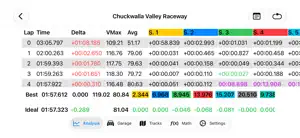
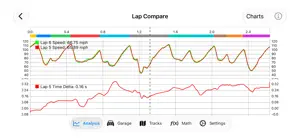
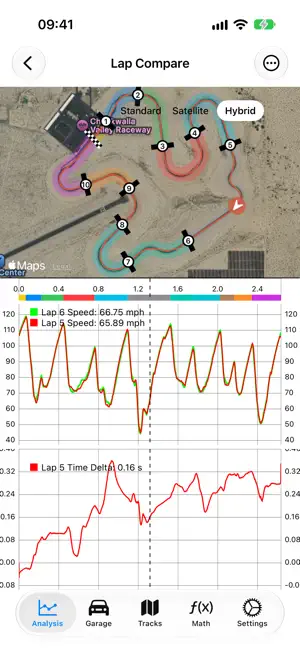
onTrackTools brings professional-grade motorsport telemetry analysis to your iPhone, iPad, Mac, and Apple Vision Pro. Whether you're refining your driving skills, comparing laps, or validating car setup changes, onTrackTools turns raw track-day data, video, and logged signals into clear, actionable insight. Key Features • Import & Analyze Telemetry: Load VBO and LD session files, then explore speed, acceleration, lateral/longitudinal Gs, GPS traces, and any other logged channel. • Analysis Dashboard (PRO): Build your own analysis screens from line charts, XY scatter plots, track maps, histograms, heatmaps, frequency plots, and statistics. Compare every session on a track, filtered by car, setup, or driver. • Drivers (PRO): Keep a profile for each driver, attribute laps stint by stint, and see who drove each lap. • Batch Import (PRO): Import a whole folder of sessions in one go on Mac, iPad, and Apple Vision Pro, with track, date, vehicle, and drivers worked out from each file. • Session Types: Tag sessions as Track Day, HPDE, Race, Time Attack, Autocross, and more, then filter and search by type or driver. • AI Assistants (Apple Intelligence): Dictate your impressions right out of the car and get structured session notes, create math channels by describing them in plain language, and manage your garage and drivers conversationally, every change echoed back for confirmation. Hands-free voice mode on every assistant. All processing happens on-device: your data never leaves your device. • Siri & Spotlight: Open sessions, show setups, create sessions, and capture notes without opening the app. • Math Channels: Create reusable calculated traces with formulas, unit-aware inputs, derivatives, integrals, and common math functions. • Built-In Track Library: 600+ track layouts, with automatic track and direction detection during import. • Automatic Sector Detection: Generate sector splits from corners, braking zones, speed peaks, or equal distances, then fine-tune them on the track map. • Automatic Weather: Conditions for every session are retrieved from Apple Weather. • Plan Your Track Day: Create a session before the data exists, log vehicle, setup, conditions, and notes at the track, then attach telemetry and video later. • Synchronized Video Overlay: Pair any video file, or one from your Photos Library, with your data. Not tied to any proprietary logger or camera. • Side-by-Side Lap Comparison: Compare laps aligned by time or distance and see where you gain or lose time. • Interactive Track Maps: GPS traces, car position, and sectors on the circuit map. Tap a sector to zoom straight to it. • Custom Tracks & Open Courses: Define your own tracks, sectors, or separate start and finish lines for hillclimbs, rally stages, and more. • Lap & Sector Tables: Best sectors highlighted and your theoretical ideal lap. • Persistent Analysis State: Laps, traces, zoom, and map view are restored per session set. • Garage Management: Vehicles, configurations, and setup changes for every session. • iCloud Sync: Sessions, tracks, garage, drivers, dashboards, videos, and math channels sync across all your devices. Plans Every feature is free for your first week, with nothing to sign up for. After that, the free plan keeps your three most recent sessions open; onTrackTools unlocks unlimited sessions, and onTrackTools PRO adds the dashboard, drivers, and batch import. Both are available monthly, yearly, or as a one-time purchase. Nothing you create is ever deleted. AI features require a device that supports Apple Intelligence running iOS/iPadOS 26, macOS 26, or visionOS 26 or later. Everything else works on every supported device. Whether you're chasing personal bests, fine-tuning driving technique, or testing car upgrades, onTrackTools is designed to help you get the most out of every lap. Terms of Use: https://www.apple.com/legal/internet-services/itunes/dev/stdeula/ Privacy Policy: https://lvsoftware.io/privacy/
What’s new
Version 1.5.0 · Updated October 20, 2026
onTrackTools 1.5 is our biggest update yet. ANALYSIS DASHBOARD (PRO) • Build your own analysis screens from seven widgets: line chart, XY scatter (G-G diagram, friction circle), track map, histogram, statistics, heatmap and frequency. • Season-wide statistics: compare every session on the same track, filtered by date, car, setup, layout or driver. • Dashboards follow the laps you select, share the cursor with the charts, map and video, and sync through iCloud. Open several at once on Mac and Apple Vision Pro. DRIVERS & SESSION TYPES • Drivers (PRO): keep a profile for each driver and attribute laps to them, stint by stint. The laps table shows who drove each lap. • Session types on every plan: Track Day, HPDE, Coaching, Qualifying, Race, Endurance, Time Attack, Autocross, Hillclimb, Drift and more, or your own. • Filter and search sessions by type and driver; Spotlight finds them too. "Manage with AI" in the Garage now handles drivers. BATCH IMPORT (PRO) • Import a whole folder of VBO and LD files in one go on Mac, iPad and Apple Vision Pro. Track, date, vehicle, drivers and session type are worked out from each file and can be reviewed before importing. IMPROVEMENTS • Faster start-up and less work during iCloud sync. • iPhone, iPad and Vision Pro: Settings ▸ Storage cleans up copies of imported files no longer needed. PLANS • Every feature is unlocked for your first week, with nothing to sign up for. • Three plans: Free, onTrackTools and onTrackTools PRO, monthly, yearly or one-time. If you already own onTrackTools, a discounted upgrade to PRO lifetime is available. • After the week, the free plan keeps your three most recent sessions open. Nothing is ever deleted: older sessions stay in your library and unlock again when you subscribe or purchase. FIXES • Fixed a crash during iCloud sync on iPhone, iPad and Apple Vision Pro. • Fixed a crash at launch after a long time without opening the app. • Switching sessions with the details open no longer carries the previous session's values over. • Video playback no longer gets stuck after panning a chart. • Mac, UI: sector deltas now follow Dark Mode right away. ...and many other improvements! Please update onTrackTools on all your devices: earlier versions cannot read data saved by 1.5.
App privacy
The developer, Ludovico Verducci, reported these privacy practices to Apple.
Data Not Collected
The developer does not collect any data from this app.
Alternatives to onTrackTools
Looking for apps like onTrackTools? Here are 6 similar apps on the App Store. The highest rated is StopWatch For Multiple Cars (5.0/5), and 5 of the 6 are free to download.
-
 Track Evolution
-
 StopWatch For Multiple Cars
5.0
StopWatch For Multiple Cars
5.0
-
 LapVision Mobile
-
 Vetkuro: Track Day Lap Timer
-
 Pit_Wall
-
 PB Buddy
5.0
PB Buddy
5.0
| App | Rating | Price | Last updated | Compare |
|---|---|---|---|---|
| onTrackTools | – | Free | October 20, 2026 | |
| Track Evolution | – | Free | Oct 18, 2026 | Compare |
| StopWatch For Multiple Cars | 5.0 / 5 (3) | 0.99 USD | Jul 26, 2026 | Compare |
| LapVision Mobile | – | Free | Jul 6, 2026 | Compare |
| Vetkuro: Track Day Lap Timer | – | Free | Oct 19, 2026 | Compare |
| Pit_Wall | – | Free | Oct 9, 2026 | Compare |
| PB Buddy | 5.0 / 5 (10) | Free | Oct 11, 2026 | Compare |
Compare onTrackTools with the top alternatives: ratings, updates, ASO score and keyword gaps →