

Spendly
Hieu Xuan Leu Finance iPhoneiPadiPod touch
Spendly is a free Finance app for iPhone and iPad by Hieu Xuan Leu. Rated 5.0/5 from 1 ratings. Requires iOS 16.6. Updated August 27, 2026.
- Rating
- 5.0
- 1 ratings
- Price
- Free
- on the App Store
- Size
- 7 MB
- Age 4+
- Updated
- Aug 27
- 2026 · v4.0.3
Screenshots
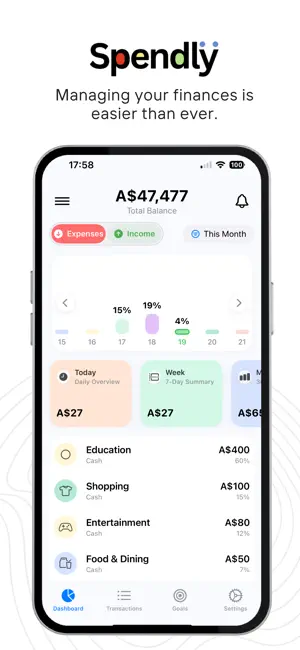


About Spendly
Spendly - a simple and effective personal finance management app. Track your spending, set savings goals, and easily keep track of your financial situation. No account required, no data collection - all information is securely stored on your device.
What’s new
Version 4.0.3 · Updated August 27, 2026
The biggest Spendly update yet: a fresh look, and six new ways to stay on top of your money. BUDGETS Set a monthly limit for each category. The big number on screen is what you have LEFT, not what you have already spent, because that is the number you actually make decisions with. Turn on alerts and Spendly tells you before you go over. SCHEDULED MONEY Rent, salary, insurance, the gym. Set a repeat once and Spendly keeps posting it for you: weekly, fortnightly, monthly or yearly, with a reminder on the day it falls due. SUBSCRIPTIONS Spendly reads your existing history and finds the payments that quietly repeat: streaming, cloud storage, insurance, bank fees. It adds them up so you can finally see what your subscriptions cost every month, and it flags the ones that look like you already cancelled them. Nothing to set up. IMPORT YOUR STATEMENT Bring in CSV, OFX or QFX from any bank, in any country. You see exactly what is about to be added before a single line is saved. Duplicates are skipped, and transfers between your own accounts are left out because they move money rather than earn or spend it. Re-categorise a merchant once and Spendly remembers it for every import after that. SAY IT INSTEAD OF TYPING IT "Twelve dollars, coffee." Spendly turns what you said into a draft you can check and edit before saving. It works for saving goals too. STATISTICS Pick a day, a month or a year and see totals, a trend line, and a category breakdown that answers the question that matters: where did the money actually go? HOME SCREEN WIDGET Income, spending and balance at a glance, in three sizes, always in the currency you have chosen in the app. ALSO IN THIS RELEASE - Redesigned throughout: new colours, type, cards and tab bar, in both light and dark - Every notification switch now lives in one place in Settings, so turning things down takes one trip - Currency picker you can search by code, name or symbol - Remove Ads as a one-time purchase, or earn a temporary ad-free pass - Fixes and performance work across the app Thank you for using Spendly.
App privacy
The developer, Hieu Xuan Leu, reported these privacy practices to Apple.
Data Not Linked to You
The following data, which may be collected but is not linked to your identity, may be used for the following purposes:
- Location: Precise Location, Coarse Location
- Identifiers: Device ID
- Usage Data: Product Interaction, Advertising Data, Other Usage Data
- Other Data: Other Data Types
Used for: Third-Party Advertising, Developer’s Advertising or Marketing, Analytics, Product Personalization, App Functionality, Other Purposes
Alternatives to Spendly
Looking for apps like Spendly? Here are 6 similar apps on the App Store. The highest rated is Spending Tracker - Spendly (5.0/5), and all 6 are free to download.
-
 Spendly – Budget Tracker
-
 Spendly: Visual Expense Log
-
 Spending Tracker - Spendly
5.0
Spending Tracker - Spendly
5.0
-
 Ignitte: Private AI Accounting
-
 Expense Tracker: Budgeting
2.0
Expense Tracker: Budgeting
2.0
-
 Focus Finance: Budget Tracker
| App | Rating | Price | Last updated | Compare |
|---|---|---|---|---|
| Spendly | 5.0 / 5 (1 rating) | Free | August 27, 2026 | |
| Spendly – Budget Tracker | – | Free | Aug 12, 2025 | Compare |
| Spendly: Visual Expense Log | – | Free | Sep 11, 2026 | Compare |
| Spending Tracker - Spendly | 5.0 / 5 (3) | Free | Sep 30, 2026 | Compare |
| Ignitte: Private AI Accounting | – | Free | Sep 22, 2026 | Compare |
| Expense Tracker: Budgeting | 2.0 / 5 (1) | Free | Aug 23, 2026 | Compare |
| Focus Finance: Budget Tracker | – | Free | Jun 17, 2026 | Compare |
Compare Spendly with the top alternatives: ratings, updates, ASO score and keyword gaps →